History and Basics
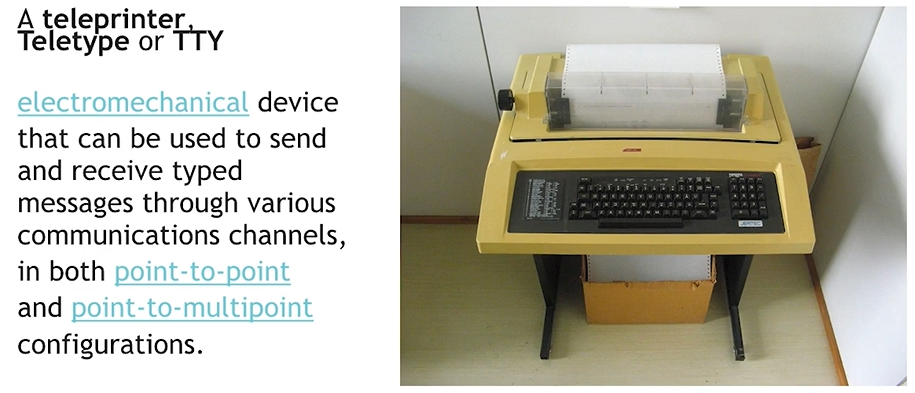
Early Communication Devices
- 1920s
- An electromechanical device for sending and receiving typed messages.
- Used various communication channels.
- Supported both point-to-point and point-to-multipoint configurations
- Miniprint 425 TDD
- Included an acoustic coupler for telephone handsets.
- Printed conversations.
Packet Data Transfer Principle
Section titled “Packet Data Transfer Principle”- Concept:
- Data is split into smaller units called packets. Each packet can travel independently across the network.
- Packets are reassembled at the destination.
- Ensures efficient and reliable data transfer
- 19
ARPANET…
- first network tested…
Historical Networks
Section titled “Historical Networks”- USEnet:
- One of the earliest distributed discussion systems, allowing users to post and read messages (similar to forums).
- FIDOnet:
- A worldwide computer network that was used for communication between bulletin board systems (BBS).
- Internet:
- The global system of interconnected computer networks that use the Internet protocol suite (TCP/IP) to link devices worldwide.
Dial-Up Connection
Section titled “Dial-Up Connection”- Definition:
- A form of Internet access using the public switched telephone network (PSTN).
- Connects to an Internet Service Provider (ISP) by dialing a phone number.
- Uses modems to convert audio signals to data and vice versa [10] [11].
- How it Works:
- Modem dials ISP.
- Audio signals are encoded/decoded for data transfer.
- Data is sent to/from computers or routers.
7. Packet Transmission Process
Section titled “7. Packet Transmission Process”- Steps:
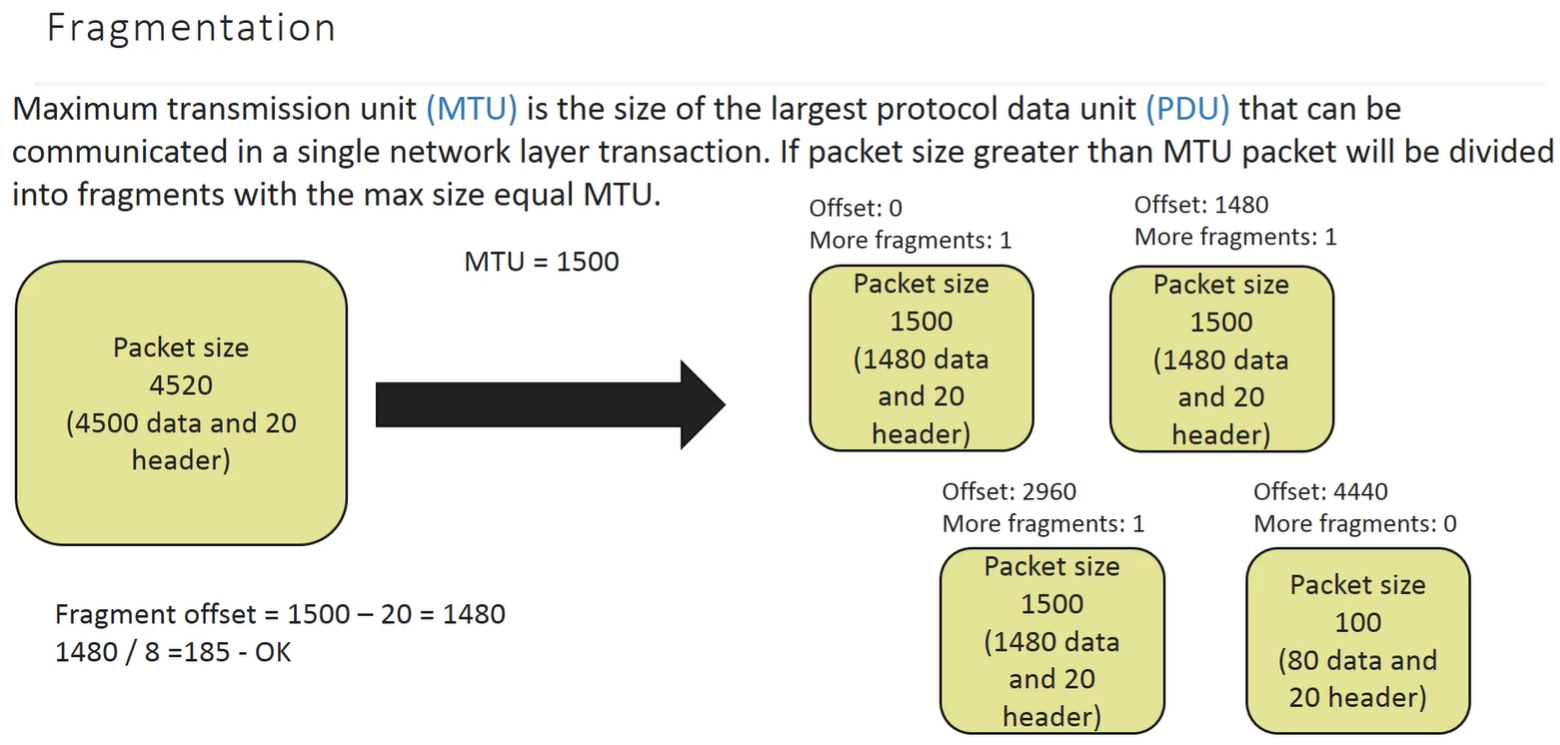
- Message is divided into packets based on the Maximum Transmission Unit (MTU).
- Packets are sent to the sender’s ISP.
- Packets are routed through various networks using routing tables.
- Recipient’s computer reassembles the message from packets and confirms receipt using a hash.
- If a packet is missing or corrupted, it is retransmitted [12].
| Topic | Key Points |
|---|---|
| Teleprinter/TTY | Early device for typed message exchange, point-to-point/multipoint |
| Packet Data Transfer | Data split into packets, reassembled at destination |
| USEnet | Early distributed discussion system |
| FIDOnet | Network for BBS communication |
| Internet | Global network using TCP/IP |
| Dial-Up Connection | Internet via telephone lines, uses modems |
| Packet Transmission | MTU, routing, reassembly, retransmission if needed |
Types of Networks..
Section titled “Types of Networks..”- PAN - 10mtrs max, simple individual network that includes bluetooth mouse, earphones, remotes etc..
- LAN
- DEPT, BUILDING, A COMPANY, ETC…
- 2 to 16M hosts, supports routing, local servers, works on private ips
- eg: ethernet - start topology
- MAN - towns and cities…
- uses high speed fiber optics etc..
- WAN - multiple cities and countries
- provided internet to LANs etc..
- uses high power network equipment
- W-LAN - uses wireless connections unlike LAN that uses cables
- uses WAP devices
- uses radio signals..
- uses wireless routers as central devices to communicate.. eg: WIFI
- low speed compared to LAN
- some security issues..
- VPN
-
estb. a secure connection virtually through internet
-
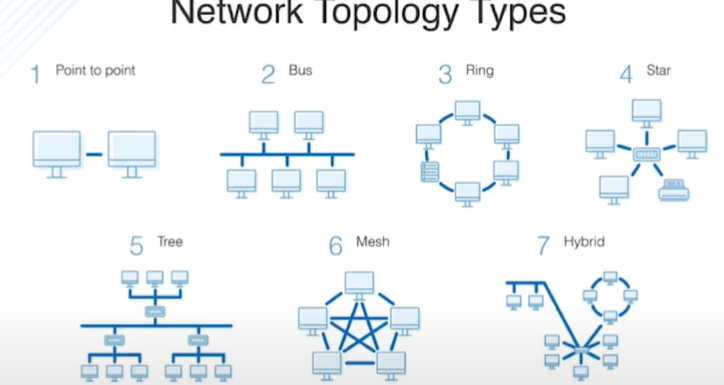
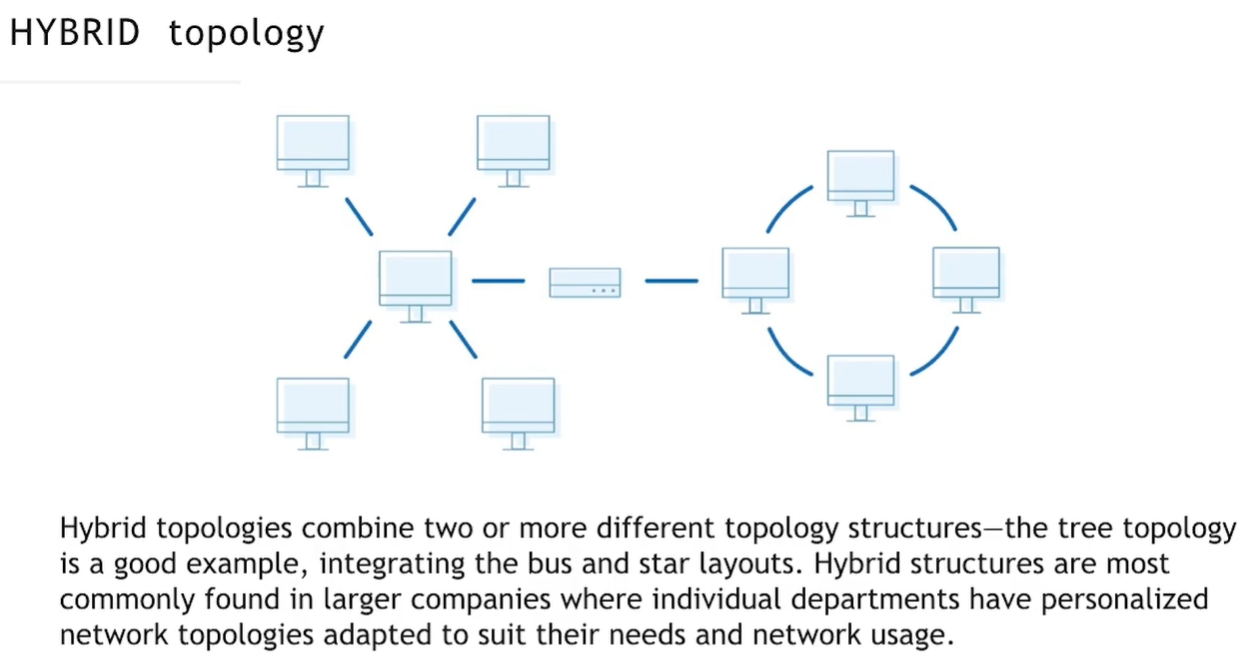
Network Topologies
Section titled “Network Topologies”- physical topo.. - actual cables and physical network.. helps in cable mangement etc..
- Logical. - diagram of a network and helps to get a high level idea to estimate stuff.. also understanding the data transmission flows etc..
-
POINT TO POINT - two endpoints connected with a link, endpoint maybe a terminal, computer
-
BUS - single cable connects many devices..
- uses T-connectors
- ADV - simple ans easy to setup, less cable
- DIS - limited cable length, dependency on central link, low performance, security
-
START - all devices are connected to central node..(switch or router or hub)
- ADV - easy, faster than BUS, Problem in one node does’t shut entire network
- DIS - central dependency, size = no.of ports, more cables, n/w speed = central device speed
-
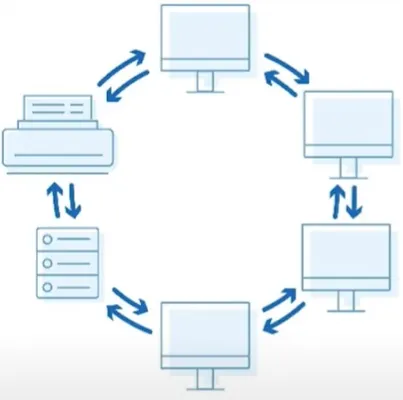
RING - closed loop config, each device connected with its two neighbors
- ADV - orderly, quick transfer
- DIS - all devices must be up to run n/w, slower than ethernet, one device damage = n/w damage
-
DUAL RING - increased n/w performance by adding one more additial link which used in link failure…
-
MESH - all devices are connected to each other directly, fault tolerant, best for fast and reliable transfer..
- ADV - reliable and best
- DIS - lots of cables, hard to trubleshoot, expensive
Eg: Internet
Devices
Section titled “Devices”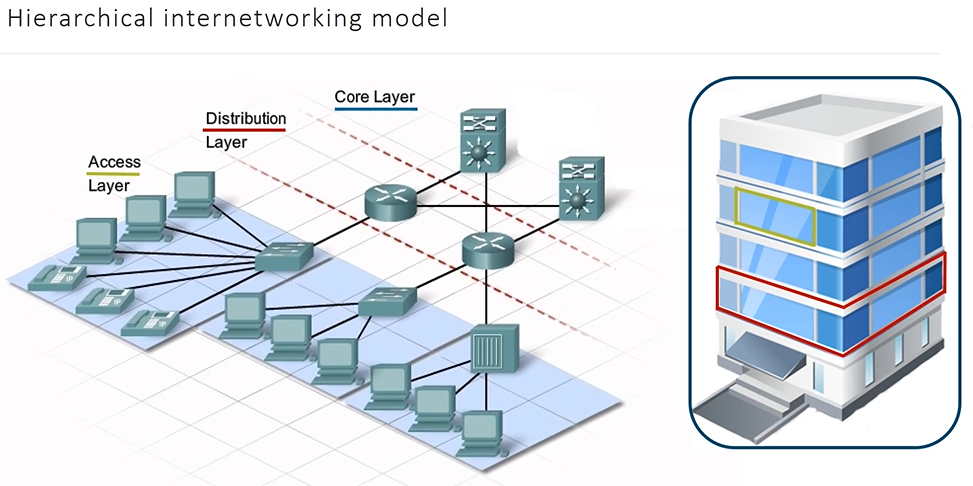
Access Layer Devices..
Section titled “Access Layer Devices..”-
NIC - allows to communicate with internet, used in Data Link and Physical Layers..
-
PHYSICAL LAYER
What it does:
- Sends electrical signals (Ethernet)
- Or radio waves (Wi-Fi)
- Converts
1s and 0s↔ physical signals
Examples:
- Voltage changes on an Ethernet cable
- Wi-Fi RF signals through the air
🔹 NIC responsibility here:
- Signal timing
- Encoding (NRZ, PAM-5, OFDM for Wi-Fi)
- Speed (1 Gbps, 10 Gbps, etc.)
-
at DATA LINK LAYER
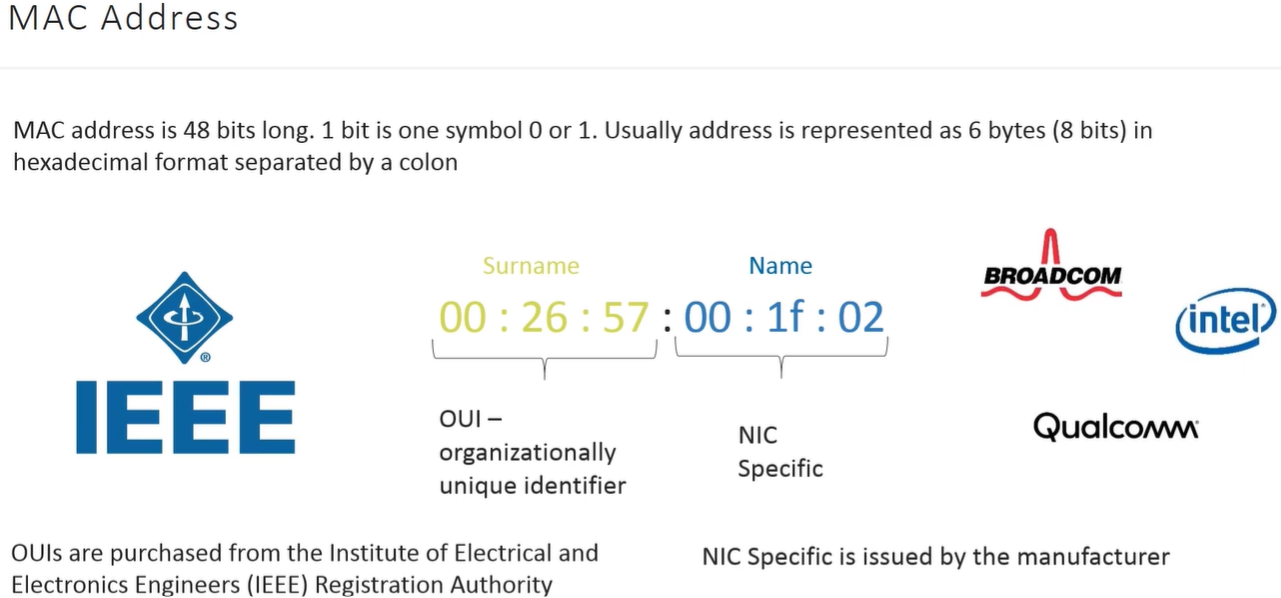
- Has a MAC address (unique hardware identifier)
- Builds and parses Ethernet or Wi-Fi frames
- Performs:
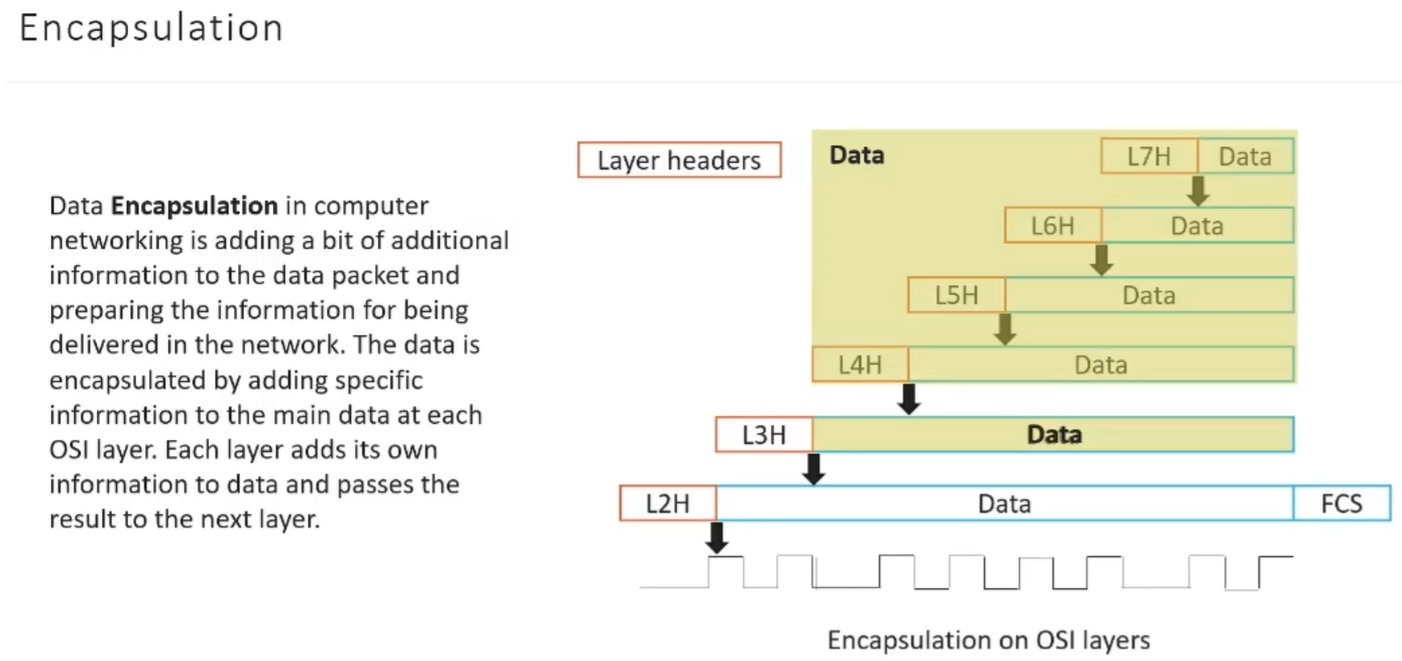
- Frame encapsulation
- Error detection (CRC)
- Frame filtering (only accepts frames for its MAC)
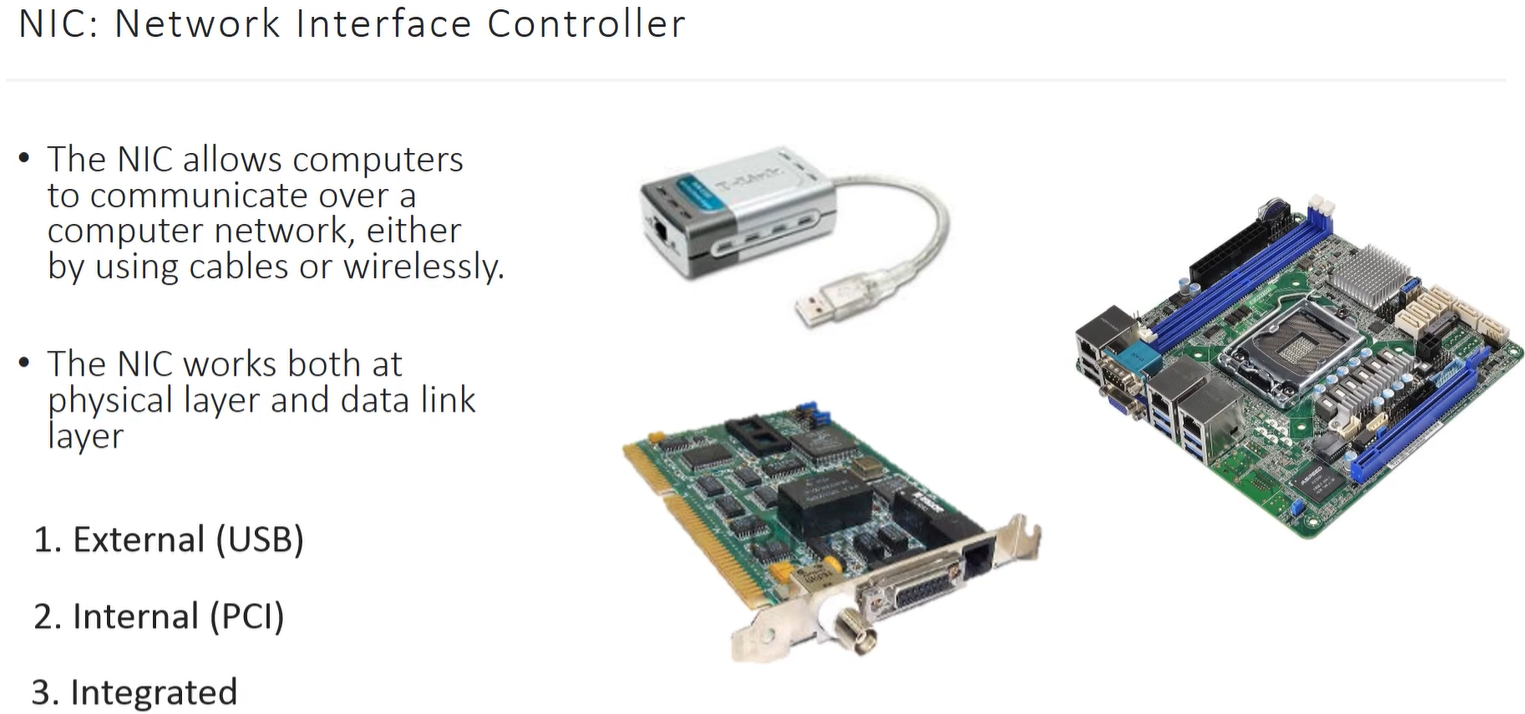
-
Connectors
- AUI(attachment unit interface) - interface for 10BASE5 Ethernet.. later replaced by 10BASE-T
- BNC - uses coaxial
- RJ45 -
- Fiber Cables - to build backbone networks.. some networks goes upto 40km at speed of 100Gbits/s
-
Repeater
- to retransmit the signal.. to cover long distance..
-
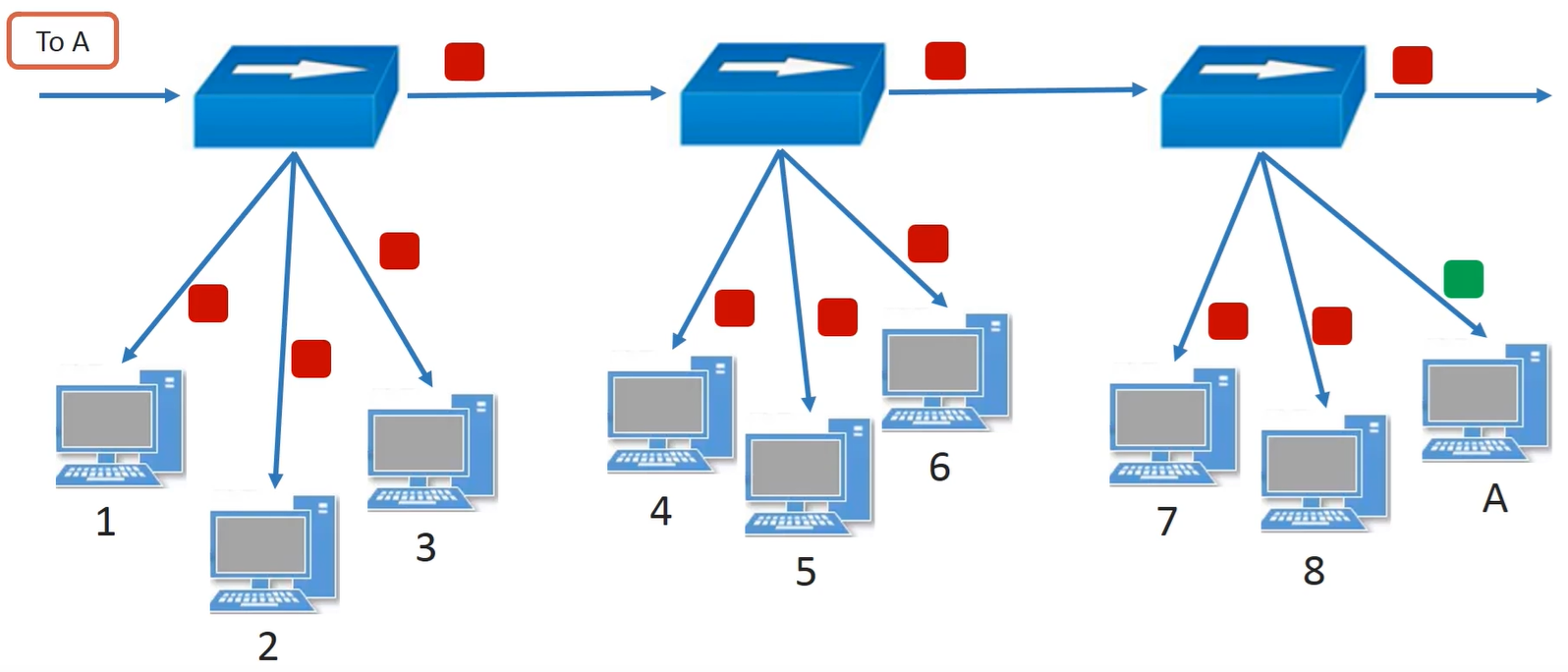
Hub
-
multiport repeater - send one port input to all other ports as output - so traffic is high
-
unlike repeater, hub also analyzes the network collisions..
-
no memory or buffer, so it fails when multiple inputs given at same time it basically ignores all other than one..
-
-
half duplex - only send or receive not both
-
simple and easy
Bridges
- connected two different networks..
- has buffer and stores frames to send slowly… no loss of data so…
- acts as bridge between LAN Segments
- datalink layer
- Transparent - n/w of same type and protocols
- Translating - n/w of differnet types eg: Ethernet to Token Ring
- Encapsulating..
- store & forward, maintains a MAC table used for filtering i.e only sends to hosts mentioned in MAC Table.. mapping b/w MAC & PORT
- also it can able to Flood if MAC not found in its table
- ADV - collision domain restriction, delay frames,
- DIS - bridge increases network latency by 10-30% - due to additional time to decide during transmission… - i.e for deciding wether to send to drop a corrupted frame…
🔁 Scenario: Network A ↔ Bridge ↔ Network B
Section titled “🔁 Scenario: Network A ↔ Bridge ↔ Network B”- PC-A (left side) → PC-B (right side)
- PC-A sends frame to PC-B
- Bridge receives frame
- Bridge checks:
- Source MAC → learns “PC-A is on left”
- Destination MAC → sees “PC-B is on right”
- Bridge forwards frame only to right side
- Other left-side devices never see it
Switch
- multiport bridge uses MACs to forward data..
- unlike repeater hub, it only forwards messages to correct destinations
- stores and forward
- cut-through - no error checking, so fast
- fragment-free -
- collision domain for each port so less collisons
- increases n/w performance..
- bit more expensive than bridge..
🔁 Scenario: PC-A → Switch → PC-B
Section titled “🔁 Scenario: PC-A → Switch → PC-B”- PC-A sends Ethernet frame
- Switch receives frame
- Switch:
- Reads source MAC → learns location
- Reads destination MAC
- Switch forwards frame only to PC-B’s port
- No one else sees the traffic
🧠 What happens with unknown MAC?
Section titled “🧠 What happens with unknown MAC?”If switch doesn’t know destination MAC:
- It floods once
- Learns when response comes back
🧠 What about broadcast?
Section titled “🧠 What about broadcast?”- Broadcast frames (ARP, DHCP) go to all ports
- That’s why switches are still one broadcast domain
| Aspect | Bridge | Switch |
|---|---|---|
| Ports | Usually 2 | Many (8, 24, 48+) |
| Implementation | Software-based | Hardware (ASICs) |
| Speed | Slow | Very fast |
| Forwarding | Store-and-forward (CPU) | ASIC-based parallel |
| Cost (historical) | Expensive per port | Cheap per port |
Distribution Layer
-
Router..
- to forward data packets b/w networks..
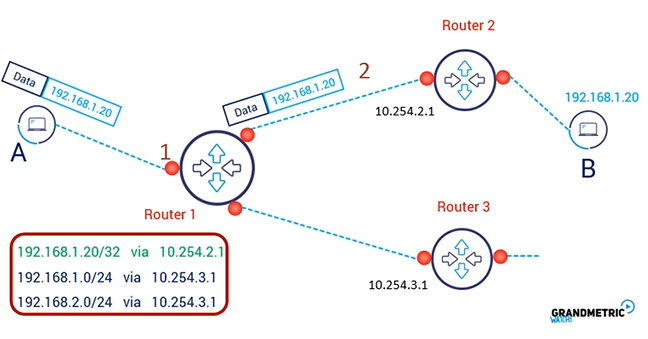
to reach B from A router 1 first talk to router 2..
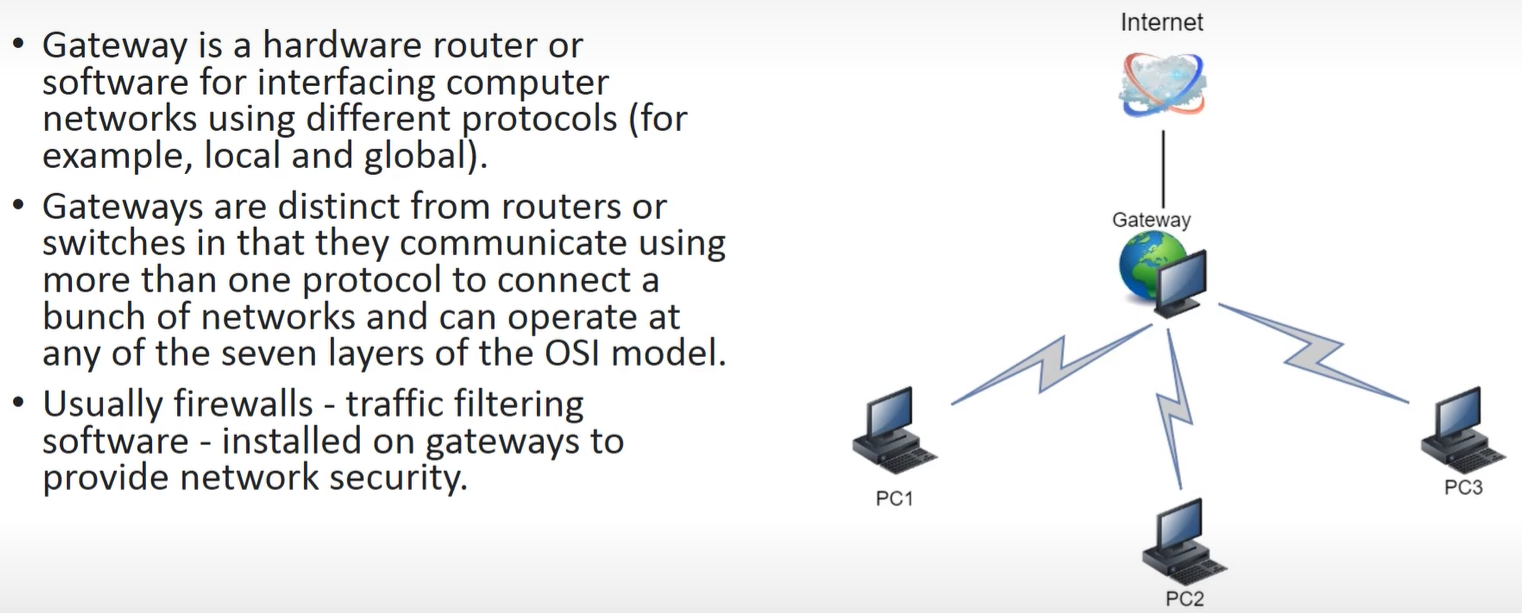
- Gateway
-
A gateway is a device (or address) that lets traffic leave one network and go to another network.
-
-
Modem
- converts data frames into a format to tranfer to wires or to other devices..
- can transmit analog signals, radio etc..
- eg: convert digital data → eletrical signals for transmission over telephone lines…
- later that signal is de-modulated..
OSI Model
Section titled “OSI Model”-
solves compatibility problem by defining a standard protocols..
-
its a reference model
-
complexity with networks
- type data formats
-
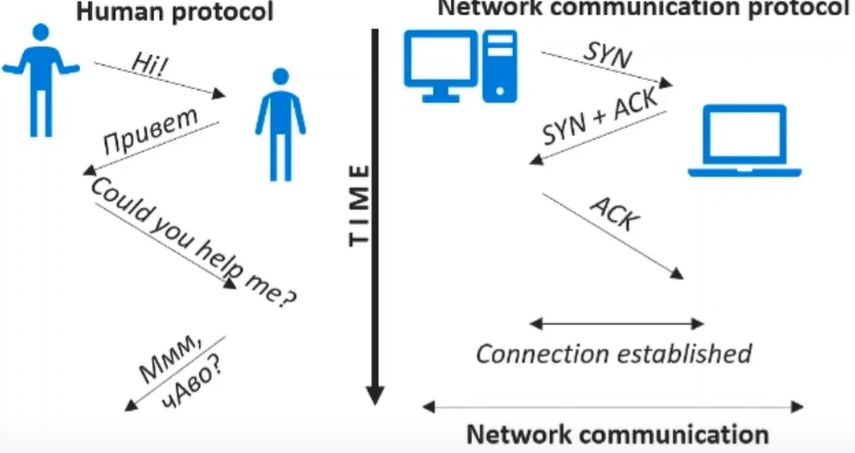
Protocol - defines common rules for interaction
IPV6
IPV6
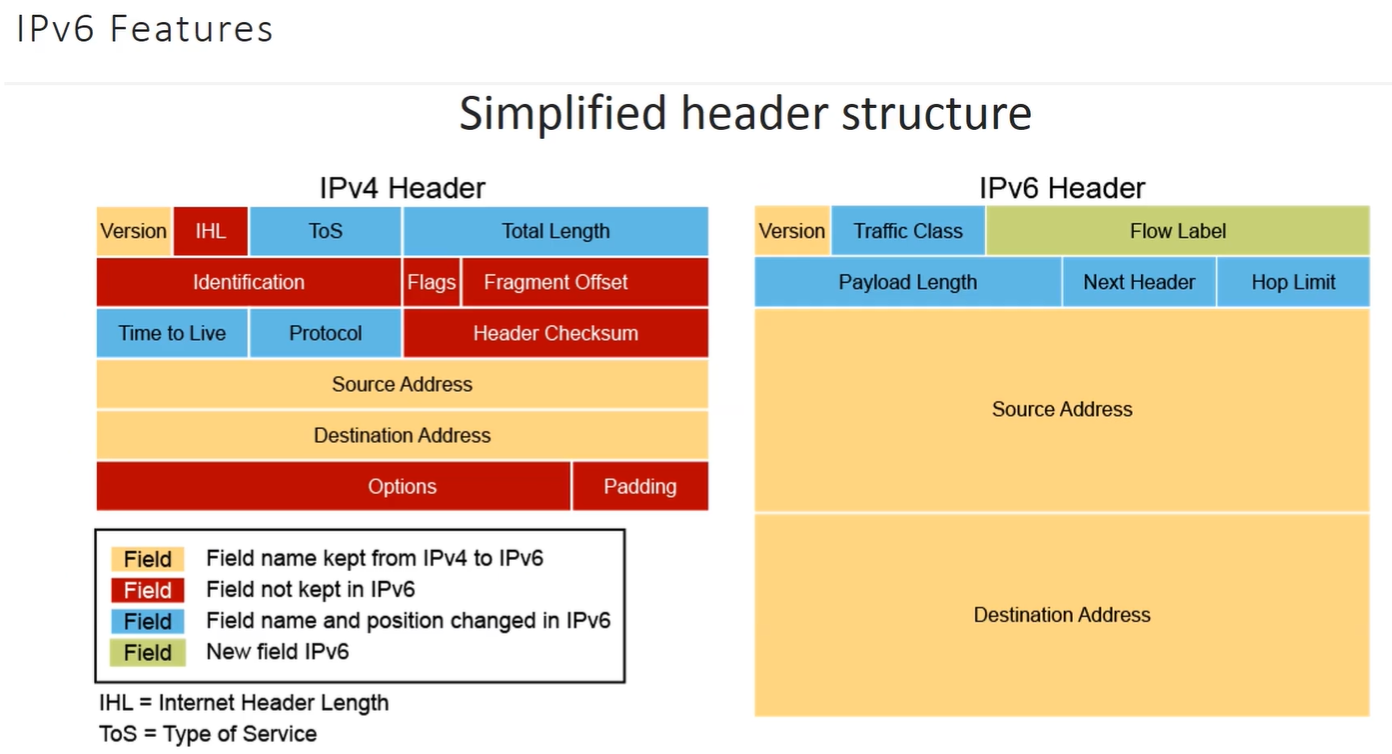
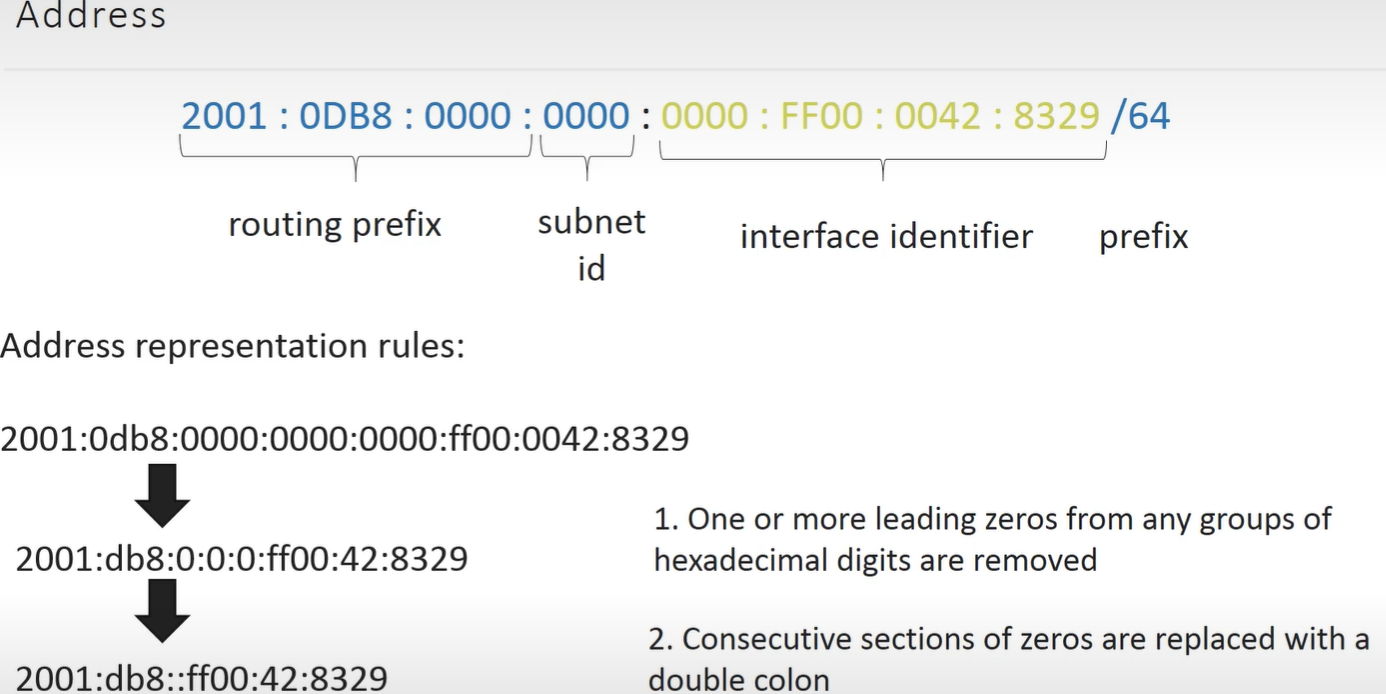
- secure, no NAT, large space, anycast and multicast…
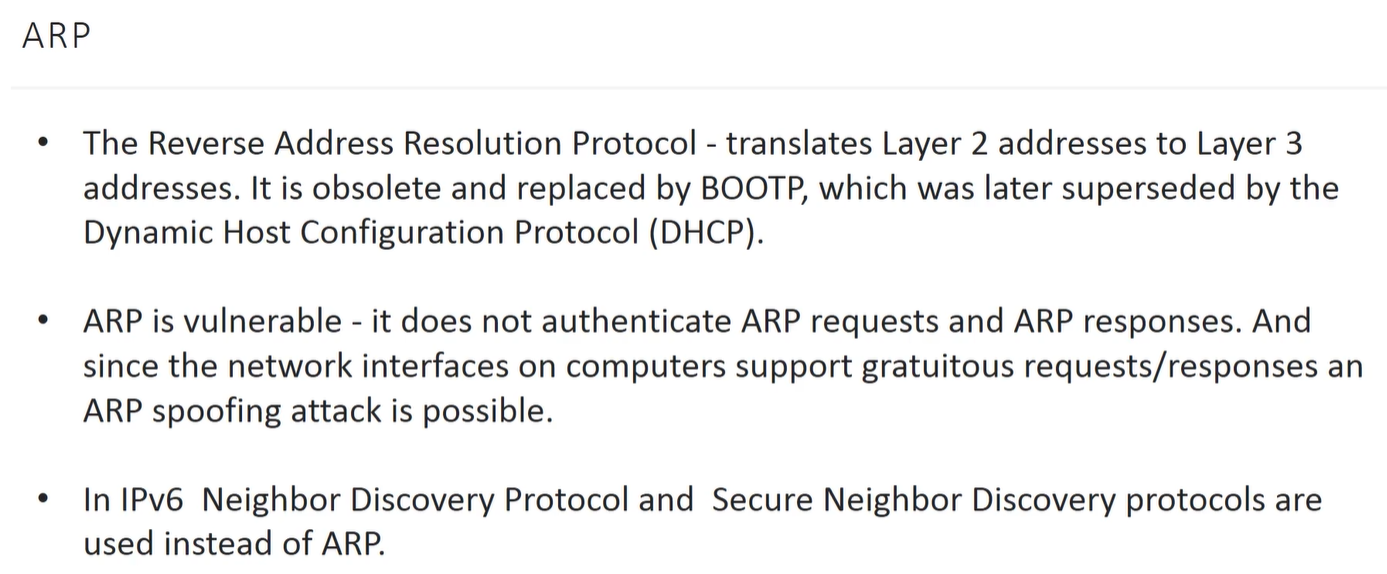
TCP
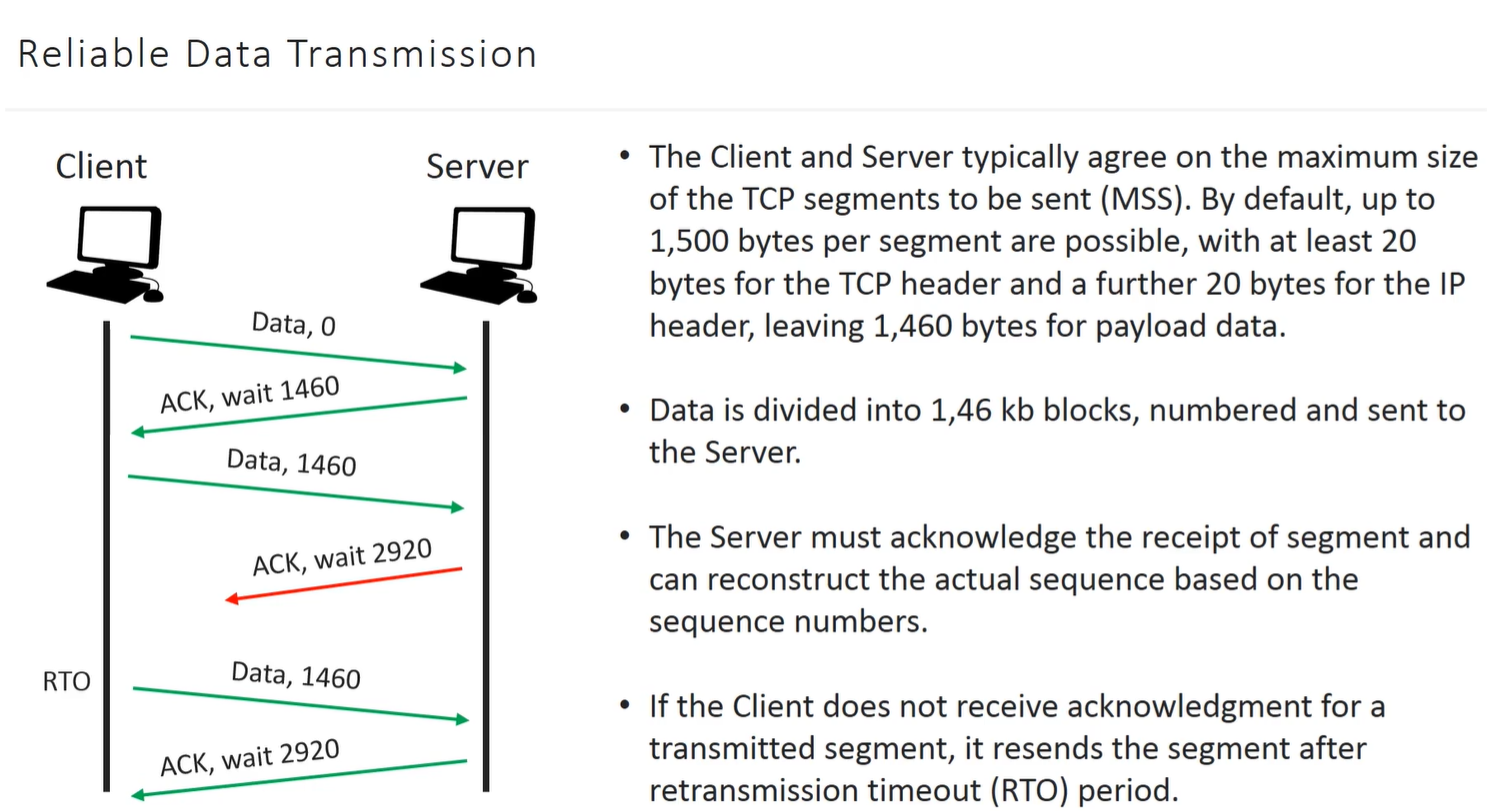
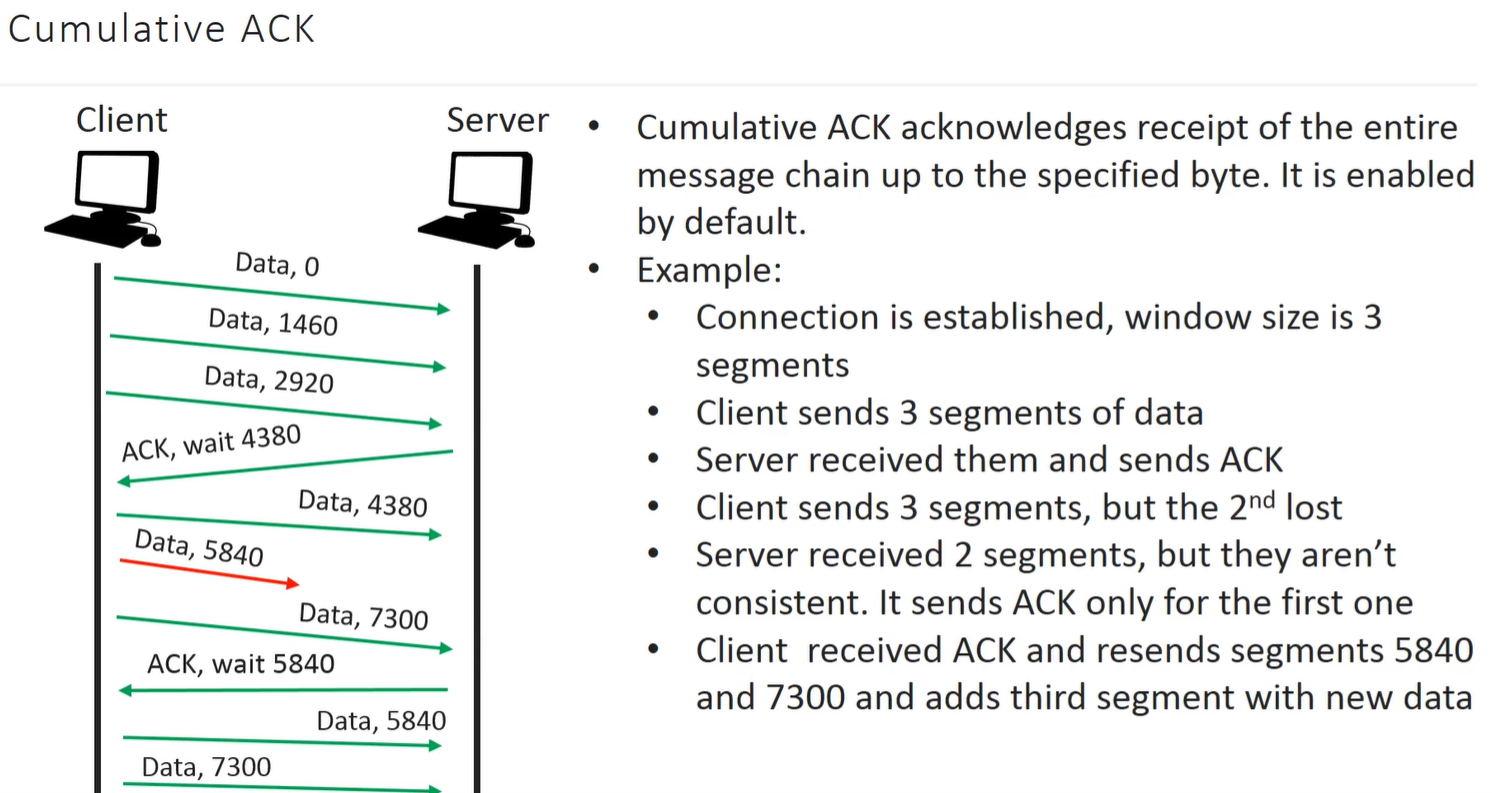
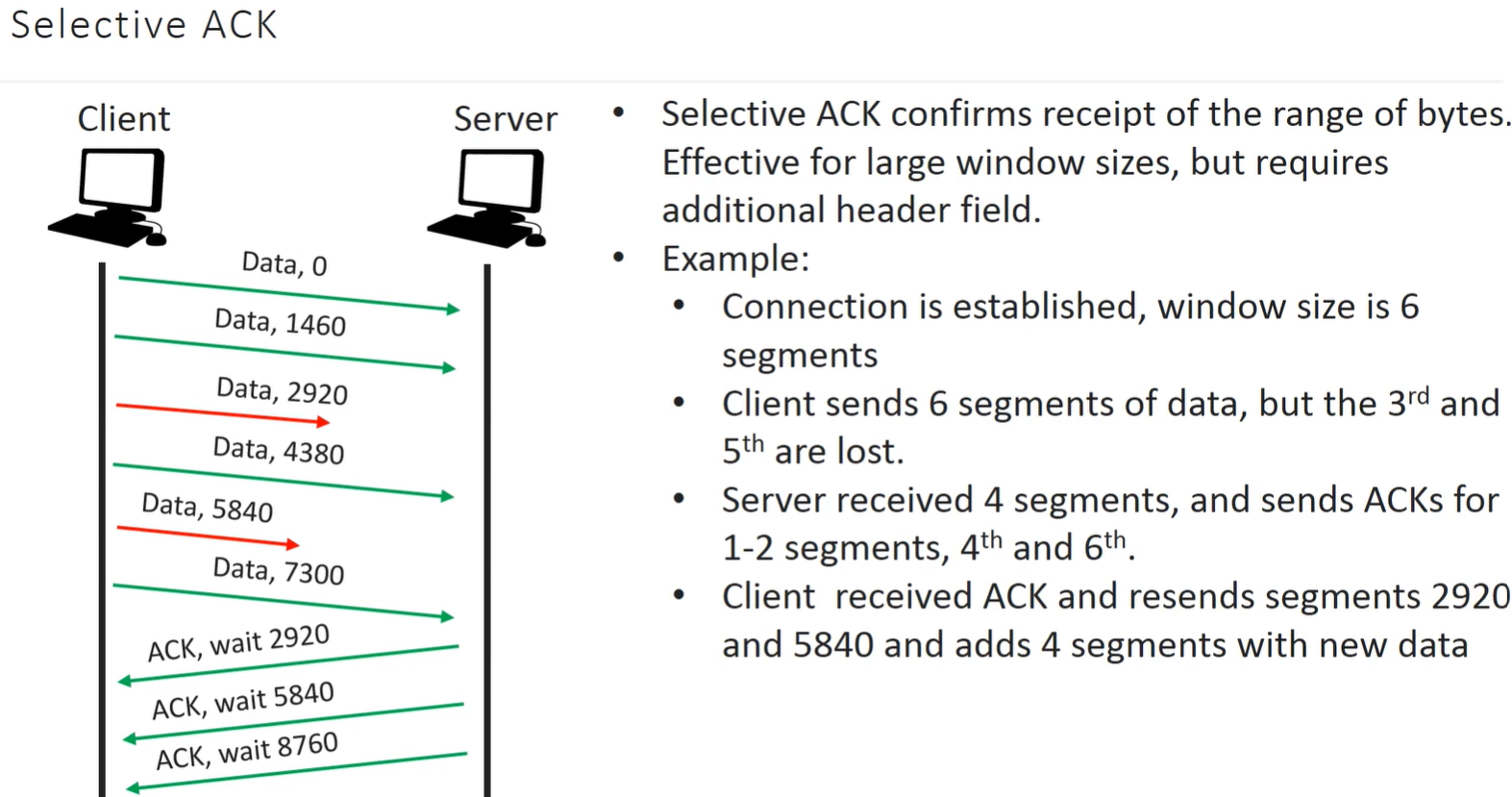
- in the above flow, when ACK is not reached to client, it trigger re-transmission..
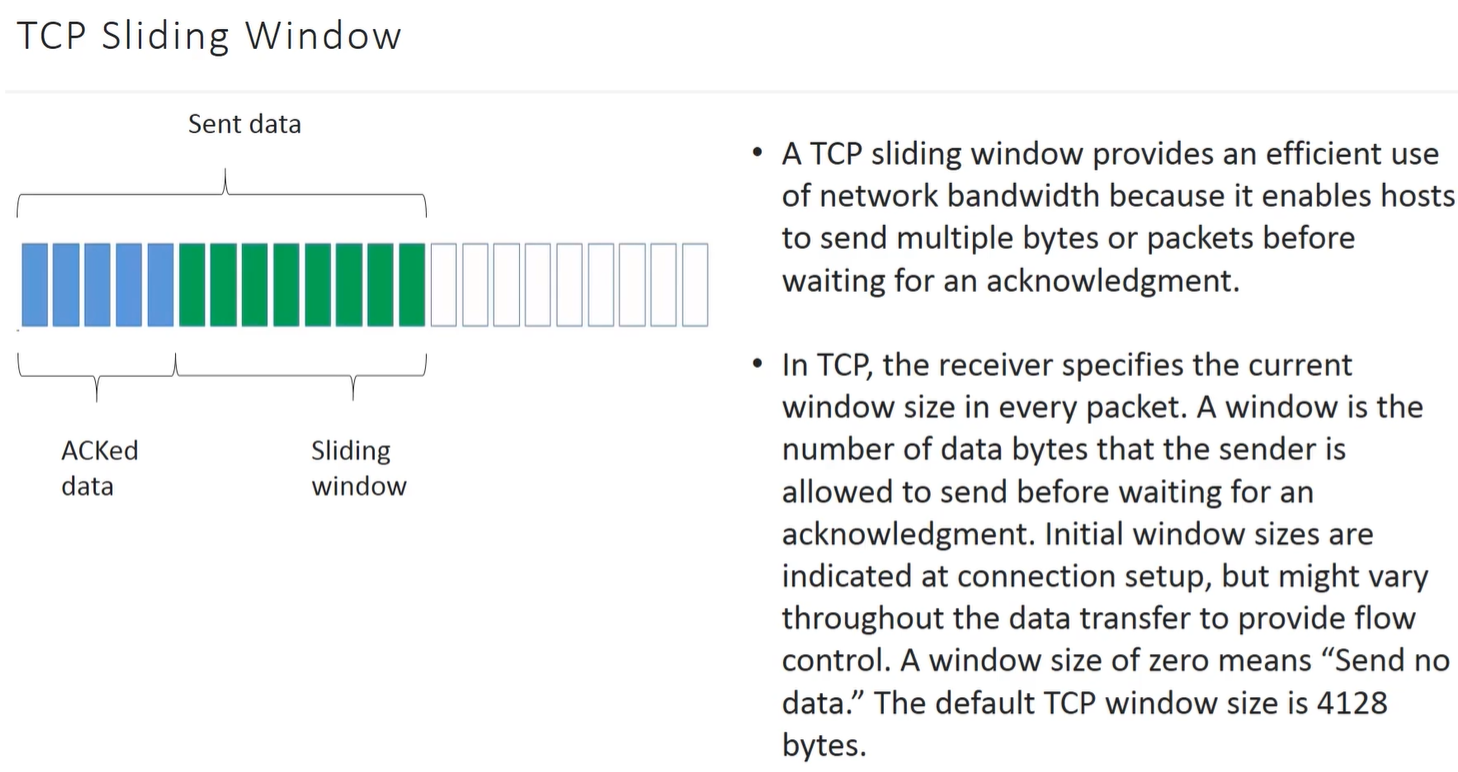
- here the problem is that if 10 subsequent packets get tranfered to server it send 10 ACK back its waste of bandwidth so bulk the data packets… and receive single response i.e ACK
-
following are methods to do it..
-
Sliding Window..
-
Cumulative
-
-
-
Selective
UDP
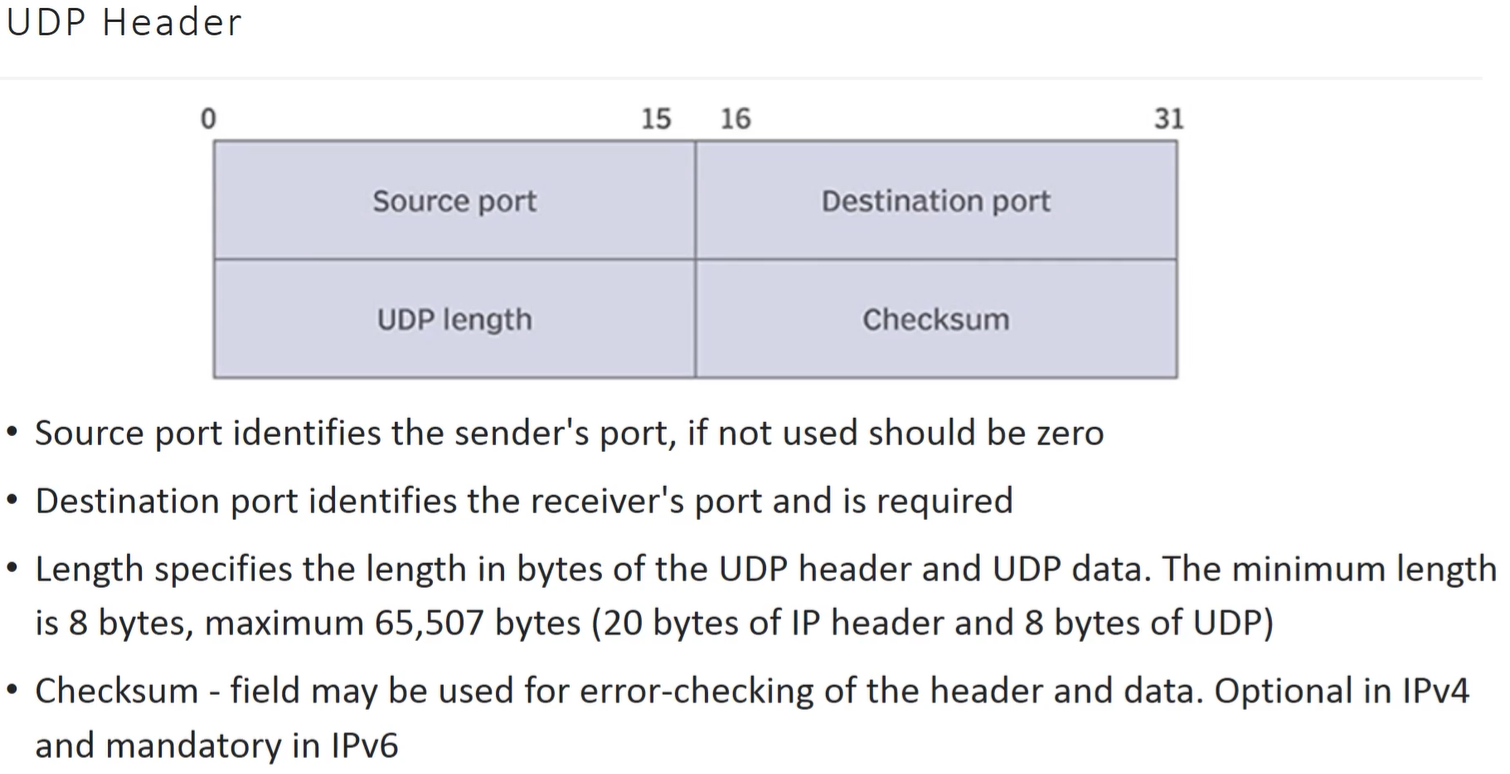
- connection less, simple, no realiability, fast
- no handshaking
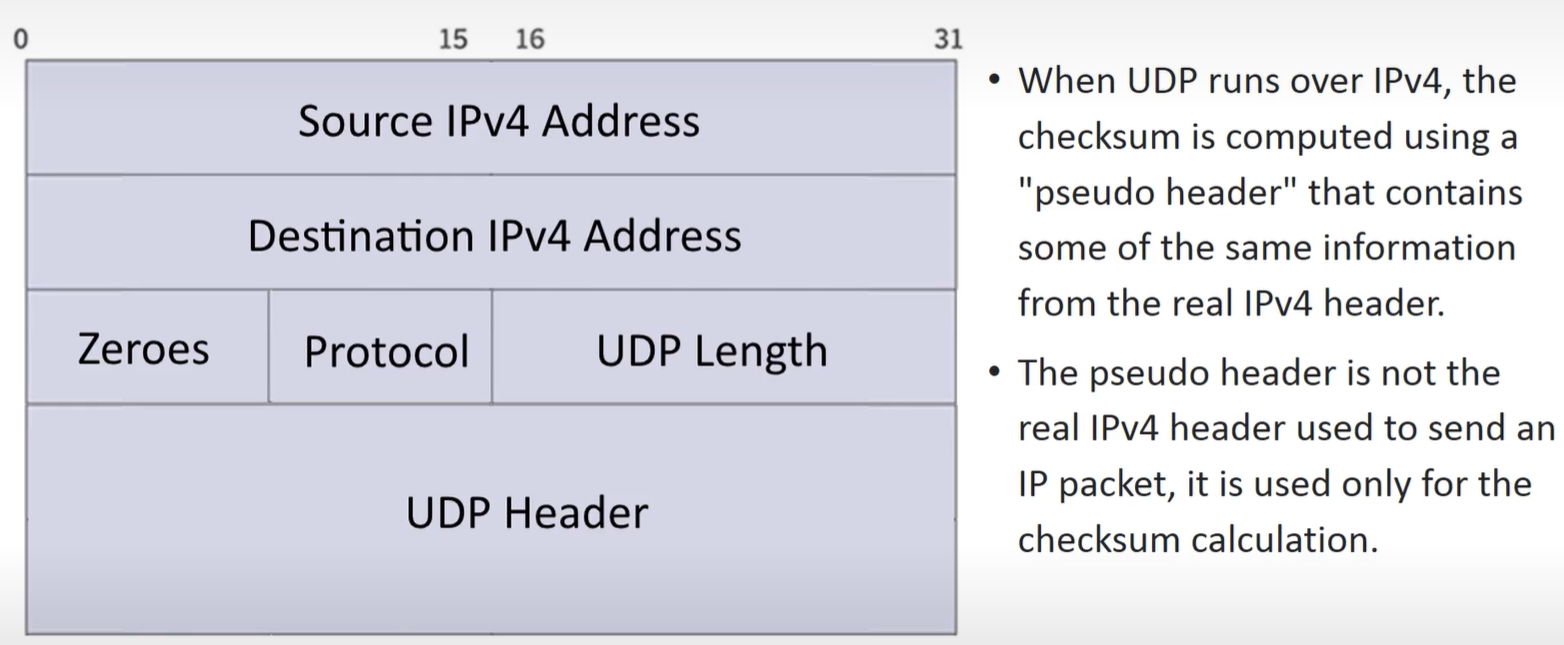
- Checksum in IPv4 is Optional but in IPV6 it is mandatory and done using pseudo header..
ICMP
-
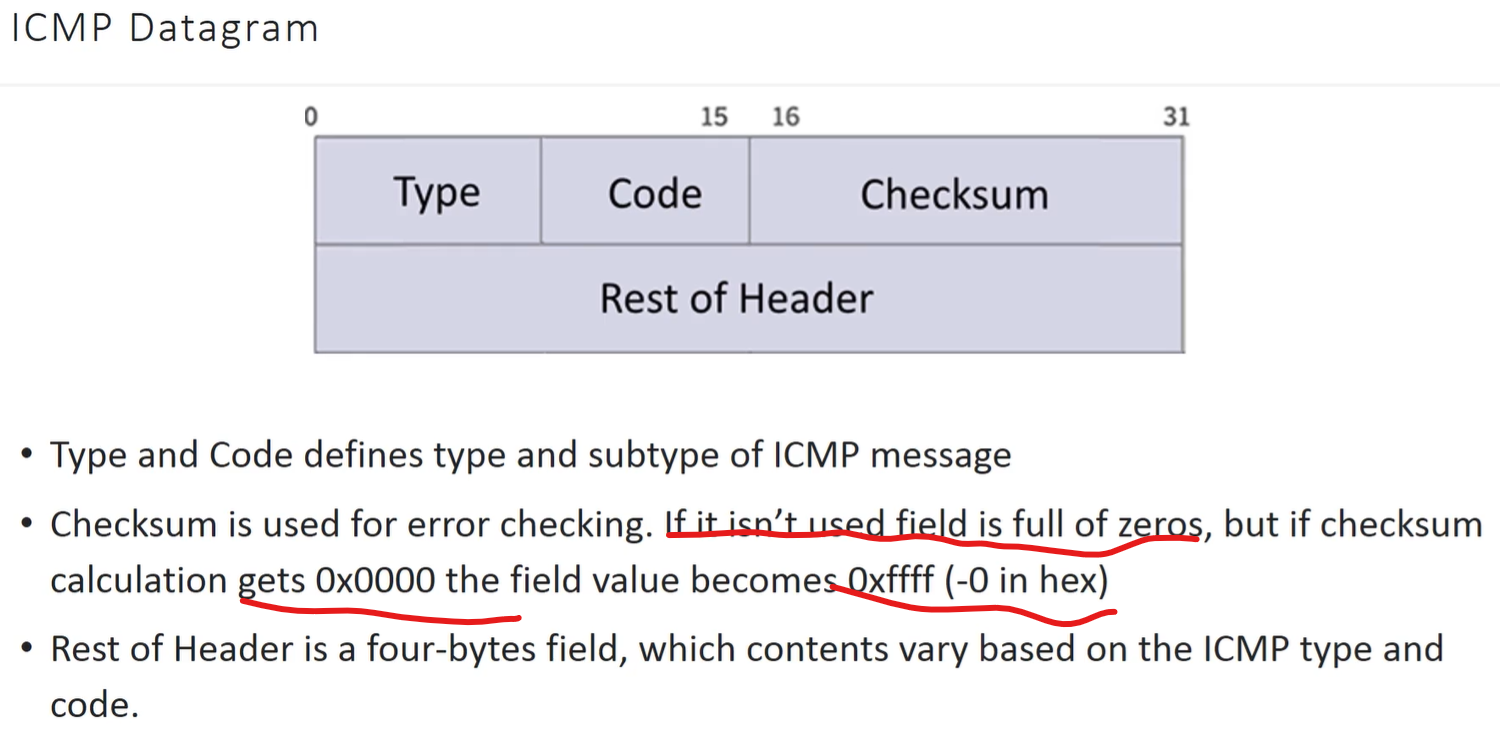
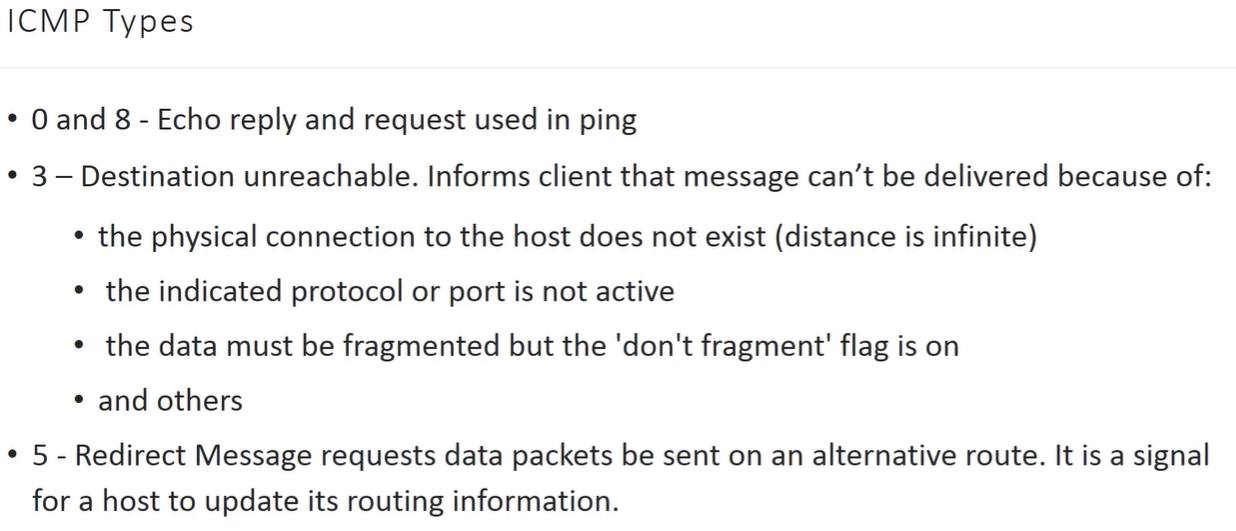
used to send error report packets etc.. back to source
-
used by ping and tracroute
Ports

-
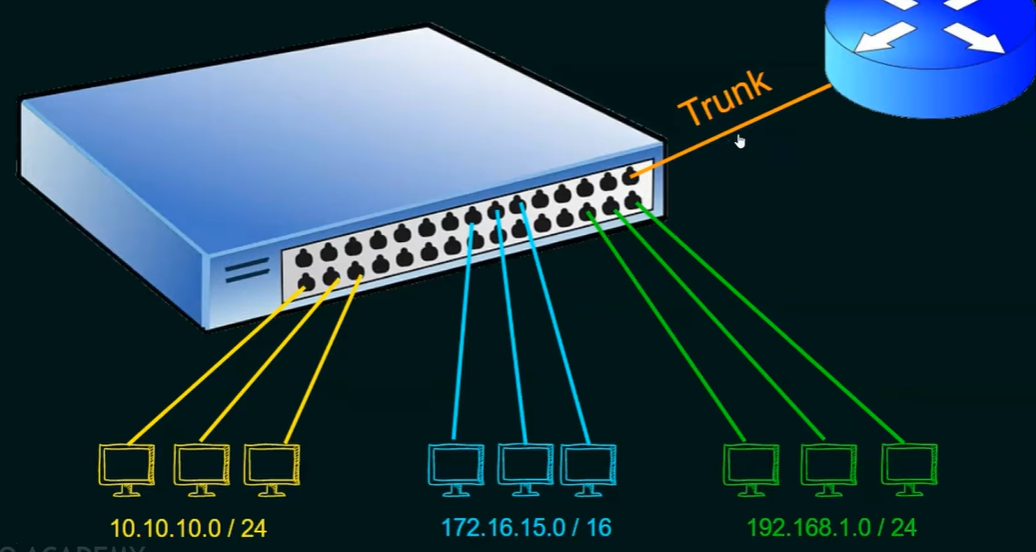
at L2 by Switch
-
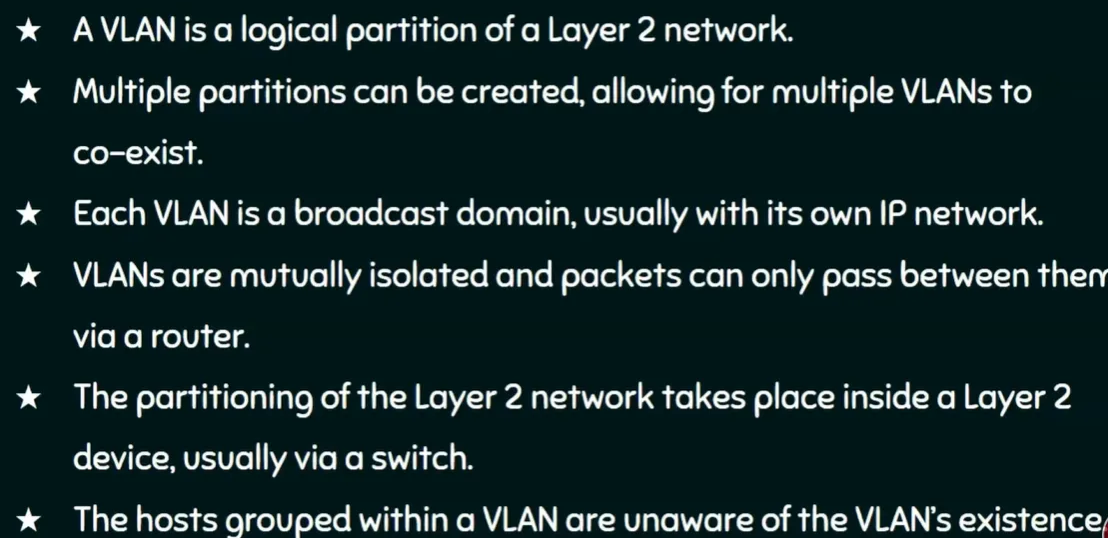
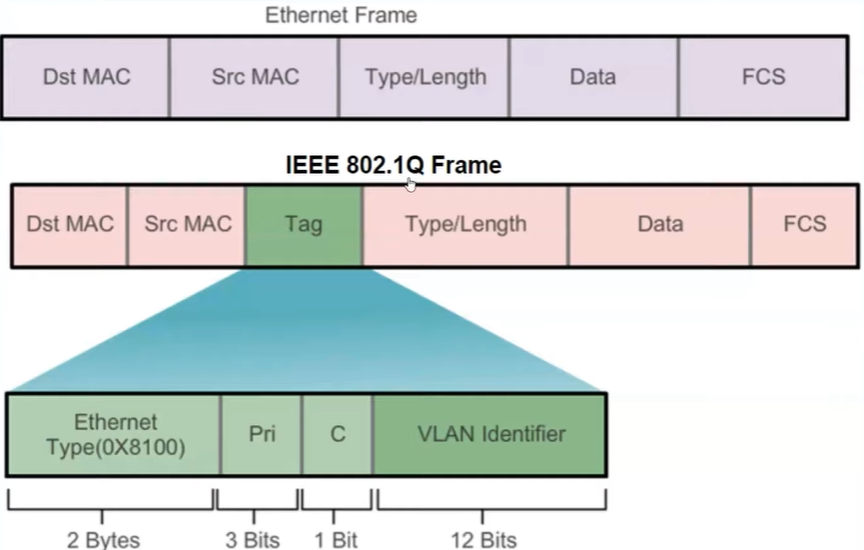
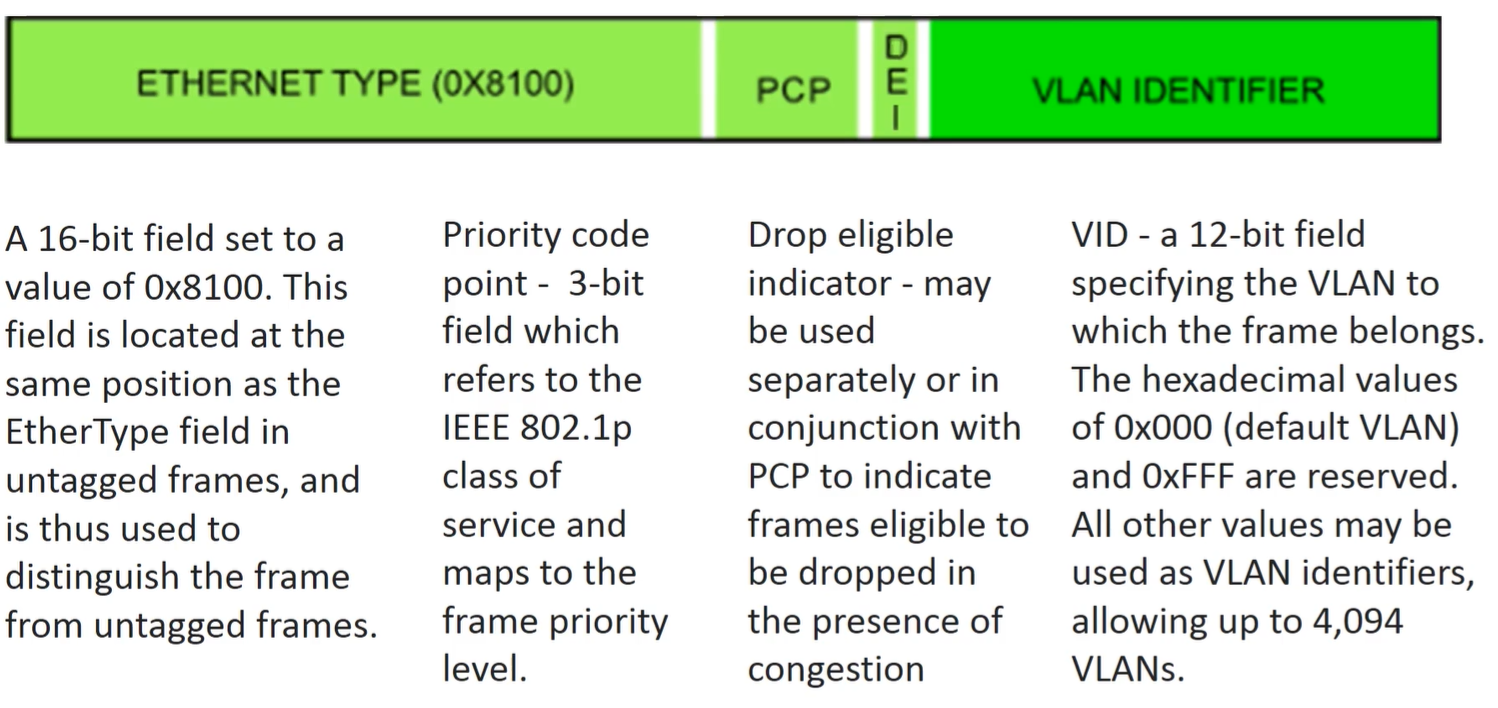
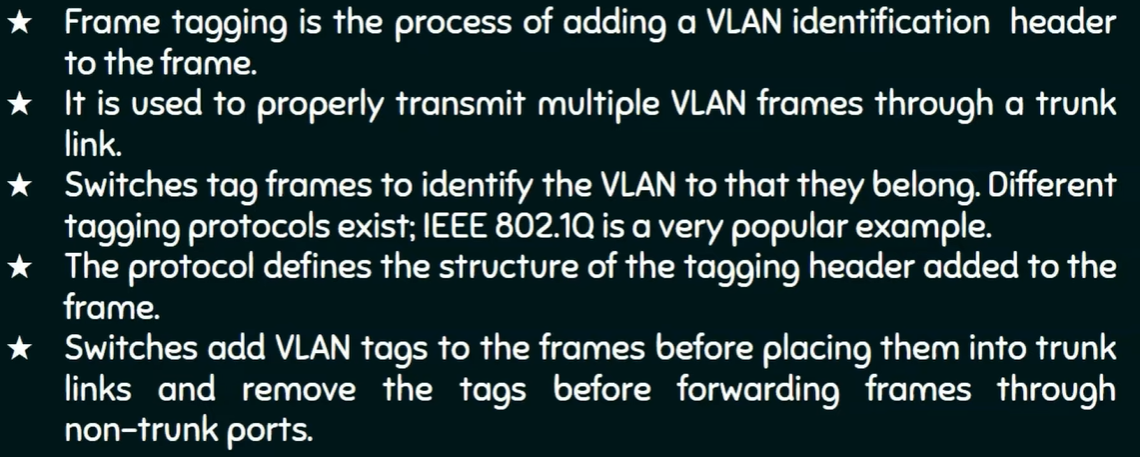
its a logical subnet that groups a collection of devices from different Physical LANs
-
inter VLAN communication is not allowed - to do that we have to connect extra Router to TRUNK Port of Switch