

CI/CD Pipeline Artifacts
What is a Pipeline Artifact?
Section titled “What is a Pipeline Artifact?”When a CI/CD pipeline runs, it produces output files — compiled binaries, Docker images, test reports, zipped packages, coverage files. These outputs are called artifacts.
Artifacts serve two purposes:
- Traceability — you can always go back and see exactly what was built from which commit
- Deployment source — downstream stages (staging, production) pull artifacts from a central store rather than rebuilding from scratch
CODE COMMIT │ ▼CI Pipeline runs │ ├── compiles code → produces .jar / .war / binary ├── runs tests → produces test-results.xml, coverage.xml ├── builds Docker image → produces image layers └── packages frontend → produces dist/ folder │ ▼ARTIFACTS stored in Artifact Repository │ ├── Dev environment pulls artifact and deploys ├── QA/Test environment pulls same artifact and tests └── Production pulls same artifact (no rebuild)The key principle: build once, deploy many times. The same artifact that passed QA goes to production — not a fresh rebuild that could be subtly different.
The Big Picture — Where Artifacts Fit
Section titled “The Big Picture — Where Artifacts Fit”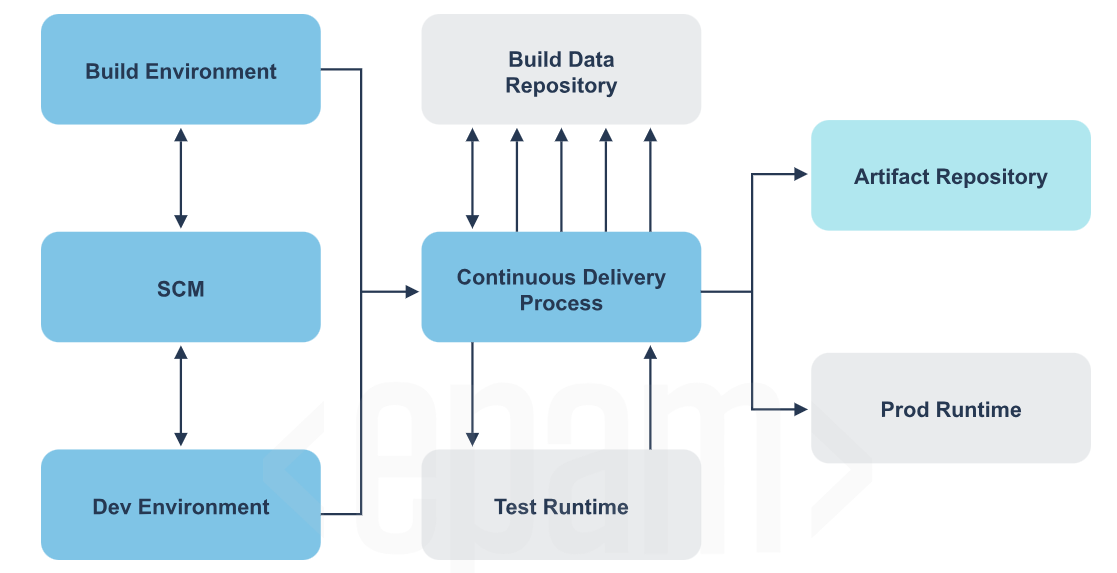
┌──────────────────┐ ┌──────────────────────────┐│ Build │ │ Build Data Repository ││ Environment │◄──────►│ (stores build metadata, ││ │ │ test results, reports) │└────────┬─────────┘ └────────────┬─────────────┘ │ │ ▼ │┌──────────────────┐ ││ SCM │ ┌────────────┴─────────────────────────┐│ (GitHub/GitLab) ├───────►│ Continuous Delivery Process ││ │ │ (Jenkins / GitHub Actions pipeline) │└────────┬─────────┘ └──────┬─────────────────┬─────────────┘ │ │ │ ▼ ▼ ▼┌──────────────────┐ ┌──────────────────┐ ┌────────────────────┐│ Dev Environment │ │ Test Runtime │ │ Artifact Repo ││ (local dev) │ │ (runs tests │ │ (JFrog/Nexus/ ││ │ │ against build) │ │ Docker Hub/ECR) │└──────────────────┘ └──────────────────┘ └────────────┬───────┘ │ ┌────────────▼───────┐ │ Prod Runtime │ │ (K8s / ECS / │ │ EC2) │ └────────────────────┘Types of Artifact Repositories
Section titled “Types of Artifact Repositories”By location
Section titled “By location”Local Repository
Stored on a developer’s own machine. Maven for example caches downloaded dependencies in ~/.m2/repository. Gradle uses ~/.gradle/caches. Fast to access, but not shared with anyone.
Remote Repository A centralized server — JFrog Artifactory, Nexus, Docker Hub, AWS ECR. The whole team pushes to and pulls from the same place. This is what a CI/CD pipeline uses.
Virtual Repository An abstraction layer that sits in front of both local and remote repos and gives them a single URL. You point your build tool at one URL and the virtual repo figures out where to actually get the artifact from.
By artifact lifecycle
Section titled “By artifact lifecycle”SNAPSHOT (development builds) RELEASE (stable builds)──────────────────────────── ───────────────────────Version: 1.0.0-SNAPSHOT Version: 1.0.0Mutable — can be overwritten Immutable — cannot be overwrittenUsed during active development Used for deployment to staging/prodAutomatically timestamped on push Fixed forever once publishedExample: myapp-1.0.0-20241201.jar Example: myapp-1.0.0.jarTool 1: JFrog Artifactory
Section titled “Tool 1: JFrog Artifactory”The most widely used universal artifact repository in enterprise environments. Supports 27+ package formats — Maven, npm, Docker, PyPI, NuGet, Helm, Go, and more.
Key concepts
Section titled “Key concepts”Domain (your company URL)└── Repository ├── Local repo (you push here) ├── Remote repo (proxy to public repos like npmjs, PyPI, Maven Central) └── Virtual repo (single URL that combines local + remote)Using Artifactory in a Jenkins pipeline
Section titled “Using Artifactory in a Jenkins pipeline”pipeline { agent any
environment { ARTIFACTORY_URL = '<https://yourcompany.jfrog.io/artifactory>' ARTIFACTORY_REPO = 'libs-release-local' ARTIFACTORY_CREDS = credentials('jfrog-credentials') // Jenkins secret }
stages { stage('Build') { steps { sh 'mvn clean package -DskipTests' } }
stage('Publish to Artifactory') { steps { // Using JFrog Jenkins plugin rtMavenRun( tool: 'Maven3', pom: 'pom.xml', goals: 'clean install', deployerId: 'deployer' ) rtPublishBuildInfo( serverId: 'artifactory-server' ) } }
// OR using plain curl if you don't have the plugin stage('Publish via curl') { steps { sh """ curl -u ${ARTIFACTORY_CREDS_USR}:${ARTIFACTORY_CREDS_PSW} \\ -T target/myapp-1.0.0.jar \\ "${ARTIFACTORY_URL}/${ARTIFACTORY_REPO}/com/myapp/1.0.0/myapp-1.0.0.jar" """ } } }}Using Artifactory in GitHub Actions
Section titled “Using Artifactory in GitHub Actions”jobs: publish: runs-on: ubuntu-latest steps: - uses: actions/checkout@v4
- name: Build with Maven run: mvn clean package -DskipTests
- name: Push to JFrog Artifactory run: | curl -u ${{ secrets.JFROG_USER }}:${{ secrets.JFROG_TOKEN }} \\ -T target/myapp-1.0.0.jar \\ "<https://yourcompany.jfrog.io/artifactory/libs-release-local/com/myapp/1.0.0/myapp-1.0.0.jar>"
# For Docker images via Artifactory Docker registry - name: Push Docker image to Artifactory run: | docker login yourcompany.jfrog.io \\ -u ${{ secrets.JFROG_USER }} \\ -p ${{ secrets.JFROG_TOKEN }}
docker build -t yourcompany.jfrog.io/docker-local/myapp:1.0.0 . docker push yourcompany.jfrog.io/docker-local/myapp:1.0.0Maven GAV Coordinate — How Artifactory organizes Java artifacts
Section titled “Maven GAV Coordinate — How Artifactory organizes Java artifacts”Every Java artifact in Artifactory (and Maven) is identified by three coordinates:
<groupId>com.mycompany</groupId> <!-- org/team that owns it --><artifactId>payment-service</artifactId> <!-- the specific component --><version>2.1.0</version> <!-- which version --><packaging>jar</packaging> <!-- output format -->This results in the artifact being stored at:
/com/mycompany/payment-service/2.1.0/payment-service-2.1.0.jarAnd consumed by other projects as:
<dependency> <groupId>com.mycompany</groupId> <artifactId>payment-service</artifactId> <version>2.1.0</version></dependency>Tool 2: Sonatype Nexus Repository
Section titled “Tool 2: Sonatype Nexus Repository”Nexus is JFrog’s main competitor. Open source version (Nexus OSS) is completely free and very widely used. Supports Maven, npm, Docker, PyPI, NuGet, Helm, APT, YUM and more.
Using Nexus in a Jenkins pipeline
Section titled “Using Nexus in a Jenkins pipeline”pipeline { agent any
environment { NEXUS_URL = '<http://nexus.yourcompany.com:8081>' NEXUS_CREDS = credentials('nexus-credentials') }
stages { stage('Build') { steps { sh 'mvn clean package' } }
stage('Deploy to Nexus') { steps { // Deploy via Maven deploy plugin sh """ mvn deploy \\ -DaltDeploymentRepository=nexus::default::${NEXUS_URL}/repository/maven-releases/ \\ -Dmaven.test.skip=true """ } }
// For npm packages stage('Publish npm package to Nexus') { steps { sh """ npm config set registry ${NEXUS_URL}/repository/npm-hosted/ npm config set _auth \\$(echo -n "${NEXUS_CREDS_USR}:${NEXUS_CREDS_PSW}" | base64) npm publish """ } } }}Using Nexus in GitHub Actions
Section titled “Using Nexus in GitHub Actions”jobs: deploy: runs-on: ubuntu-latest steps: - uses: actions/checkout@v4
- uses: actions/setup-java@v4 with: java-version: '17' distribution: 'temurin'
- name: Configure Maven settings for Nexus run: | mkdir -p ~/.m2 cat > ~/.m2/settings.xml << EOF <settings> <servers> <server> <id>nexus</id> <username>${{ secrets.NEXUS_USERNAME }}</username> <password>${{ secrets.NEXUS_PASSWORD }}</password> </server> </servers> </settings> EOF
- name: Deploy to Nexus run: mvn deploy -DskipTests
# Python package to Nexus PyPI repo - name: Publish Python package to Nexus run: | pip install twine python setup.py sdist bdist_wheel twine upload \\ --repository-url ${{ secrets.NEXUS_URL }}/repository/pypi-hosted/ \\ --username ${{ secrets.NEXUS_USERNAME }} \\ --password ${{ secrets.NEXUS_PASSWORD }} \\ dist/*Tool 3: Docker Hub
Section titled “Tool 3: Docker Hub”Docker Hub is the default public registry for Docker images. Every docker pull nginx or docker pull python:3.11 comes from Docker Hub. You can also create private repositories to store your own application images.
Core Docker commands
Section titled “Core Docker commands”# Login to Docker Hubdocker login# prompts for username and password/token
# Tag your locally built image for Docker Hub# Format: docker tag <local-image> <dockerhub-username>/<repo-name>:<tag>docker tag myapp:latest johndoe/myapp:1.0.0docker tag myapp:latest johndoe/myapp:latest
# Push image to Docker Hubdocker push johndoe/myapp:1.0.0docker push johndoe/myapp:latest
# Pull an image from Docker Hubdocker pull johndoe/myapp:1.0.0
# Search Docker Hub from terminaldocker search nginxUsing Docker Hub in a Jenkins pipeline
Section titled “Using Docker Hub in a Jenkins pipeline”pipeline { agent any
environment { DOCKER_CREDENTIALS = credentials('dockerhub-credentials') IMAGE_NAME = 'johndoe/myapp' IMAGE_TAG = "${env.BUILD_NUMBER}" // use Jenkins build number as tag }
stages { stage('Build Docker Image') { steps { sh "docker build -t ${IMAGE_NAME}:${IMAGE_TAG} ." sh "docker tag ${IMAGE_NAME}:${IMAGE_TAG} ${IMAGE_NAME}:latest" } }
stage('Push to Docker Hub') { steps { sh "echo ${DOCKER_CREDENTIALS_PSW} | docker login -u ${DOCKER_CREDENTIALS_USR} --password-stdin" sh "docker push ${IMAGE_NAME}:${IMAGE_TAG}" sh "docker push ${IMAGE_NAME}:latest" } }
stage('Deploy') { steps { // On deployment server — pull the specific build version sh "docker pull ${IMAGE_NAME}:${IMAGE_TAG}" sh "docker run -d -p 80:8080 ${IMAGE_NAME}:${IMAGE_TAG}" } }
stage('Cleanup local images') { steps { // Remove local images after push to save disk space on Jenkins agent sh "docker rmi ${IMAGE_NAME}:${IMAGE_TAG}" sh "docker rmi ${IMAGE_NAME}:latest" } } }}Using Docker Hub in GitHub Actions
Section titled “Using Docker Hub in GitHub Actions”name: Build and Push to Docker Hub
on: push: branches: [main]
jobs: docker: runs-on: ubuntu-latest steps: - uses: actions/checkout@v4
- name: Set up Docker Buildx uses: docker/setup-buildx-action@v3
- name: Login to Docker Hub uses: docker/login-action@v3 with: username: ${{ secrets.DOCKERHUB_USERNAME }} password: ${{ secrets.DOCKERHUB_TOKEN }} # use access token, not password
# Generate a unique tag from the commit SHA - name: Generate image tag id: tag run: echo "value=$(git rev-parse --short HEAD)" >> $GITHUB_OUTPUT
- name: Build and push uses: docker/build-push-action@v5 with: context: . push: true tags: | ${{ secrets.DOCKERHUB_USERNAME }}/myapp:latest ${{ secrets.DOCKERHUB_USERNAME }}/myapp:${{ steps.tag.outputs.value }} cache-from: type=gha # use GitHub Actions cache to speed up builds cache-to: type=gha,mode=maxDocker Hub image tagging strategy
Section titled “Docker Hub image tagging strategy”Tagging images properly is critical for traceability and rollback:
# BAD — only latest, you can never roll back to a specific builddocker push johndoe/myapp:latest
# GOOD — always tag with something unique AND keep a latest pointerdocker push johndoe/myapp:latestdocker push johndoe/myapp:1.0.0          # semantic versiondocker push johndoe/myapp:abc1234        # git commit SHAdocker push johndoe/myapp:build-42       # CI build number
The commit SHA tag is the most useful in CI/CD because it creates a direct link between a deployed image and the exact line of code that built it.
Tool 4: AWS CodeArtifact
Section titled “Tool 4: AWS CodeArtifact”AWS’s managed artifact service. No servers to maintain. Supports Maven, npm, PyPI, NuGet, Swift, Ruby Gems. Integrates natively with IAM for access control.
Key concepts
Section titled “Key concepts”AWS Account└── CodeArtifact Domain (top-level namespace, e.g. "mycompany") └── Repository (e.g. "my-maven-repo", "my-npm-repo") └── Packages (individual artifacts stored here)Setup and usage
Section titled “Setup and usage”# Authenticate with CodeArtifact (token lasts 12 hours)aws codeartifact login \\ --tool npm \\ --domain mycompany \\ --domain-owner 123456789012 \\ --repository my-npm-repo
# For Mavenaws codeartifact login \\ --tool mvn \\ --domain mycompany \\ --domain-owner 123456789012 \\ --repository my-maven-repo
# After login, your tool (npm/mvn) is automatically configured# to use CodeArtifact as the registry — no manual URL editing needednpm publish # publishes to CodeArtifactnpm install # installs from CodeArtifact (with public npm as upstream fallback)Using CodeArtifact in GitHub Actions
Section titled “Using CodeArtifact in GitHub Actions”jobs: publish: runs-on: ubuntu-latest permissions: id-token: write # needed for OIDC auth with AWS contents: read
steps: - uses: actions/checkout@v4
- name: Configure AWS credentials uses: aws-actions/configure-aws-credentials@v4 with: role-to-assume: arn:aws:iam::123456789012:role/GitHubActionsRole aws-region: us-east-1
- name: Login to CodeArtifact run: | aws codeartifact login \\ --tool npm \\ --domain mycompany \\ --domain-owner 123456789012 \\ --repository my-npm-repo
- name: Install dependencies and build run: | npm ci npm run build
- name: Publish package to CodeArtifact run: npm publishUsing CodeArtifact in a Jenkins pipeline
Section titled “Using CodeArtifact in a Jenkins pipeline”pipeline { agent any
stages { stage('Auth with CodeArtifact') { steps { withAWS(credentials: 'aws-credentials', region: 'us-east-1') { sh """ aws codeartifact login \\ --tool mvn \\ --domain mycompany \\ --domain-owner 123456789012 \\ --repository my-maven-repo """ } } }
stage('Build and Publish') { steps { sh 'mvn clean deploy' } } }}Tool 5: GitHub Packages
Section titled “Tool 5: GitHub Packages”GitHub’s built-in package registry. If your code is already on GitHub, GitHub Packages is the path-of-least-resistance for storing artifacts — no external service needed. Supports npm, Maven, Gradle, Docker, NuGet, RubyGems.
Publishing an npm package to GitHub Packages
Section titled “Publishing an npm package to GitHub Packages”# .npmrc in your project root@your-org:registry=https://npm.pkg.github.com# Loginnpm login --registry=https://npm.pkg.github.com# Username: your GitHub username# Password: GitHub Personal Access Token with write:packages scope
# Publishnpm publishUsing GitHub Packages in GitHub Actions
Section titled “Using GitHub Packages in GitHub Actions”name: Publish to GitHub Packages
on: push: tags: ['v*'] # only publish on version tags
jobs: publish-npm: runs-on: ubuntu-latest permissions: contents: read packages: write # required to push to GitHub Packages
steps: - uses: actions/checkout@v4
- uses: actions/setup-node@v4 with: node-version: '20' registry-url: '<https://npm.pkg.github.com>' scope: '@your-org'
- run: npm ci - run: npm run build - run: npm publish env: NODE_AUTH_TOKEN: ${{ secrets.GITHUB_TOKEN }} # GITHUB_TOKEN works automatically
publish-docker: runs-on: ubuntu-latest permissions: contents: read packages: write
steps: - uses: actions/checkout@v4
- name: Login to GitHub Container Registry uses: docker/login-action@v3 with: registry: ghcr.io username: ${{ github.actor }} password: ${{ secrets.GITHUB_TOKEN }} # no extra secret needed
- name: Build and push Docker image uses: docker/build-push-action@v5 with: context: . push: true tags: | ghcr.io/${{ github.repository }}/myapp:latest ghcr.io/${{ github.repository }}/myapp:${{ github.sha }}Consuming a GitHub Package in another repo
Section titled “Consuming a GitHub Package in another repo”steps: - name: Login to GHCR uses: docker/login-action@v3 with: registry: ghcr.io username: ${{ github.actor }} password: ${{ secrets.GITHUB_TOKEN }}
- name: Pull and run image run: | docker pull ghcr.io/your-org/myapp:latest docker run -d -p 8080:8080 ghcr.io/your-org/myapp:latestTool 6: NuGet (.NET packages)
Section titled “Tool 6: NuGet (.NET packages)”NuGet is the package manager for .NET. .nupkg is the package format — a ZIP file containing DLLs, metadata, and a .nuspec manifest.
Basic NuGet commands
Section titled “Basic NuGet commands”# Pack a .NET project into a .nupkg artifactdotnet pack --configuration Release --output ./artifacts
# Push to NuGet.org (public)dotnet nuget push ./artifacts/MyLibrary.1.0.0.nupkg \\ --api-key YOUR_API_KEY \\ --source <https://api.nuget.org/v3/index.json>
# Push to a private Nexus/Artifactory NuGet feeddotnet nuget push ./artifacts/MyLibrary.1.0.0.nupkg \\ --api-key YOUR_KEY \\ --source <https://nexus.yourcompany.com/repository/nuget-hosted/>
# Install a NuGet packagedotnet add package Newtonsoft.Json --version 13.0.3
# Restore all packages listed in .csprojdotnet restoreUsing NuGet in GitHub Actions
Section titled “Using NuGet in GitHub Actions”jobs: publish-nuget: runs-on: ubuntu-latest steps: - uses: actions/checkout@v4
- uses: actions/setup-dotnet@v4 with: dotnet-version: '8.0.x'
- name: Restore dependencies run: dotnet restore
- name: Build run: dotnet build --configuration Release --no-restore
- name: Test run: dotnet test --no-build --verbosity normal
- name: Pack run: dotnet pack --configuration Release --output ./artifacts
- name: Push to GitHub Packages NuGet feed run: | dotnet nuget push ./artifacts/*.nupkg \\ --api-key ${{ secrets.GITHUB_TOKEN }} \\ --source <https://nuget.pkg.github.com/$>{{ github.repository_owner }}/index.jsonGitHub Actions Built-in Artifact Storage
Section titled “GitHub Actions Built-in Artifact Storage”GitHub Actions has its own lightweight artifact storage for sharing files between jobs in the same workflow run or downloading build outputs from the UI. This is NOT a full artifact repository — it’s temporary storage (default 90 days, configurable).
jobs:  build:    runs-on: ubuntu-latest    steps:      - uses: actions/checkout@v4
      - name: Build        run: |          npm ci          npm run build           # produces dist/ folder
      - name: Run tests        run: |          npm test -- --coverage  # produces coverage/ folder
      # Save artifacts from this job      - name: Upload build output        uses: actions/upload-artifact@v4        with:          name: frontend-build-${{ github.run_number }}          path: dist/          retention-days: 30
      - name: Upload test coverage        uses: actions/upload-artifact@v4        if: always()              # upload even if tests fail        with:          name: coverage-report          path: coverage/          retention-days: 14
  deploy:    runs-on: ubuntu-latest    needs: build                  # wait for build job to finish
    steps:      # Download artifact that build job created      - name: Download build output        uses: actions/download-artifact@v4        with:          name: frontend-build-${{ github.run_number }}          path: ./dist
      - name: Deploy to S3        run: aws s3 sync ./dist s3://my-bucket/
Complete Pipeline — Artifacts End to End
Section titled “Complete Pipeline — Artifacts End to End”Here is a full real-world pipeline that uses multiple artifact destinations together:
name: Full CI/CD with Artifacts
on:  push:    branches: [main]
env:  IMAGE_NAME: ${{ secrets.DOCKERHUB_USERNAME }}/myapp
jobs:  # ── Job 1: Build & Test ───────────────────────────────────────  build-and-test:    runs-on: ubuntu-latest    steps:      - uses: actions/checkout@v4
      - uses: actions/setup-node@v4        with:          node-version: '20'          cache: 'npm'
      - run: npm ci      - run: npm run build      - run: npm test -- --coverage --ci
      # Store test results and build output as GitHub artifacts      - uses: actions/upload-artifact@v4        if: always()        with:          name: test-results          path: |            coverage/            test-results.xml          retention-days: 14
      - uses: actions/upload-artifact@v4        with:          name: dist-${{ github.run_number }}          path: dist/          retention-days: 30
  # ── Job 2: Build Docker & Push to Docker Hub ──────────────────  docker-publish:    runs-on: ubuntu-latest    needs: build-and-test
    outputs:      image-tag: ${{ steps.tag.outputs.value }}
    steps:      - uses: actions/checkout@v4
      - name: Generate image tag        id: tag        run: echo "value=$(git rev-parse --short HEAD)" >> $GITHUB_OUTPUT
      - uses: docker/setup-buildx-action@v3
      - uses: docker/login-action@v3        with:          username: ${{ secrets.DOCKERHUB_USERNAME }}          password: ${{ secrets.DOCKERHUB_TOKEN }}
      - uses: docker/build-push-action@v5        with:          context: .          push: true          tags: |            ${{ env.IMAGE_NAME }}:latest            ${{ env.IMAGE_NAME }}:${{ steps.tag.outputs.value }}            ${{ env.IMAGE_NAME }}:build-${{ github.run_number }}          cache-from: type=gha          cache-to: type=gha,mode=max
  # ── Job 3: Publish npm package to GitHub Packages ─────────────  npm-publish:    runs-on: ubuntu-latest    needs: build-and-test    permissions:      packages: write
    steps:      - uses: actions/checkout@v4
      - uses: actions/setup-node@v4        with:          node-version: '20'          registry-url: '<https://npm.pkg.github.com>'
      - run: npm ci      - run: npm publish        env:          NODE_AUTH_TOKEN: ${{ secrets.GITHUB_TOKEN }}
  # ── Job 4: Deploy using the Docker image ──────────────────────  deploy:    runs-on: ubuntu-latest    needs: docker-publish
    steps:      - name: Pull and deploy image        run: |          IMAGE="${{ env.IMAGE_NAME }}:${{ needs.docker-publish.outputs.image-tag }}"          echo "Deploying image: $IMAGE"          # Pull the exact image built in this pipeline run          docker pull $IMAGE          docker stop myapp || true          docker rm myapp || true          docker run -d --name myapp -p 80:3000 $IMAGE
Choosing the Right Tool — Quick Decision Guide
Section titled “Choosing the Right Tool — Quick Decision Guide”What are you storing? Where is your code? Best choice───────────────────── ─────────────────── ─────────────────────────────Docker images GitHub GitHub Container Registry (ghcr.io)Docker images Anywhere Docker HubDocker images (AWS) AWS CodePipeline Amazon ECRJava/Maven artifacts Enterprise JFrog Artifactory or Nexusnpm packages GitHub GitHub Packagesnpm packages Enterprise JFrog Artifactory or NexusPython packages AWS AWS CodeArtifact.NET packages GitHub GitHub Packages (NuGet feed).NET packages Enterprise Nexus or JFrogMulti-format (all in one) Enterprise JFrog Artifactory (most complete)Temporary CI build output GitHub Actions actions/upload-artifactMulti-format (AWS native) AWS AWS CodeArtifactKey Concepts Summary
Section titled “Key Concepts Summary”CONCEPT WHAT IT MEANS─────────────────── ──────────────────────────────────────────────────────Artifact Any file produced by a build (jar, image, zip, report)Repository Central store where artifacts are pushed and pulled fromSnapshot Mutable build, used during development (can be overwritten)Release Immutable build, used for deployment (never overwritten)GAV coordinate GroupId + ArtifactId + Version — Java artifact identifierImage tag Label on a Docker image (use SHA/build number for traceability)latest tag Alias pointing to most recent — always also push a unique tagRetention policy How long to keep artifacts before auto-deletingUpstream proxy Remote repo that proxies a public registry (saves bandwidth)