

Linux N/w Troubleshooting
1. The Troubleshooting Mindset
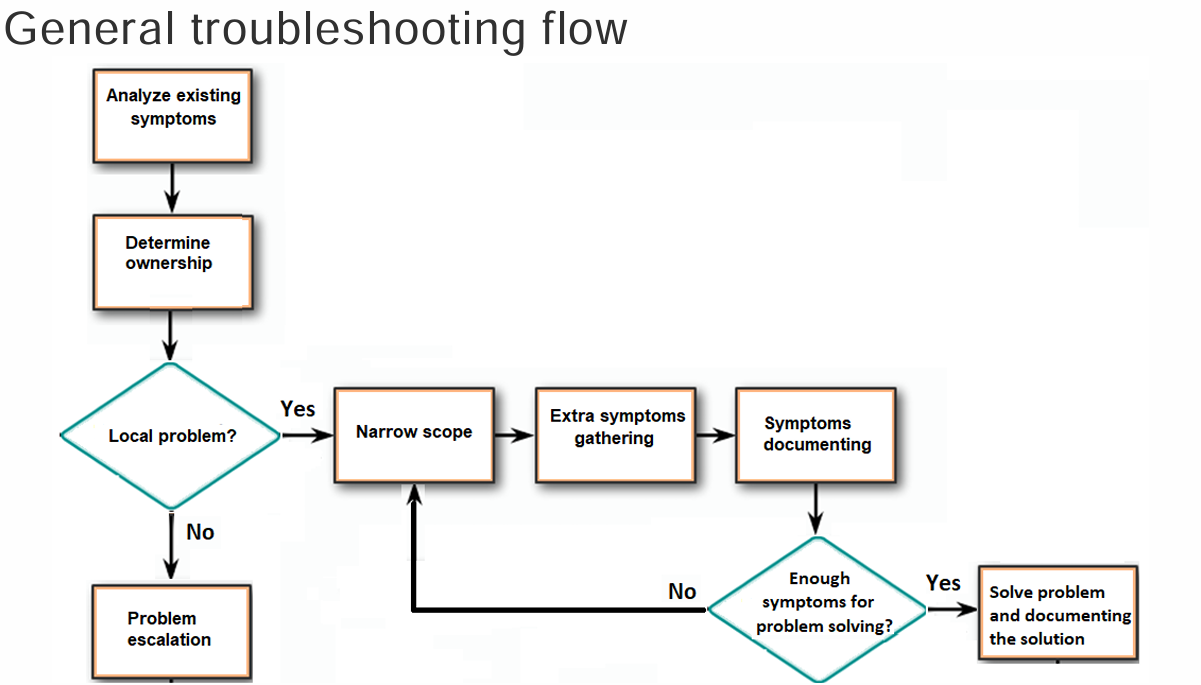
Section titled “1. The Troubleshooting Mindset”To solve any issue in your Practical Task, follow this 4-step loop to avoid wasting time :
- Step 1: Symptom Gathering: Document what exactly isn’t working for the user or the system.
- Step 2: Problem Isolation: Eliminate variables one by one until you find the root cause.
- Step 3: Corrective Action: Implement and test your fix.
- Step 4: Documentation: Save the result so you (or the next guy) don’t have to solve it twice .
2. The “Layered” Strategy (OSI Model)
Section titled “2. The “Layered” Strategy (OSI Model)”Think of the network in two halves to narrow your search :
- Hardware Layers (1-3): Physical cables, MAC addresses, and IP routing. If
pingfails, start here. - Software Layers (4-7): Ports, sessions, and applications (like a browser). If the site loads but “Login” fails, look here.
3. The Troubleshooting Toolkit
Section titled “3. The Troubleshooting Toolkit”Connectivity & Pathing
Section titled “Connectivity & Pathing”-
ping: Uses ICMP Echo to verify accessibility .- Example:
ping 8.8.8.8. - Details: Shows sequence number (
icmp_seq), Time to Live (ttl), and round-trip time (time) .
- Example:
-
traceroute: Traces the exact hop-by-hop route by incrementing the TTL value.-
Command:
traceroute -n <destination>. -
Logic: Router sends ICMP Time Exceeded when TTL hits 0.
Terminal window 1. It sends a packet with a TTL value equal to 1.2. The first router receives the packet and decreases the TTL.3. With a TTL equal to 0, the router sends a timeout back to traceroute,with this packet, traceroute knows about the first router.4. Now, traceroute sends another packet with a TTL equal to 2.5. The first router decreases the TTL and sends the packet to the second routerwhich decreases it in turn: the TTL is equal to 0…
-
-
mtr: Combinespingandtracerouteinto a real-time diagnostic table.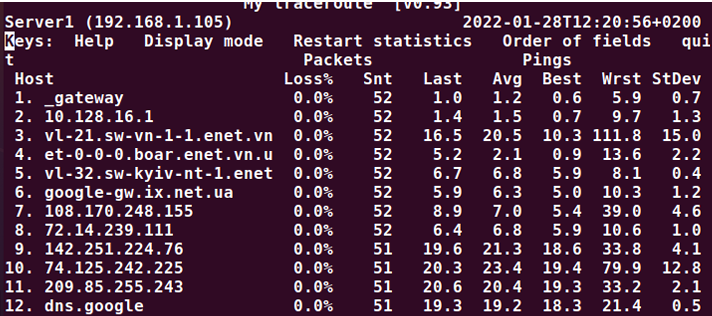
Service & Protocol Checks
Section titled “Service & Protocol Checks”-
netstat: Reveals network connections, open ports, and listening processes.- TCP Check:
netstat -at -n(Shows all TCP connections numerically). - UDP Check:
netstat -au -n(Shows all UDP connections numerically).
- TCP Check:
-
dig/host/nslookup: Used for DNS lookup and troubleshooting name resolution issues .-
DNS Query:
dig google.comorhost google.com. -
Specific Server:
nslookup epam.com 8.8.8.8(Asks Google’s DNS specifically).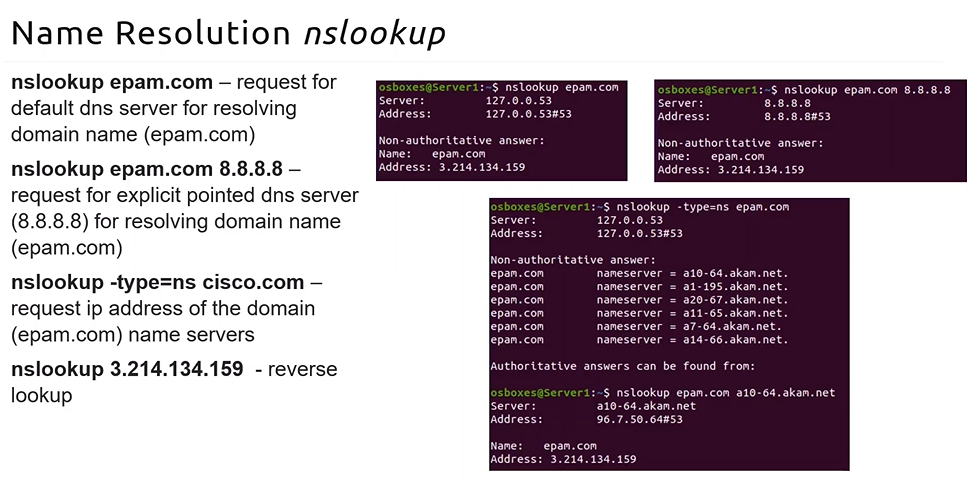
-
-
arp: Displays and modifies the local ARP table .- Command:
arp -a.
- Command:
Deep Packet & Port Inspection
Section titled “Deep Packet & Port Inspection”-
nmap: Used for security auditing and scanning for open ports on remote hosts .- Basic Scan:
nmap epam.com. - scanning for open ports is illegal in some countries and organization.. take prior consent
- Basic Scan:
-
tcpdump: A powerful packet sniffer that captures raw data from an interface .- Filter:
sudo tcpdump icmp(Captures only ping-related traffic)
- Filter:
| Goal | Command | Why use it? |
|---|---|---|
| Is the server up? | ping <ip> | Simplest “is it alive” check. |
| Where is it failing? | mtr <ip> | Finds the exact router dropping packets. |
| Is DNS working? | dig google.com | Checks if the name translates to an IP. |
| Is SSH listening? | netstat -tunlp | Verifies the service is actually running. |
| Who is on my Wi-Fi? | arp -a | Sees MAC addresses of local neighbors. |