

Testing!
Quality Gates
Section titled “Quality Gates”What are Quality Gates?
Section titled “What are Quality Gates?”A quality gate is a checkpoint in the CI/CD pipeline where your code is evaluated against a set of predefined criteria before it’s allowed to move to the next stage. Think of it as a bouncer at the door — if your code doesn’t meet the standards, it doesn’t get in.
They are not just pass/fail checks. They generate reports that give your team visibility into the health of the codebase at every stage.
How a Quality Gate Condition is Defined
Section titled “How a Quality Gate Condition is Defined”A quality gate condition has three parts:
| Measure | Comparison Operator | Error Value |
|---|---|---|
| Blocker Issues | > | 0 |
| Code Coverage | < | 80% |
| Code Duplication | > | 3% |
| Critical Vulnerabilities | > | 0 |
The first row reads: “Fail the build if there is more than 0 blocker issues.” Each project defines its own quality gate conditions — there’s no universal set.
Where Quality Gates Live in a CI/CD Pipeline
Section titled “Where Quality Gates Live in a CI/CD Pipeline”Code Push → Build → [Quality Gate 1: Unit Tests + Code Coverage] → [Quality Gate 2: Code Quality / Static Analysis] → [Quality Gate 3: Security / Vulnerability Scan] → [Quality Gate 4: Performance Tests] → Deploy to Staging → [Quality Gate 5: E2E + Regression Tests] → Deploy to ProductionEach gate is a hard stop. If it fails, the pipeline halts and the team is notified. Nothing broken makes it downstream.
Why Automate Testing?
Section titled “Why Automate Testing?”Manually running tests is not feasible in a CI/CD pipeline where code is being pushed dozens of times a day. QA Automation means integrating testing tools directly into the pipeline so tests run automatically on every commit.
| Benefit | What it means in practice |
|---|---|
| Improved Scalability | Tests run 24/7 — a push at 2 AM gets tested just like one at 2 PM |
| Enhanced Efficiency | Faults are caught the moment they’re introduced, not days later in code review |
| Faster Delivery | No waiting for a QA engineer to manually test — pipeline moves at machine speed |
| Consistency | Same tests, same environment, same criteria every single time |
Real world: A team at a large company pushing 50+ commits a day cannot have a human test every single one. Automation is what makes CI/CD actually continuous — without it, you just have a fancy version control system.
Testing Types in a CI/CD Pipeline
Section titled “Testing Types in a CI/CD Pipeline”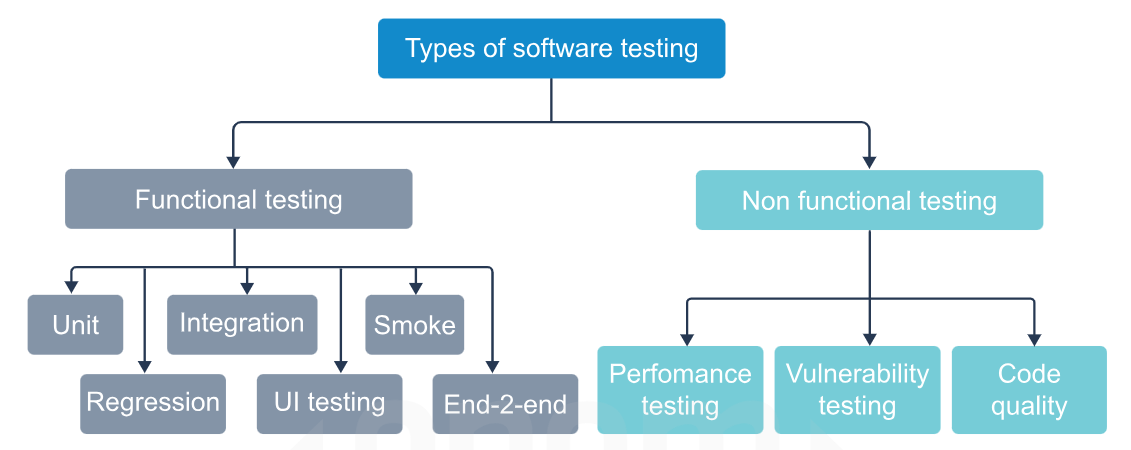
1. Unit Testing
Section titled “1. Unit Testing”What is it?
Section titled “What is it?”Unit testing tests the smallest individual pieces of code in isolation — a single function, method, or class. The idea is: before you test how things work together, first confirm each piece works on its own.
Key Points
Section titled “Key Points”- Each unit is tested independently — no database, no network, no external systems
- Uses mock objects, stubs, and fakes to simulate dependencies the unit relies on
- Written by developers, not QA — they live right next to the source code
- Run on every single commit — fastest tests in the pipeline (should complete in seconds)
- Frameworks handle running, logging failures, and generating summaries automatically
What is a Mock / Stub / Fake?
Section titled “What is a Mock / Stub / Fake?”| Term | What it does |
|---|---|
| Mock | A fake object you configure to return specific values so the unit doesn’t need the real dependency |
| Stub | A simplified replacement that returns hardcoded responses |
| Fake | A working but simplified implementation (e.g. an in-memory DB instead of a real one) |
Why Unit Testing Matters Early
Section titled “Why Unit Testing Matters Early”Finding a bug in unit testing costs very little — it’s just the developer’s time. Finding the same bug in production costs user trust, revenue, and hours of debugging across multiple teams. The earlier the catch, the cheaper the fix.
Java Example (JUnit 5)
Section titled “Java Example (JUnit 5)”public class GradeCalculator { public String getGrade(double average) { if (average >= 90) return "A"; else if (average >= 75) return "B"; else if (average >= 60) return "C"; else if (average >= 50) return "D"; else return "F"; }}import org.junit.jupiter.api.Test;import static org.junit.jupiter.api.Assertions.*;
class GradeCalculatorTest {
GradeCalculator calc = new GradeCalculator();
@Test void testGradeA() { assertEquals("A", calc.getGrade(95)); }
@Test void testGradeF() { assertEquals("F", calc.getGrade(30)); }
@Test void testBoundaryCondition() { // exactly 75 should be B, not C assertEquals("B", calc.getGrade(75)); }}Run with Maven:
mvn testRun with Gradle:
./gradlew testOutput:
Tests run: 3, Failures: 0, Errors: 0, Skipped: 0BUILD SUCCESSReal World Implementation
Section titled “Real World Implementation”In a CI pipeline (Jenkins, GitHub Actions etc.), the unit test stage looks like this:
# GitHub Actions example- name: Run Unit Tests  run: mvn test
- name: Publish Test Results  uses: actions/upload-artifact@v3  with:    name: test-results    path: target/surefire-reports/
If even one unit test fails, the pipeline stops here. Nothing goes further.
2. Code Quality Testing (Static Analysis)
Section titled “2. Code Quality Testing (Static Analysis)”What is it?
Section titled “What is it?”Code quality testing uses static analysis tools that read your code without running it and flag issues related to structure, style, complexity, duplication, and potential bugs. The code never executes — the tool just reads it like a very strict reviewer.
What it measures
Section titled “What it measures”- Readability — Is the code easy to understand?
- Consistency — Does it follow the same style/conventions throughout?
- Maintainability — Can another developer modify it without breaking things?
- Duplication — Are the same blocks of logic repeated across files?
- Complexity — Are methods too long or deeply nested?
- Robustness — Are there unhandled exceptions, null pointer risks, resource leaks?
- Security — Are there known vulnerability patterns in the code?
Most Used Tools
Section titled “Most Used Tools”| Tool | Language | What it does |
|---|---|---|
| SonarQube | Java, JS, Python, C# and more | Full code quality + security platform, integrates with CI/CD |
| Checkstyle | Java | Enforces coding style (naming conventions, formatting) |
| PMD | Java | Finds bad practices — empty catch blocks, unused variables |
| SpotBugs | Java | Finds actual bug patterns in bytecode |
| ESLint | JavaScript | Style + logic checks |
| Pylint / Flake8 | Python | Style and error checking |
SonarQube Quality Gate Example
Section titled “SonarQube Quality Gate Example”SonarQube is the industry standard for this in enterprise pipelines. It defines a “Quality Gate” directly — your pipeline calls SonarQube, it analyzes the code, and returns pass or fail.
# Run SonarQube analysis via Mavenmvn sonar:sonar \ -Dsonar.projectKey=student-grades \ -Dsonar.host.url=http://localhost:9000 \ -Dsonar.login=your_tokenSonarQube then reports things like:
Quality Gate Status: FAILED - Blocker Issues: 2 (threshold: 0) ❌ - Code Coverage: 61% (threshold: 80%) ❌ - Duplications: 1.2% (threshold: 3%) ✅The pipeline sees FAILED and stops.
Checkstyle Example in pom.xml
Section titled “Checkstyle Example in pom.xml”<plugin> <groupId>org.apache.maven.plugins</groupId> <artifactId>maven-checkstyle-plugin</artifactId> <version>3.3.0</version> <executions> <execution> <phase>validate</phase> <goals><goal>check</goal></goals> </execution> </executions></plugin>Now mvn validate will fail the build if code style rules are broken — before even compiling.
3. Smoke Testing
Section titled “3. Smoke Testing”What is it?
Section titled “What is it?”Smoke testing is the first sanity check after a build is created. It runs a minimal, fast set of tests to confirm the build is even worth testing further. The name comes from hardware testing — you power on a circuit board and if it smokes, you don’t test anything else.
Key Points
Section titled “Key Points”- Tests only the most critical, core features — login works, homepage loads, APIs respond
- Runs on a newly deployed build — not on source code
- If smoke tests fail, the QA team stops everything and sends the build back — no point running 4 hours of regression tests on a broken build
- Should be fast — typically under 10 minutes
- Acts as a gatekeeper before deeper testing begins
What Smoke Tests Check (examples)
Section titled “What Smoke Tests Check (examples)”- Can the application start up without crashing?
- Can a user log in?
- Does the main API endpoint return a 200 response?
- Does the database connection work?
- Does the home page render?
Java Example (Smoke Test using REST Assured)
Section titled “Java Example (Smoke Test using REST Assured)”import io.restassured.RestAssured;import org.junit.jupiter.api.Test;import static io.restassured.RestAssured.*;import static org.hamcrest.Matchers.*;
public class SmokeTest {
@Test void appIsUpAndResponding() { RestAssured.baseURI = "http://localhost:8080";
given() .when() .get("/health") .then() .statusCode(200) // app must be running .body("status", equalTo("UP")); // health check must pass }
@Test void mainApiEndpointReachable() { given() .when() .get("/api/students") .then() .statusCode(200); // endpoint must exist and respond }}Real World Flow
Section titled “Real World Flow”Build created → Deploy to test environment → Run Smoke Tests → PASS: hand off to full QA suite (regression, performance, etc.) → FAIL: immediately reject build, notify developer, stop pipeline4. Performance Testing
Section titled “4. Performance Testing”What is it?
Section titled “What is it?”Performance testing checks how the application behaves under load — does it stay fast and stable when 1000 users hit it simultaneously? Is it still responsive when the database has 10 million records?
What it measures
Section titled “What it measures”| Parameter | Question it answers |
|---|---|
| Speed / Response time | Does the app respond within acceptable time under normal conditions? |
| Scalability | How many concurrent users can it handle before degrading? |
| Stability | Does it stay stable over a long period under sustained load? |
| Throughput | How many requests per second can it process? |
| Resource usage | CPU, memory, disk usage under load — are there leaks? |
Types of Performance Tests
Section titled “Types of Performance Tests”| Type | What it does |
|---|---|
| Load test | Simulates expected normal load — e.g. 500 users |
| Stress test | Pushes beyond expected load to find the breaking point |
| Spike test | Sudden huge burst of users — e.g. flash sale traffic |
| Soak/Endurance test | Runs normal load for hours/days to catch memory leaks |
Most Used Tools
Section titled “Most Used Tools”| Tool | Notes |
|---|---|
| Apache JMeter | Industry standard, Java-based, open source |
| Gatling | Code-based load tests (Scala), great CI integration |
| k6 | Modern, JavaScript-based, excellent for API load testing |
| Locust | Python-based, easy to write test scripts |
JMeter in a CI Pipeline
Section titled “JMeter in a CI Pipeline”# Run JMeter test from command line (headless mode for CI)jmeter -n \ -t test-plan.jmx \ -l results.jtl \ -e -o reports/
# -n = headless (no GUI)# -t = test plan file# -l = log results to file# -e -o = generate HTML reportPipeline then checks if average response time < 500ms and error rate < 1%. If not, the quality gate fails.
Real World Context
Section titled “Real World Context”An e-commerce company runs performance tests against their checkout API before every release. Their quality gate: average response time must stay under 300ms with 1000 concurrent users. If a new code change causes it to hit 450ms, the pipeline fails and the release is blocked — before any customer ever sees the slowdown.
5. Regression Testing
Section titled “5. Regression Testing”What is it?
Section titled “What is it?”Regression testing verifies that new code changes haven’t broken existing functionality. Every time you fix a bug, add a feature, or refactor code, you run the existing test suite to confirm nothing that used to work now breaks.
Key Points
Section titled “Key Points”- Not a new set of tests — it’s re-running existing tests after changes
- The “regression” is a bug that was working fine and broke because of an unrelated change
- Regression is common and sneaky — fixing a payment bug might accidentally break the email notification system
- Automated regression is what makes refactoring safe in large codebases
- This is the largest and most comprehensive test suite — can take minutes to hours
Methods
Section titled “Methods”| Method | Description |
|---|---|
| Retest All | Run the entire test suite every time — safest but slowest |
| Selective Regression | Only run tests related to changed modules — faster but needs good dependency mapping |
| Priority-based | Run critical/high-risk tests first — balance between speed and coverage |
How it’s Different from Unit Testing
Section titled “How it’s Different from Unit Testing”| Unit Test | Regression Test | |
|---|---|---|
| Purpose | Verify a single unit works correctly | Verify existing features still work after changes |
| When written | When the code is first written | When a bug is fixed or feature is changed |
| When run | Every commit | After any code change, as part of CI |
| Scope | One function/class | The entire application’s test suite |
Java Example
Section titled “Java Example”// Originally: StudentService only had getStudent()// New feature added: deleteStudent() — regression test ensures getStudent() still works
@Testvoid regressionTest_getStudentStillWorksAfterDeleteFeatureAdded() { StudentService service = new StudentService(); service.addStudent(new Student("Alice", new double[]{85, 90}));
// This is the regression check — did adding delete() break add/get? Student result = service.getStudent("Alice");
assertNotNull(result); assertEquals("Alice", result.getName());}
@Testvoid regressionTest_gradeCalculationUnchangedAfterRefactor() { GradeCalculator calc = new GradeCalculator(); // These were passing before the refactor — must still pass assertEquals("A", calc.getGrade(95)); assertEquals("F", calc.getGrade(40)); assertEquals("B", calc.getGrade(75));}6. Vulnerability Testing (Security Testing)
Section titled “6. Vulnerability Testing (Security Testing)”What is it?
Section titled “What is it?”Vulnerability testing scans your application and its dependencies for known security weaknesses — things like SQL injection risks, exposed credentials, outdated libraries with known CVEs (Common Vulnerabilities and Exposures), insecure configurations etc.
Key Points
Section titled “Key Points”- Not looking for logic bugs — specifically looking for security exploits
- Two approaches: SAST (Static — reads code) and DAST (Dynamic — attacks running app)
- Dependency scanning is huge — your own code might be fine but a library you imported might have a critical vulnerability
- A vulnerability = any weakness that could allow unauthorized access, data theft, or system compromise
SAST vs DAST
Section titled “SAST vs DAST”| SAST (Static) | DAST (Dynamic) | |
|---|---|---|
| When | Before running — scans source code | Against a running app |
| What | Code patterns, hardcoded secrets, risky API calls | SQL injection, XSS, auth bypass |
| Tools | SonarQube, Snyk, Semgrep, Checkmarx | OWASP ZAP, Burp Suite |
| In pipeline | Early — runs alongside unit tests | Later — needs a deployed environment |
Most Used Tools
Section titled “Most Used Tools”| Tool | Type | What it does |
|---|---|---|
| OWASP Dependency Check | SAST | Scans Java dependencies for known CVEs |
| Snyk | SAST | Dependency + code vulnerability scanning |
| SonarQube | SAST | Includes security rules alongside code quality |
| OWASP ZAP | DAST | Automated penetration testing against running app |
| Trivy | SAST | Scans Docker images for vulnerabilities |
OWASP Dependency Check in Maven
Section titled “OWASP Dependency Check in Maven”<plugin> <groupId>org.owasp</groupId> <artifactId>dependency-check-maven</artifactId> <version>8.4.0</version> <configuration> <failBuildOnCVSS>7</failBuildOnCVSS> <!-- fail if CVSS score >= 7 (High/Critical) --> </configuration></plugin>mvn dependency-check:checkOutput:
[ERROR] One or more dependencies were identified with vulnerabilities: log4j-core-2.14.1.jar : CVE-2021-44228 (Log4Shell) CVSS: 10.0 CRITICAL[INFO] BUILD FAILUREThe pipeline stops. You cannot ship software with a critical known vulnerability.
7. End-to-End Testing (E2E)
Section titled “7. End-to-End Testing (E2E)”What is it?
Section titled “What is it?”E2E testing simulates a complete real user journey through the entire application — from the UI all the way down through the backend services, APIs, and database. It tests the system as a whole, not individual parts.
Key Points
Section titled “Key Points”- Most expensive and slowest test type — runs against a fully deployed environment
- Tests real integrations — actual database, actual APIs, actual UI
- Catches bugs that unit tests can’t — problems that only appear when all parts are connected
- Runs later in the pipeline — after build, unit tests, and deployment to staging
- In modern apps, this typically means automated browser testing or API flow testing
What E2E Tests Verify
Section titled “What E2E Tests Verify”- Complete user flows: register → login → perform action → logout
- Data flows correctly from UI → API → database → back to UI
- Third-party integrations work (payment gateways, email services)
- All subsystems interact correctly with each other
- Application behaves correctly across different environments
| Tool | Use case |
|---|---|
| Selenium | Browser automation — simulates real user in a browser |
| Cypress | Modern frontend E2E testing, excellent DX |
| Playwright | Microsoft’s browser automation — fast and reliable |
| REST Assured | Java — E2E API flow testing |
| Postman/Newman | API E2E testing via collections |
Java REST Assured E2E Example (API flow)
Section titled “Java REST Assured E2E Example (API flow)”// End-to-end: Create student → Retrieve student → Check grade@Testvoid fullStudentGradeFlow() { // Step 1: Create a student String studentId = given() .contentType("application/json") .body("{\"name\":\"Alice\", \"marks\":[85,90,78,92]}") .when() .post("/api/students") .then() .statusCode(201) .extract().path("id");
// Step 2: Retrieve the student given() .when() .get("/api/students/" + studentId) .then() .statusCode(200) .body("name", equalTo("Alice"));
// Step 3: Get calculated grade — tests entire chain (API → service → calculator) given() .when() .get("/api/students/" + studentId + "/grade") .then() .statusCode(200) .body("grade", equalTo("B")) .body("average", equalTo(86.25f));}This single test exercises the HTTP layer, service layer, business logic, and database all at once.
8. User Interface (UI) Testing
Section titled “8. User Interface (UI) Testing”What is it?
Section titled “What is it?”UI testing verifies that all visual and interactive elements of the application work correctly and meet design specifications — from buttons and forms to navigation menus and error messages.
What it covers
Section titled “What it covers”- Behavior: Are all functions understandable and usable?
- Errors: Can a user complete flows without hitting bugs or crashes?
- Buttons, menus, forms, icons, colors, fonts, text boxes, toolbars
- Input validation — what happens when a user enters invalid data?
- Responsiveness — does it work on different screen sizes?
Key Points
Section titled “Key Points”- Usually runs on the final deployed product
- Should also be adjusted throughout development — catching UI issues early is cheaper
- In CI/CD, this is typically automated using headless browser testing
- The “top line” of all testing — what users directly interact with
| Tool | Notes |
|---|---|
| Selenium WebDriver | Industry standard browser automation |
| Cypress | Developer-friendly, great for React/Vue apps |
| Playwright | Handles modern web apps well including SPAs |
| Appium | Mobile UI testing (iOS + Android) |
Selenium Java Example
Section titled “Selenium Java Example”// UI Test: Verify student grade form submits and displays resultimport org.openqa.selenium.WebDriver;import org.openqa.selenium.chrome.ChromeDriver;import org.openqa.selenium.By;import org.junit.jupiter.api.*;import static org.junit.jupiter.api.Assertions.*;
public class GradeFormUITest {
WebDriver driver;
@BeforeEach void setup() { driver = new ChromeDriver(); driver.get("http://localhost:8080/grades"); }
@Test void submitGradeFormDisplaysResult() { // Fill in student name driver.findElement(By.id("studentName")).sendKeys("Alice"); // Fill in marks driver.findElement(By.id("marks")).sendKeys("85,90,78,92"); // Submit driver.findElement(By.id("submitBtn")).click();
// Verify result displayed on page String result = driver.findElement(By.id("gradeResult")).getText(); assertEquals("Grade: B", result); }
@Test void emptyFormShowsValidationError() { driver.findElement(By.id("submitBtn")).click(); String error = driver.findElement(By.id("errorMsg")).getText(); assertEquals("Please enter student name and marks", error); }
@AfterEach void teardown() { driver.quit(); }}Test Report
Section titled “Test Report”A test report is an automatically generated document at the end of each test stage that records what was tested, what passed, what failed, and metrics like coverage percentage.
In CI/CD pipelines:
- Maven generates reports in
target/surefire-reports/ - Gradle generates reports in
build/reports/tests/ - Jenkins, GitHub Actions etc. can pick these up and display them in the pipeline summary dashboard
- SonarQube generates a full quality dashboard with trends over time
Testing Order in a CI/CD Pipeline (Summary)
Section titled “Testing Order in a CI/CD Pipeline (Summary)”Commit pushed ↓[Stage 1] Unit Tests → Fast, runs on every commit, catches logic bugs ↓[Stage 2] Code Quality → Static analysis, SonarQube quality gate ↓[Stage 3] Security Scan → Dependency CVE check, SAST ↓[Stage 4] Build + Package → Create JAR/Docker image ↓[Stage 5] Smoke Tests → Deploy to test env, confirm it boots ↓[Stage 6] Regression Tests → Full test suite, nothing old is broken ↓[Stage 7] Performance Tests → Load test, response time gate ↓[Stage 8] E2E Tests → Full user journey simulation ↓[Stage 9] UI Tests → Browser automation ↓Deploy to ProductionEach stage is a quality gate. Any failure stops the pipeline.
Real Java Project — All Testing Types Together
Section titled “Real Java Project — All Testing Types Together”Project: student-grades — same structure as the build tools notes.
student-grades/├── pom.xml└── src/ ├── main/java/com/school/ │ ├── Student.java │ ├── GradeCalculator.java │ ├── StudentService.java ← new: manages list of students │ └── StudentController.java ← new: REST API layer └── test/java/com/school/ ├── unit/ │ ├── GradeCalculatorTest.java ← Unit tests │ └── StudentServiceTest.java ← Unit tests with mocks ├── smoke/ │ └── AppSmokeTest.java ← Smoke tests ├── regression/ │ └── GradeRegressionTest.java ← Regression tests └── e2e/ └── StudentGradeFlowTest.java ← E2E testsSource Files
Section titled “Source Files”Student.java
package com.school;
public class Student {    private String id;    private String name;    private double[] marks;
    public Student(String id, String name, double[] marks) {        this.id = id;        this.name = name;        this.marks = marks;    }
    public String getId() { return id; }    public String getName() { return name; }    public double[] getMarks() { return marks; }}
GradeCalculator.java
package com.school;
public class GradeCalculator {
    public double calculateAverage(Student student) {        if (student.getMarks() == null || student.getMarks().length == 0)            throw new IllegalArgumentException("Marks cannot be empty");
        double sum = 0;        for (double mark : student.getMarks()) sum += mark;        return sum / student.getMarks().length;    }
    public String getGrade(double average) {        if (average >= 90) return "A";        else if (average >= 75) return "B";        else if (average >= 60) return "C";        else if (average >= 50) return "D";        else return "F";    }}
StudentService.java
package com.school;
import java.util.*;
public class StudentService {    private final Map<String, Student> store = new HashMap<>();    private final GradeCalculator calculator;
    // Constructor injection — makes it mockable in tests    public StudentService(GradeCalculator calculator) {        this.calculator = calculator;    }
    public Student addStudent(Student student) {        store.put(student.getId(), student);        return student;    }
    public Student getStudent(String id) {        return store.get(id);    }
    public String getGradeForStudent(String id) {        Student student = store.get(id);        if (student == null) throw new NoSuchElementException("Student not found: " + id);        double avg = calculator.calculateAverage(student);        return calculator.getGrade(avg);    }
    public void deleteStudent(String id) {        store.remove(id);    }}
pom.xml (with all test dependencies)
Section titled “pom.xml (with all test dependencies)”<project xmlns="http://maven.apache.org/POM/4.0.0" xmlns:xsi="http://www.w3.org/2001/XMLSchema-instance" xsi:schemaLocation="http://maven.apache.org/POM/4.0.0 http://maven.apache.org/xsd/maven-4.0.0.xsd">
<modelVersion>4.0.0</modelVersion> <groupId>com.school</groupId> <artifactId>student-grades</artifactId> <version>1.0-SNAPSHOT</version>
<properties> <maven.compiler.source>20</maven.compiler.source> <maven.compiler.target>20</maven.compiler.target> <junit.version>5.10.0</junit.version> </properties>
<dependencies>
<!-- JUnit 5 — Unit + Regression + Smoke tests --> <dependency> <groupId>org.junit.jupiter</groupId> <artifactId>junit-jupiter</artifactId> <version>${junit.version}</version> <scope>test</scope> </dependency>
<!-- Mockito — for mocking dependencies in unit tests --> <dependency> <groupId>org.mockito</groupId> <artifactId>mockito-junit-jupiter</artifactId> <version>5.5.0</version> <scope>test</scope> </dependency>
<!-- REST Assured — for E2E API tests --> <dependency> <groupId>io.rest-assured</groupId> <artifactId>rest-assured</artifactId> <version>5.3.2</version> <scope>test</scope> </dependency>
</dependencies>
<build> <plugins> <plugin> <groupId>org.apache.maven.plugins</groupId> <artifactId>maven-surefire-plugin</artifactId> <version>3.1.2</version> </plugin> </plugins> </build>
</project>Unit Tests
Section titled “Unit Tests”GradeCalculatorTest.java
package com.school.unit;
import com.school.*;import org.junit.jupiter.api.*;import static org.junit.jupiter.api.Assertions.*;
class GradeCalculatorTest {
    GradeCalculator calc = new GradeCalculator();
    @Test    void testAverageCalculation() {        Student s = new Student("1", "Alice", new double[]{85, 90, 78, 92});        assertEquals(86.25, calc.calculateAverage(s), 0.01);    }
    @Test    void testGradeA() { assertEquals("A", calc.getGrade(95)); }
    @Test    void testGradeB() { assertEquals("B", calc.getGrade(80)); }
    @Test    void testGradeF() { assertEquals("F", calc.getGrade(30)); }
    @Test    void testBoundaryExactly75IsB() { assertEquals("B", calc.getGrade(75)); }
    @Test    void testEmptyMarksThrowsException() {        Student s = new Student("2", "Bob", new double[]{});        assertThrows(IllegalArgumentException.class,            () -> calc.calculateAverage(s));    }}
StudentServiceTest.java (with Mockito mock)
package com.school.unit;
import com.school.*;import org.junit.jupiter.api.*;import org.junit.jupiter.api.extension.ExtendWith;import org.mockito.*;import org.mockito.junit.jupiter.MockitoExtension;import static org.junit.jupiter.api.Assertions.*;import static org.mockito.Mockito.*;
@ExtendWith(MockitoExtension.class)class StudentServiceTest {
    @Mock    GradeCalculator mockCalculator;    // ← Mockito creates a fake GradeCalculator
    @InjectMocks    StudentService service;             // ← injects the mock into StudentService
    @Test    void testGetGradeForStudent() {        Student alice = new Student("1", "Alice", new double[]{85, 90});        service.addStudent(alice);
        // Tell the mock what to return — we're testing the SERVICE, not the calculator        when(mockCalculator.calculateAverage(alice)).thenReturn(87.5);        when(mockCalculator.getGrade(87.5)).thenReturn("B");
        String grade = service.getGradeForStudent("1");
        assertEquals("B", grade);        // Verify the calculator was actually called        verify(mockCalculator).calculateAverage(alice);        verify(mockCalculator).getGrade(87.5);    }
    @Test    void testGetGradeForNonExistentStudentThrows() {        assertThrows(java.util.NoSuchElementException.class,            () -> service.getGradeForStudent("999"));    }
    @Test    void testDeleteStudent() {        Student s = new Student("1", "Alice", new double[]{80});        service.addStudent(s);        service.deleteStudent("1");        assertNull(service.getStudent("1"));    }}
Smoke Test
Section titled “Smoke Test”package com.school.smoke;
import org.junit.jupiter.api.*;import static org.junit.jupiter.api.Assertions.*;import com.school.*;
// Smoke test — checks the core pieces can even instantiate and respond// In a real web app this would hit the /health endpointclass AppSmokeTest {
@Test void coreServiceCanBeInstantiated() { // If this fails, something is fundamentally broken GradeCalculator calc = new GradeCalculator(); StudentService service = new StudentService(calc); assertNotNull(service); }
@Test void basicCalculationWorks() { // Most critical feature — if this fails, nothing else matters GradeCalculator calc = new GradeCalculator(); Student s = new Student("1", "Test", new double[]{70}); assertDoesNotThrow(() -> calc.calculateAverage(s)); }}Regression Tests
Section titled “Regression Tests”package com.school.regression;
import com.school.*;import org.junit.jupiter.api.*;import static org.junit.jupiter.api.Assertions.*;
// These tests existed before. After adding deleteStudent() to StudentService,// we rerun these to confirm nothing broke.class GradeRegressionTest {
GradeCalculator calc = new GradeCalculator(); StudentService service = new StudentService(calc);
@Test void regression_addAndGetStudentStillWorksAfterDeleteAdded() { Student s = new Student("1", "Alice", new double[]{85, 90, 78, 92}); service.addStudent(s);
Student retrieved = service.getStudent("1"); assertNotNull(retrieved); assertEquals("Alice", retrieved.getName()); }
@Test void regression_gradeCalculationUnchangedAfterServiceRefactor() { assertEquals("A", calc.getGrade(95)); assertEquals("B", calc.getGrade(80)); assertEquals("C", calc.getGrade(65)); assertEquals("D", calc.getGrade(55)); assertEquals("F", calc.getGrade(40)); }
@Test void regression_deleteDoesNotAffectOtherStudents() { service.addStudent(new Student("1", "Alice", new double[]{85})); service.addStudent(new Student("2", "Bob", new double[]{70}));
service.deleteStudent("1");
// Bob must still be there assertNotNull(service.getStudent("2")); assertEquals("Bob", service.getStudent("2").getName()); }}Run Everything
Section titled “Run Everything”# Run all testsmvn test
# Output[INFO] Tests run: 13, Failures: 0, Errors: 0, Skipped: 0[INFO] BUILD SUCCESS
# Reports generated at:# target/surefire-reports/com.school.unit.GradeCalculatorTest.txt# target/surefire-reports/com.school.unit.StudentServiceTest.txt# target/surefire-reports/com.school.smoke.AppSmokeTest.txt# target/surefire-reports/com.school.regression.GradeRegressionTest.txtQuick Reference — All Testing Types
Section titled “Quick Reference — All Testing Types”| Type | When in pipeline | Speed | Tests what |
|---|---|---|---|
| Unit | Every commit, first | Seconds | Individual functions/classes |
| Code Quality | After unit tests | Seconds–minutes | Code structure, style, complexity |
| Smoke | After deployment to test env | Minutes | Core features alive |
| Regression | After smoke passes | Minutes–hours | Nothing old is broken |
| Performance | After regression | Minutes–hours | Speed, load, stability |
| Vulnerability | Alongside unit/quality | Minutes | Security weaknesses |
| E2E | After deployment to staging | Minutes–hours | Full user flows |
| UI | Last, on final build | Minutes–hours | Visual elements, user interaction |