

NAT
The Core Logic of NAT
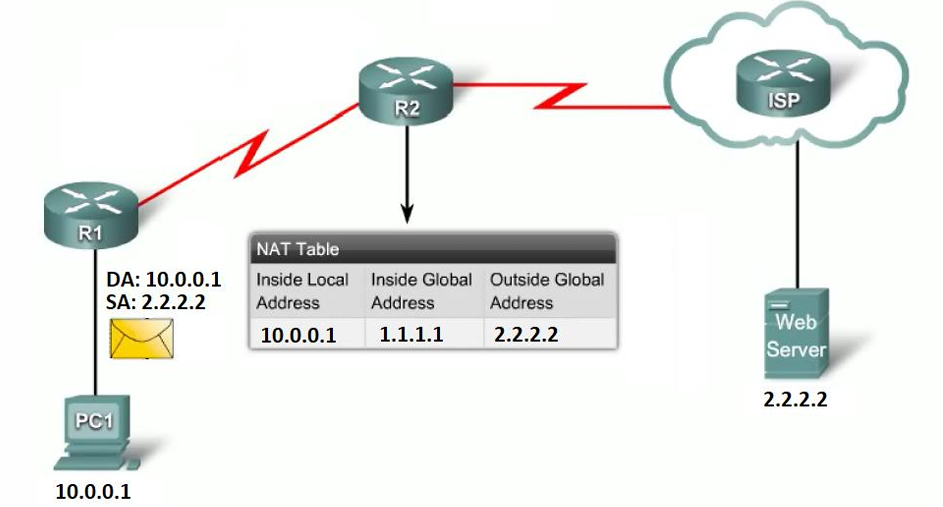
Section titled “The Core Logic of NAT”NAT is a process that translates network addresses, primarily to conserve the limited supply of public IPv4 addresses. It allows your internal network to use private addresses (like 10.0.0.0/8, 172.16.0.0/16, or 192.168.1.0/24) and only translates them to a public address when traffic needs to hit the Internet.
Types of NAT & Real-World Examples
Section titled “Types of NAT & Real-World Examples”Here is how the different translations work in reality:
-
Static NAT (One-to-One): Maps exactly one local address to one global address.
- Example: You have a private web server (
10.0.1.50). You buy a dedicated public IP (203.0.113.5) and map them 1:1. Only that server uses that public IP.
- Example: You have a private web server (
-
Dynamic NAT (Many-to-Many): Maps multiple local addresses to a pool of global addresses.
- Example: A company has 100 internal PCs but only bought 10 public IPs. The router dynamically assigns a public IP to a PC only when it browses the web. If 10 people are online, the 11th person has to wait for an IP to free up.
-
PAT / NAT Overloading (Many-to-One): Maps many local addresses to a single global address by changing the network port numbers.
- Example: Your home Wi-Fi. All your phones, TVs, and laptops have private IPs, but they all share the single public IP assigned by your ISP by using different source ports.
-
SNAT (Source NAT): Translates a private IP to a public routable IP by changing the source address of packets as they pass through the router.
-
DNAT (Destination NAT / Port Forwarding): Changes the destination address (and sometimes the port) of incoming packets. It redirects traffic meant for an external address to an internal IP.
- Example: You are hosting a Minecraft server on Client A (
10.0.1.20). You set up DNAT on the Server so when your friends connect to the Server’s public IP on port 25565, the Server automatically changes the destination and forwards it to Client A.
- Example: You are hosting a Minecraft server on Client A (
When we talked about firewalls, we were exclusively using the Filter Table (the security guards). To do NAT, we must explicitly switch to the NAT Table (the translators) using the -t nat flag.
Instead of INPUT and OUTPUT, the NAT table uses two completely different checkpoints:
PREROUTING: The packet just arrived. We translate it before the router decides where it goes. (Used for bringing traffic IN).POSTROUTING: The router has already decided where the packet goes. We translate it right before it leaves the door. (Used for sending traffic OUT).
Here is the anatomy of the 4 commands translated into pure logic.
1. Static SNAT (Source NAT)
Section titled “1. Static SNAT (Source NAT)”The Logic: Your internal network (10.0.0.0/16) wants to browse the internet. They can’t use their private IPs outside. Right before the packet leaves the server, the server erases their private return address and stamps its own static public IP (192.168.1.105) on the envelope.
-
sudo iptables -t nat -A POSTROUTING -s 10.0.0.0/16 -j SNAT --to-source 192.168.1.105- The Breakdown:
-t nat: Use the translator table.-A POSTROUTING: Do this right before the packet leaves.-s 10.0.0.0/16: If the source is my internal network…-j SNAT --to-source 192.168.1.105: …Jump to Source NAT and change the return address to192.168.1.105.
EXAMPLE: Client B connected to Server and want to access internet..
sudo iptables -t nat -A POSTROUTING -s <CLIENT_B_IP> -j SNAT --to-source <SERVER_OWN_IP>[server@epam ~]$ sudo iptables -t nat -A POSTROUTING -s 10.0.2.11 -j SNAT --to-source 192.168.1.60- Note: SERVER IP is the ip connected to router interface eg: enp0s3 and CLIENTIP is the ip connected to server interface i.e enp0s3 maybe..
Deleting Rules..
Section titled “Deleting Rules..”- Find the Line Number:
sudo iptables -t nat -L POSTROUTING --line-numbers-
sudo iptables -t nat -D POSTROUTING 1—> Delete by Line Number -
Delete by Exact Match:
Terminal window # To delete the specific SNAT rule:sudo iptables -t nat -D POSTROUTING -s 10.0.2.11 -j SNAT --to-source 192.168.1.60# To delete the specific MASQUERADE rule:sudo iptables -t nat -D POSTROUTING -s 10.0.2.11 -o enp0s3 -j MASQUERADE
-
- The Breakdown:
2. MASQUERADE (Dynamic SNAT)
Section titled “2. MASQUERADE (Dynamic SNAT)”The Logic: This does the exact same thing as above, but it is used when your server’s outside internet IP changes constantly (like a home router getting a dynamic IP from an ISP). Instead of hardcoding the IP, you tell the server, “Whatever IP is currently on my outside door, use that.”
-
The Command:
sudo iptables -t nat -A POSTROUTING -o enp0s3 -j MASQUERADE- The Breakdown:
-o enp0s3: If the packet is going out of theenp0s3internet door…-j MASQUERADE: …Dynamically rewrite the source address to match that door.
NOW BOTH CLIENT A, B Gets the Internet.. bcoz.. This rule tells the server: “Take any packet that is about to exit the
enp0s3door—whether it came from Client A, Client B, or anywhere else—and dynamically translate its source IP to match theenp0s3interface.” - The Breakdown:
The Logic of the Strict Rule
Section titled “The Logic of the Strict Rule”If your security policy dictates that only Client B (10.0.2.11) is allowed to access the internet, and Client A must remain isolated, you simply combine the two concepts.
You apply the -s (source) condition to restrict who gets translated, and you use the MASQUERADE target to handle the dynamic IP translation.
The Strict Command:
sudo iptables -t nat -A POSTROUTING -s 10.0.2.11 -o enp0s3 -j MASQUERADE
3. DNAT (Destination NAT / Port Forwarding)
Section titled “3. DNAT (Destination NAT / Port Forwarding)”The Logic: A customer on the internet wants to view a website on your private, hidden web server (10.0.1.100). They send a request to your Server’s public port 80. The moment it arrives, the Server scrubs the destination IP and rewrites it, forwarding it to the hidden machine on port 8080.
-
The Command:
sudo iptables -t nat -A PREROUTING -i s3 -p tcp --dport 80 -j DNAT --to 10.0.1.100:8080- The Breakdown:
-A PREROUTING: Do this immediately when it arrives, before routing.-i s3: If it comes in through thes3door…--dport 80: …and it’s asking for port 80…-j DNAT --to 10.0.1.100:8080: …Jump to Destination NAT and rewrite the target to10.0.1.100, port8080.
DNAT (Port Forwarding) is strictly used to pass traffic through the Server to a hidden backend machine.
If you apply a DNAT rule to port 80 on the Server while the Server is running its own website on port 80, the DNAT rule intercepts the packet in the
PREROUTINGphase—before the Server even realizes the packet was meant for its own local web server—and violently hijacks it to the backend client.The Real-World Lab Scenario
Let’s construct the classic Port Forwarding setup shown in the slide.
- The Goal: You want a computer on your physical home network (like your host PC) to access a secret web server running on Client A (
10.0.1.10). - The Problem: Your host PC cannot route to
10.0.1.10because it is a private, hidden subnet behind your Server. - The Solution: You tell your host PC to connect to the Server’s public-facing IP (
192.168.1.60) on a specific port, and the Server will secretly forward that connection to Client A.
Lab Task
Section titled “Lab Task”Assume Client B (
10.0.2.11) is running a web server on standard port 80. We will configure the Server so that if anyone hits its outside interface (enp0s3) on port 8940, it forwards the traffic to Client B on port 80.Step 1: The Translation Rule (NAT Table) This rule goes on the Server. It specifies that all incoming TCP connections to port 8940 on the external interface should be sent to port 80 of the internal machine
10.0.1.10.On Client B.. install apache2 and start it..
pranav@client-b:~$ sudo systemctl start apache2On Server
sudo iptables -t nat -A PREROUTING -i enp0s3 -p tcp --dport 8940 -j DNAT --to 10.0.2.11:80-i enp0s3: The packet is arriving on the Server’s external interface.--dport 8080: The packet is asking for port 8940.-j DNAT --to 10.0.2.11:80: Rewrite the destination IP to Client B and change the requested port to 80.
Step 2: The Security Guard Rule (Filter Table) Because the packet’s destination was rewritten to
10.0.1.10, the Server’s routing engine will now attempt to push it through the machine to the internal network. The middleman security guard (FORWARDchain) must explicitly allow this.Bash
sudo iptables -A FORWARD -p tcp -d 10.0.2.11 --dport 80 -j ACCEPTd 10.0.2.11: If the packet is destined for Client B…--dport 80: …and it is asking for standard web port 80…j ACCEPT: …let it pass the checkpoint.
The Final Execution
Section titled “The Final Execution”If you set this up, you can open a web browser on your physical Windows/Mac host machine and navigate to
http://192.168.1.60:8940.The Server will intercept it, change the envelope, and seamlessly hand it to Client A. Your host machine will think it is talking to the Server, but it is actually talking to Client B.
- The Breakdown:
4. The Firewall Rule for DNAT
Section titled “4. The Firewall Rule for DNAT”The Logic: Because DNAT (Rule 3) changed the destination to 10.0.1.100, the packet now has to travel through the router to get to the internal network. Remember from earlier: traffic passing through is checked by the Filter table’s FORWARD guard. If you don’t tell the guard to let it through, it gets dropped, even though the translation succeeded.
-
The Command:
sudo iptables -A FORWARD -p tcp -d 10.0.1.100 --dport 8080 -j ACCEPT- The Breakdown:
A FORWARD: Tell the middleman security guard…d 10.0.1.100 --dport 8080: …if you see a packet going to10.0.1.100on port8080…j ACCEPT: …allow it to pass.
- The Breakdown:
| NAT Type | Chain | Target | Translation Flag | Pure Logic & Execution |
|---|---|---|---|---|
| SNAT (Source NAT) | POSTROUTING | -j SNAT | --to-source <IP> | Logic: Changes the source address of packets passing through the router to a specific, static public address.+1 |
Requirement: You must manually define the exact IP it translates to. |
| MASQUERADE (Dynamic SNAT) | POSTROUTING | -j MASQUERADE | None (Automatic) | Logic: A dynamic form of SNAT. It automatically reads the IP of the outbound interface and applies it.
Requirement: You only specify the exit interface (e.g., -o enp0s3). |
| DNAT (Destination NAT) | PREROUTING | -j DNAT | --to <IP>:<Port> | Logic: Changes the destination address (and optionally port) of incoming packets .
Requirement: Used to redirect external traffic to an internal, hidden machine. |