

Swap Memory
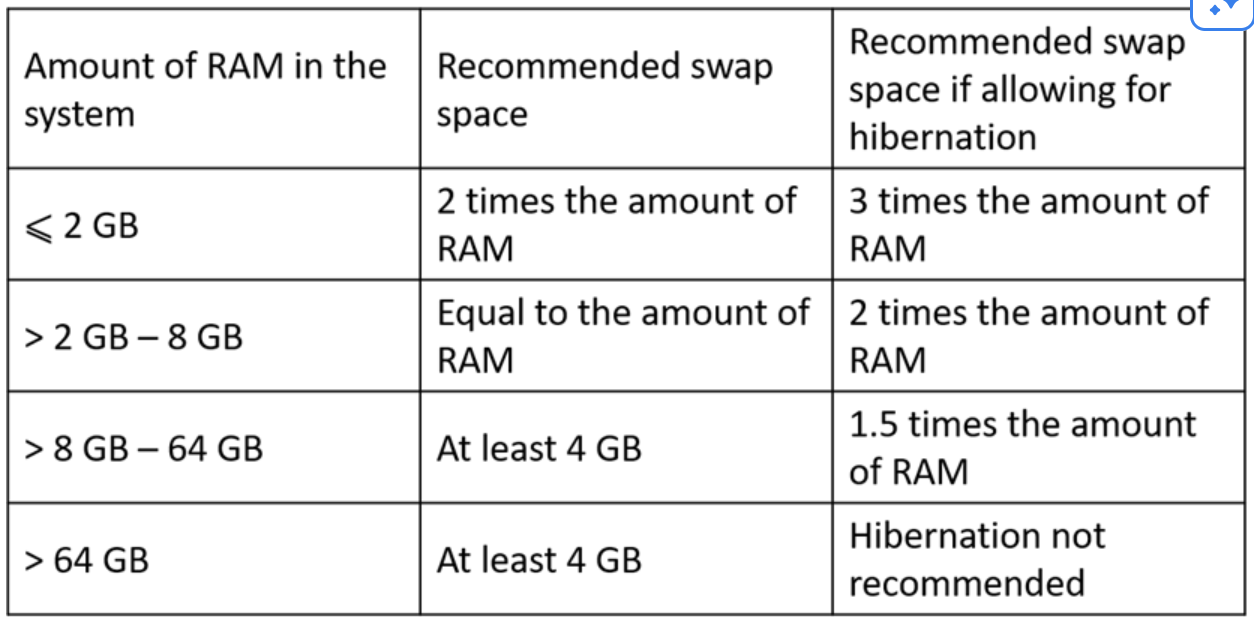
Swap space is an overflow buffer on your physical storage (HDD/SSD) that acts as virtual memory.
The Logic: Physical RAM is extremely fast but limited in capacity. When RAM fills up, the Linux kernel’s Memory Management Unit (MMU) identifies “inactive pages” (memory blocks not recently used) and moves them to the Swap space on the disk. This frees up high-speed RAM for active processes. Because disk I/O is vastly slower than RAM I/O, heavy reliance on swap degrades system performance (a state known as “thrashing”). Swap prevents out-of-memory (OOM) kernel crashes but is not a replacement for physical RAM.
Swappiness (The Control Valve)
Section titled “Swappiness (The Control Valve)”- Swappiness is a kernel parameter (
0to100) defining how aggressively the system moves memory pages to Swap versus dropping the filesystem cache.- Default:
60. A balanced approach. - Low Value (e.g.,
10): The kernel aggressively keeps application data in RAM and prefers dropping file cache. Ideal for interactive desktop systems where low latency is critical. - High Value (e.g.,
90): The kernel aggressively swaps out inactive memory to keep the file cache large. Ideal for batch-processing servers where high disk I/O throughput is more critical than instant memory access.
- Default:
- Commands
- To Check -
cat /proc/sys/vm/swappinessORsudo sysctl vm.swappiness - To Change -
sysctl vm.swappiness=20→ NOT RECOMMEND TO CHNAGE THE DEFAULT VALUE- Permanent: Add to
/etc/sysctl.conf→vm.swappiness=20
- Permanent: Add to
- To Check -
Two Ways of Creating SWAP Space
Section titled “Two Ways of Creating SWAP Space”1. Adding Swap via LVM - Partition or Volume [Recommended]
Section titled “1. Adding Swap via LVM - Partition or Volume [Recommended]”Use this when extending a dedicated swap partition backed by LVM.
-
Create LV:
sudo lvcreate VolGroup00 -n LogVol02 -L 2G -
Format as Swap:
sudo mkswap /dev/VolGroup00/LogVol02 -
Persist (fstab): Add
/dev/VolGroup00/LogVol02 swap swap defaults 0 0to/etc/fstab -
Reload Systemd:
sudo systemctl daemon-reload -
Activate:
sudo swapon -v /dev/VolGroup00/LogVol02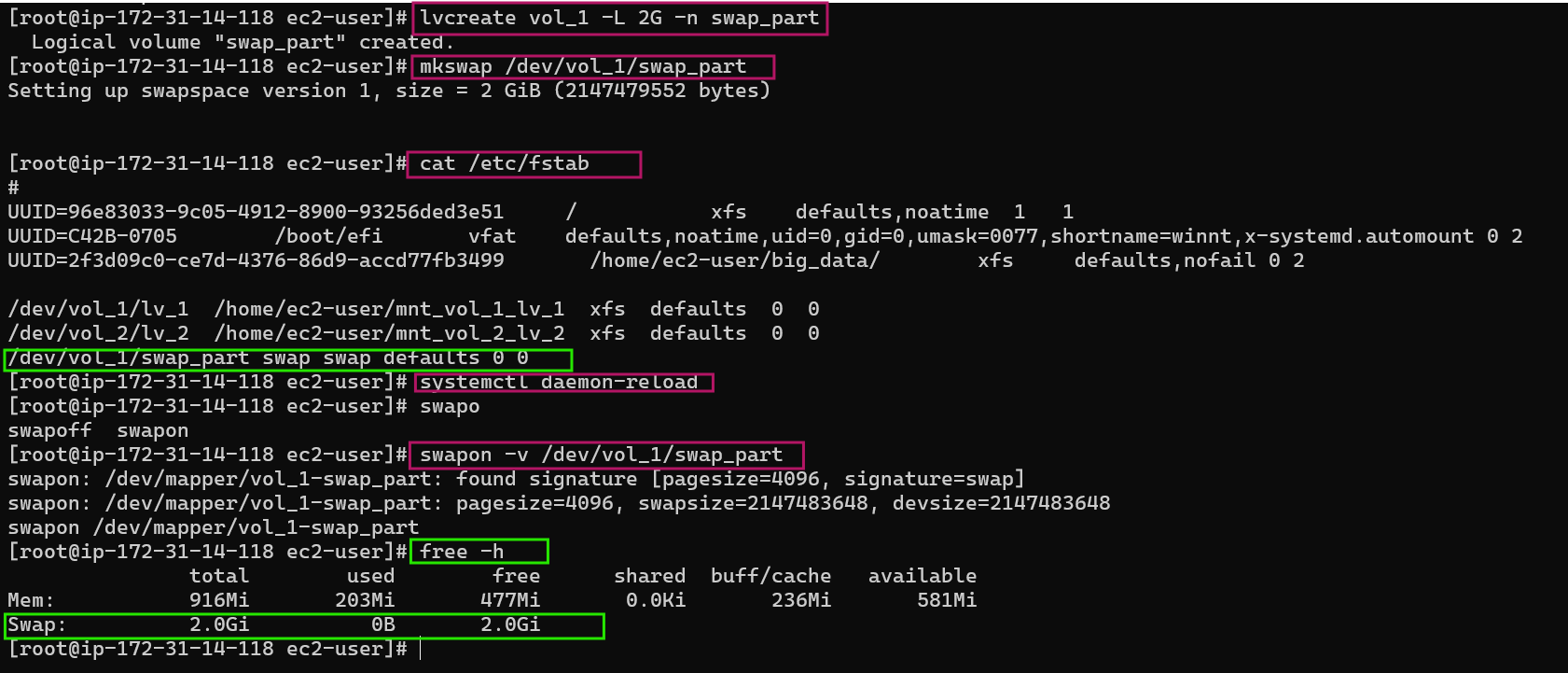
2. Creating a Swap File
Section titled “2. Creating a Swap File”Use this for quick, flexible swap addition without altering partitions.
-
Allocate Space (e.g., 64MB):
sudo dd if=/dev/zero of=/swapfile bs=1024 count=65536(Math: block size1024bytes *65536blocks = 64MB) ORbs=1M count=64 -
Format as Swap:
sudo mkswap /swapfile -
Secure File:
sudo chmod 0600 /swapfile(Critical: Prevents non-root users from reading RAM data dumped to disk). -
Persist (fstab): Add
/swapfile swap swap defaults 0 0to/etc/fstab -
Reload Systemd:
sudo systemctl daemon-reload -
Activate:
sudo swapon /swapfile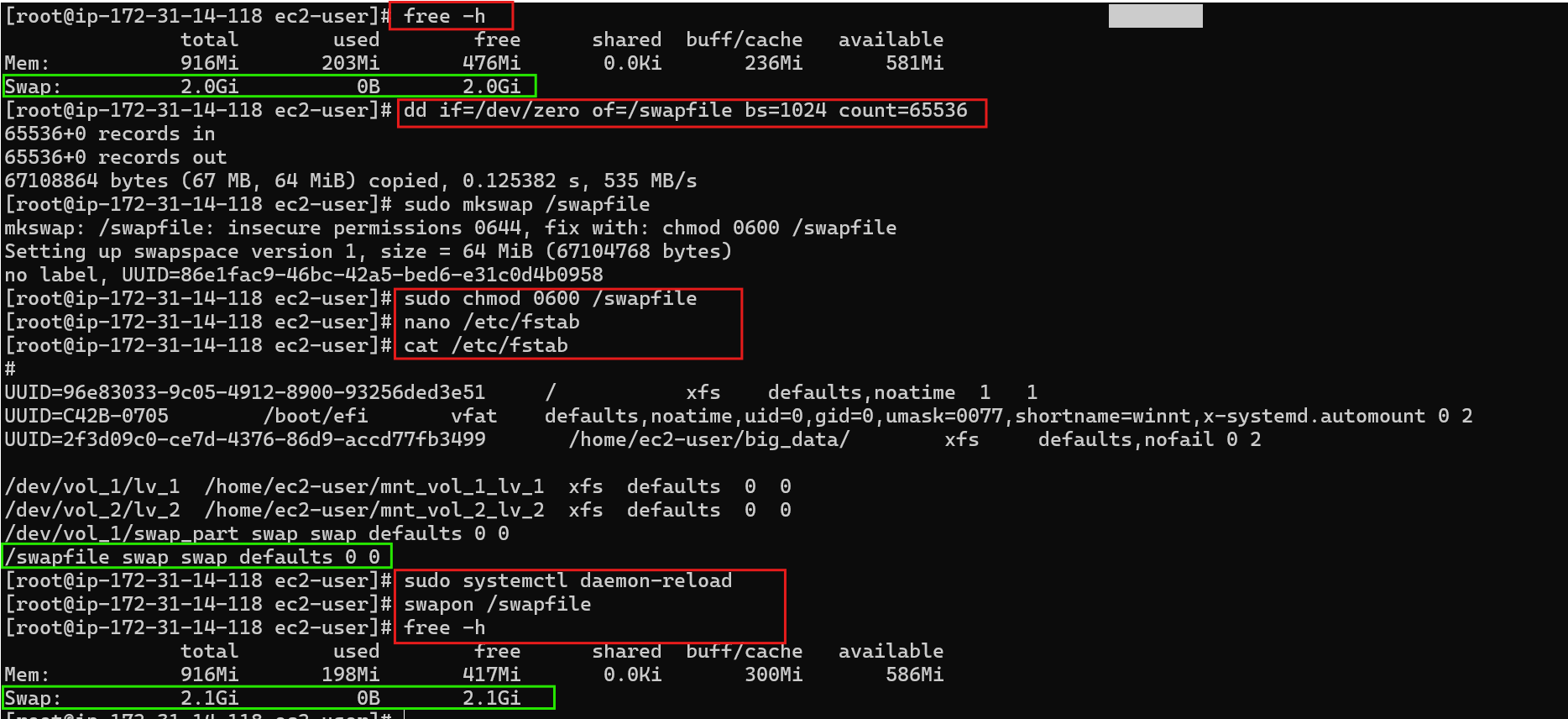
3. Removing a Swap File
Section titled “3. Removing a Swap File”-
Deactivate:
sudo swapoff -v /swapfile -
Remove Persistence: Delete the
/swapfileline from/etc/fstab -
Reload Systemd:
sudo systemctl daemon-reload -
Delete File:
sudo rm /swapfile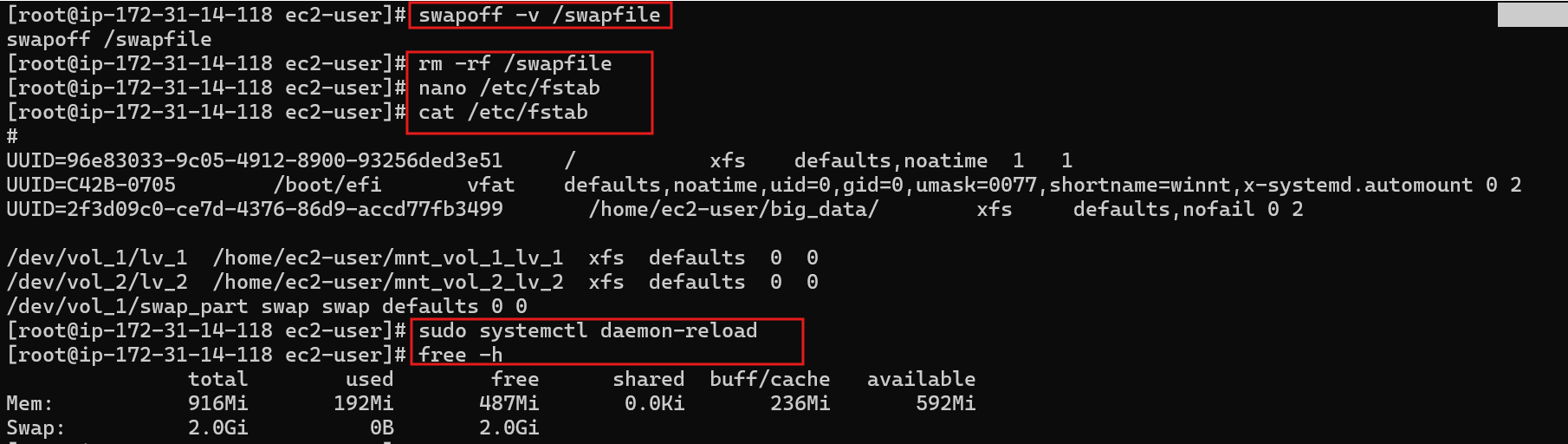
Resize SWAP File
Section titled “Resize SWAP File”-
There is NO Direct Way to Increase or Decrease the Swap size.. but we can remove old one and create a new file with Desired Configuration..
-
Eg: To increase from 2GB → 4GB:
Terminal window swapoff /swapfilerm /swapfilefallocate-l 4G /swapfilechmod600 /swapfilemkswap /swapfileswapon /swapfile
-
| Feature | Swap Partition | Swap File |
|---|---|---|
| Architecture | A dedicated block device/partition on the disk. | A dedicated file residing within an existing filesystem. |
| Performance | Historically faster (especially on HDDs due to contiguous placement reducing seek time). | Virtually identical in modern kernels (2.6+) as the kernel maps disk blocks directly, bypassing filesystem cache. |
| Flexibility | Rigid. Requires volume management (like LVM) or downtime to resize. | Highly flexible. Can be created, resized, or destroyed instantly on any mounted filesystem. |
| Recommendation | Red Hat recommends partitions for raw performance reliability. | Preferred for administrative ease and rapid scaling. |