- Time based schedular
- crond: The daemon (background process) that runs constantly. It checks every minute to see if any scheduled tasks need to be executed.
- crontab: The “table” or text file that lists your specific scheduled jobs.
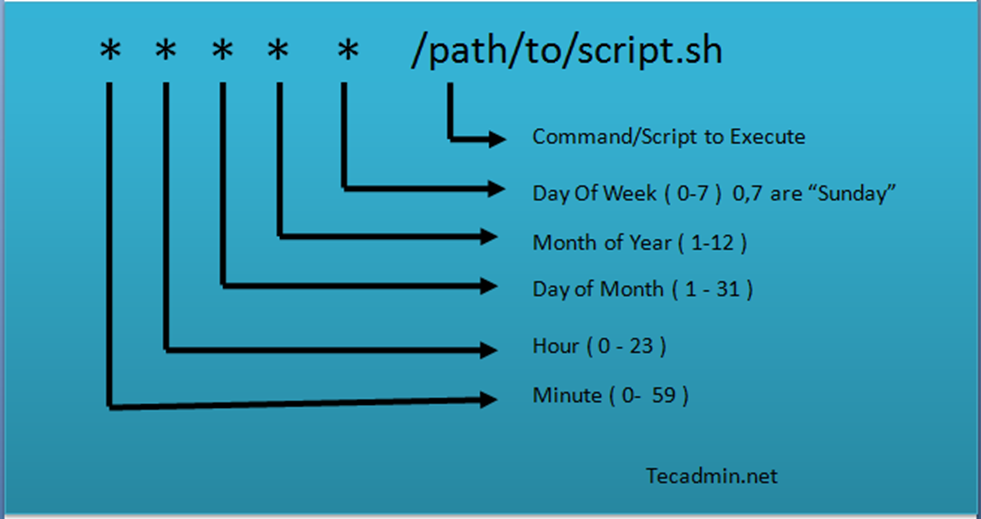
A crontab line has five time fields followed by the command to execute.
| Field | Range | Meaning |
|---|
| 1 | 0-59 | Minute |
| 2 | 0-23 | Hour (24-hour clock) |
| 3 | 1-31 | Day of the Month |
| 4 | 1-12 | Month (or names like Jan, Feb) |
| 5 | 0-7 | Day of the Week (0 or 7 is Sunday) |
| Operator | Logic | Example | Meaning |
|---|
* | Always | * * * * * | Every minute, every day. |
, | Discrete values | 0 12,18 * * * | At 12:00 and 18:00. |
- | Range | 0 9-17 * * * | Every hour from 9 AM to 5 PM. |
/ | Intervals (Steps) | */15 * * * * | Every 15 minutes. |
- User Crontabs: * Managed via
crontab -e.
- Stored in
/var/spool/cron/ (Red Hat) or /var/spool/cron/crontabs/ (Debian/Ubuntu).
- Runs with the permissions of the user who created it.
- System-Wide Crontabs:
- Stored in
/etc/crontab and /etc/cron.d/.
- These files include an extra field for the username that should run the command.
- Shortcut Directories:
- Drop scripts into these for automatic execution:
/etc/cron.hourly/, /etc/cron.daily/, /etc/cron.weekly/, /etc/cron.monthly/.
crontab -e: Edit your current crontab (uses the $EDITOR variable).crontab -l: List (view) your current cron jobs.crontab -r: Remove your crontab.crontab -u username -e: (Root only) Edit another user’s schedule.
| Goal | Cron Expression |
|---|
| Every Minute | * * * * * |
| Every 10 Minutes | */10 * * * * |
| Daily at 2:00 AM | 0 2 * * * |
| Twice a day (5 AM & 5 PM) | 0 5,17 * * * |
| Every Sunday at 5:00 PM | 0 17 * * sun |
| Every 4 Hours | 0 */4 * * * |
| Every 30 Seconds | * * * * * (command; sleep 30; command) |
- Absolute Paths: Always use full paths (e.g.,
/usr/bin/python3 instead of just python3) because cron has a very limited PATH environment.
- Logging Output: By default, cron sends output to local mail. To log to a file instead, use:
* * * * /path/to/script.sh >> /var/log/myscript.log 2>&1
- Anacron: If your computer is often turned off (like a laptop), use Anacron. It ensures “daily” jobs run immediately after the next boot if they were missed.
- Validation: Use crontab.guru to double-check your timing logic.

