

Merge vs Squash Merge
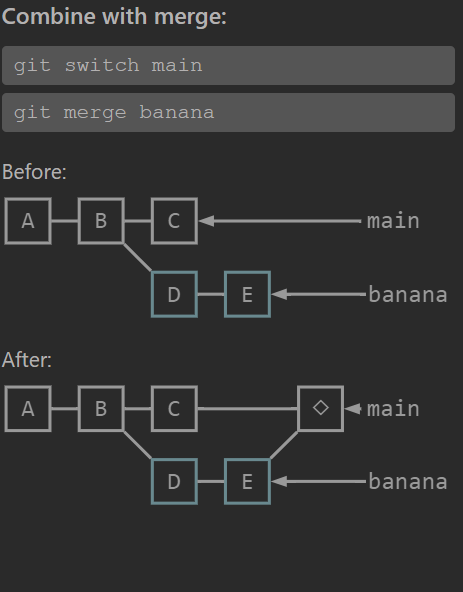
1️⃣ Normal Merge (git merge feat)
Section titled “1️⃣ Normal Merge (git merge feat)”Git preserves the full commit history of the feature branch and creates a merge commit.
Command
Section titled “Command”git checkout maingit merge featGraph Before Merge
Section titled “Graph Before Merge”C1 -> C2 -> C3 (main) \ F1 -> F2 -> F3 -> F4 -> F5 (feat)Graph After Merge
Section titled “Graph After Merge”C1 -> C2 -> C3 -------- M1 (main) \ / F1 -> F2 -> F3 -> F4 -> F5 (feat)M1 = merge commit with two parents
parent1 = C3parent2 = F5What Happens
Section titled “What Happens”All commits appear in history:
C1C2C3F1F2F3F4F5M1Benefit
Section titled “Benefit”- Preserves true development history
- Shows branching structure
- Useful for debugging large systems (like repos at Amazon)
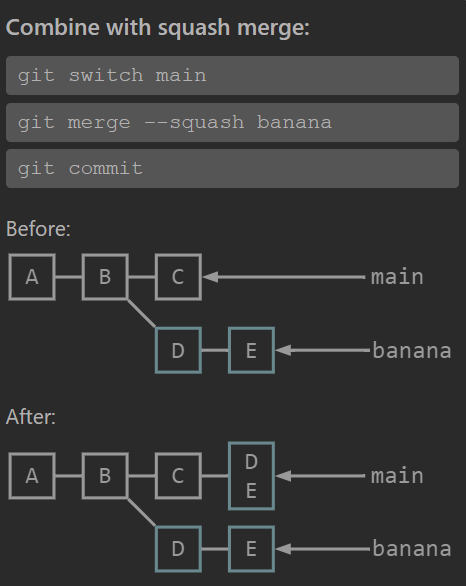
2️⃣ Squash Merge (git merge --squash feat)
Section titled “2️⃣ Squash Merge (git merge --squash feat)”Git combines all feature commits into one commit before adding them to main.
Command
Section titled “Command”git checkout maingit merge --squash featgit commit -m "Add feature implementation"Graph Before
Section titled “Graph Before”C1 -> C2 -> C3 (main) \ F1 -> F2 -> F3 -> F4 -> F5 (feat)Graph After
Section titled “Graph After”C1 -> C2 -> C3 -> S1 (main) \ F1 -> F2 -> F3 -> F4 -> F5 (feat)S1 = single commit representing F1–F5
What Happens
Section titled “What Happens”main history becomes:
C1C2C3S1All intermediate feature commits disappear from main.
3️⃣ Key Differences
Section titled “3️⃣ Key Differences”| Feature | Normal Merge | Squash Merge |
|---|---|---|
| History preserved | ✅ Yes | ❌ No |
| Merge commit created | ✅ Yes | ❌ No |
Feature commits visible in main | ✅ Yes | ❌ No |
| Branch structure visible | ✅ Yes | ❌ No |
| Main branch history clean | ❌ Sometimes messy | ✅ Very clean |
4️⃣ Real Team Usage
Section titled “4️⃣ Real Team Usage”Normal Merge
Section titled “Normal Merge”Used when:
- Feature branch history is meaningful
- Multiple devs collaborated
- Debugging may require seeing intermediate commits
Example in big repos like Amazon internal services.
Squash Merge
Section titled “Squash Merge”Used when:
- Feature branch has many small commits
- Teams enforce 1 PR = 1 commit
- Keep
mainvery clean
Typical commit message:
Add checkout discount logicinstead of:
fix bugtry againdebugfinal fixadd tests5️⃣ One Critical Difference (Most Devs Miss)
Section titled “5️⃣ One Critical Difference (Most Devs Miss)”With normal merge, Git remembers the branch was merged.
With squash merge, Git does not know the branch was merged.
So if you later run:
git merge featGit may try merging again because there is no merge relationship recorded.
✅ Simple way to remember
Normal merge → keep historySquash merge → compress history