

Basic Commands
Commands
Section titled “Commands”-
ls,pwd,cd -
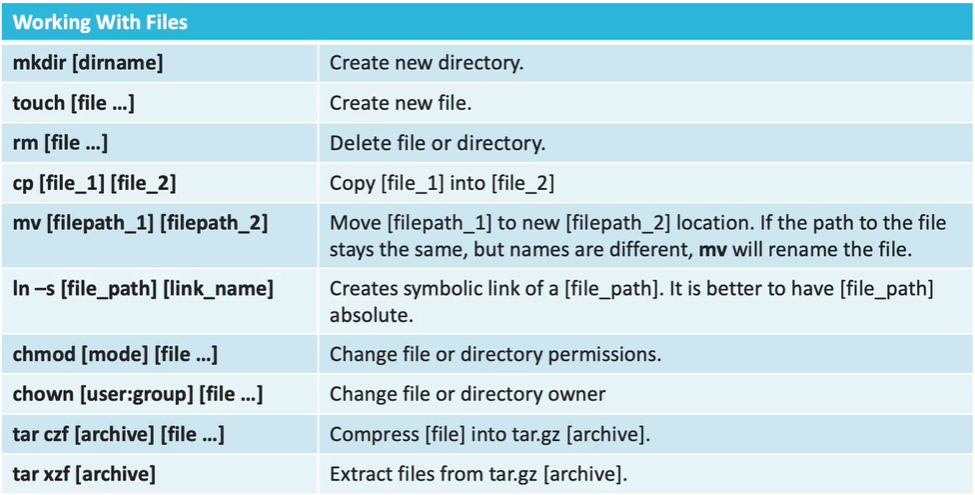
mkdir,rmdir,rm -r→ remove non-empty dirs -
touch,cat > file.ext→ overrides,cat >> file.ext→ appends,cat file.ext→ prints -
find <dir/path> -name “expression”→ expression is CASE SENSITIVE
-
use
inamefor IGNORE CASE SENSITIVE..
-
-
find <dir/path> -type <f/d> -name “exp”→ f for files, d for dirs -
more find commands - https://www.tecmint.com/35-practical-examples-of-linux-find-command/
- find all .txt files and remove them..
find . -type f -name "*.txt" -exec rm -f {} \;
- Find Directories with 777 Permissions and chmod to 755
find / -type d -perm 777 -print -exec chmod 755 {} \;
find / -type f ! -perm 777- files without having 777 permissions- Find Last 50 Days Modified Files -
find / -mtime 50 - Find Last 50 Days Accessed Files -
find / -atime 50 - 50 to 100 -
find / -mtime +50 –mtime -100 find / -mmin -60- modified in last- accessed -
find / -amin -60
- accessed -
- find all .txt files and remove them..
-
man→ manual -
mv [source_directory] [destination_directory]- also works for files.. -
cp -r [source_directory] [destination_directory]- just remove -r to work with files
Commands List
Section titled “Commands List”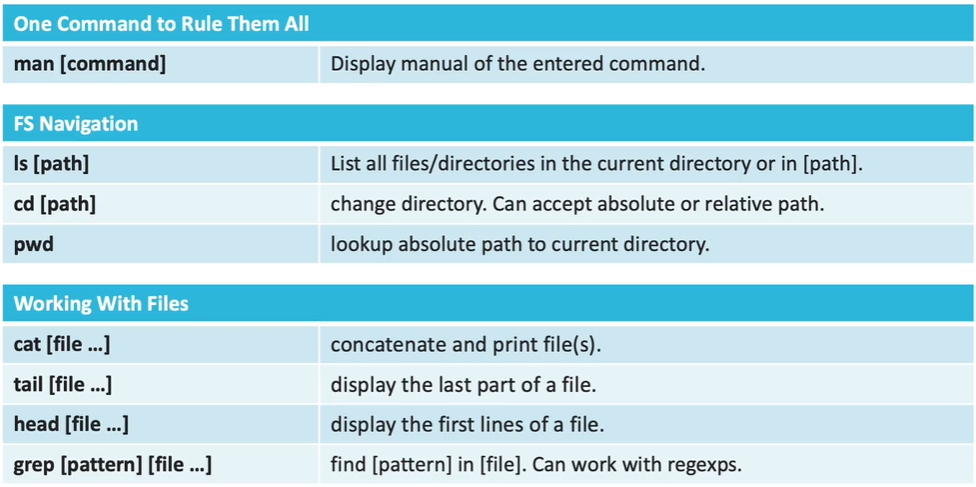
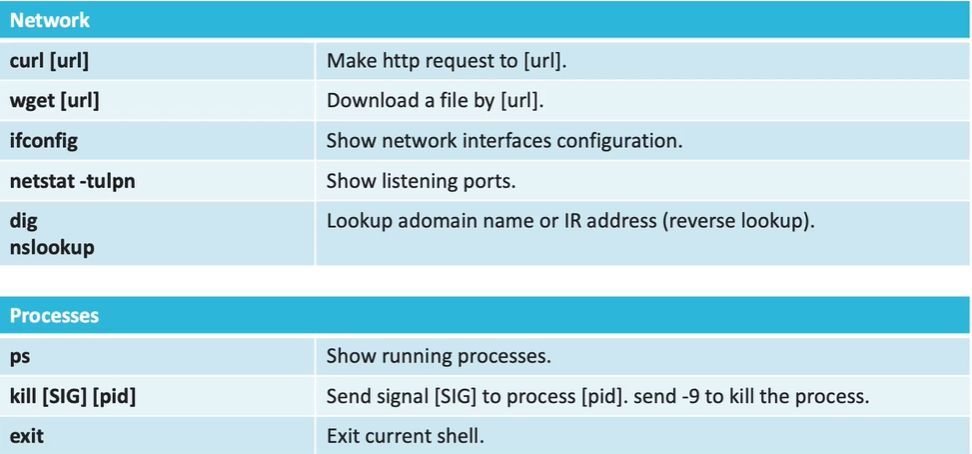
[server@epam .ssh]$ sudo netstat -tunlp | grep “:80” tcp6 0 0 :::80 :::* LISTEN 6216/httpd
[server@epam .ssh]$ sudo netstat -tunlp | grep “:22” tcp 0 0 0.0.0.0:22 0.0.0.0:* LISTEN 5833/sshd: /usr/sbi tcp6 0 0 :::22 :::* LISTEN 5833/sshd: /usr/sbi
| Command | Logic / One-Line Working |
|---|---|
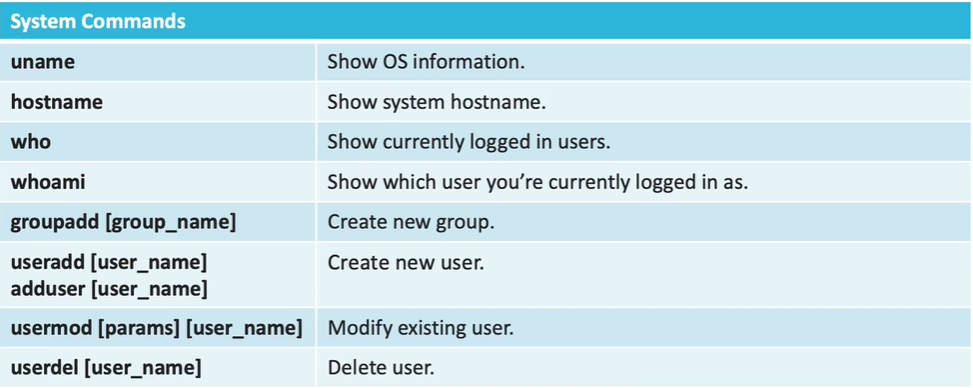
netstat -tunlp | Shows TCP, UDP, Numeric IPs, Listening ports, and PIDs. |
ss -atp | Lists all active TCP connections and the programs using them. |
ss -ntlp | grep :80` |
netstat -rn | Displays the Kernel Routing Table (shows your gateway). |
ss -s | Displays a summary of socket statistics (how many established, closed, etc.). |
netstat -i | Displays a table of all Network Interfaces and error/packet counts. |
| Command | One-Line Working |
|---|---|
tcpdump -i eth0 | Captures all traffic flowing through the eth0 interface. |
tcpdump -c 5 -i any | Captures exactly 5 packets from all interfaces and then exits. |
tcpdump -n -i any | Disables DNS resolution to show raw IP addresses instead of hostnames. |
tcpdump port 22 | Filters and shows only traffic related to SSH. |
tcpdump src 10.0.0.10w | Captures only packets coming from the specific IP 10.0.0.10. |
tcpdump -w capture.pcap | Saves the captured traffic to a file to be opened later in Wireshark. |
tcpdump -A -i any | Prints the packet content in ASCII (useful for reading HTTP/unencrypted data). |
tcpdump icmp | Filters and shows only Ping (ICMP) traffic. |
| Category | Command | Purpose |
|---|---|---|
| Monitoring/Info | lsblk | List block devices and their tree structure. |
pvs / vgs / lvs | Quick summary of PVs, VGs, or LVs. | |
pvdisplay / vgdisplay / lvdisplay | Detailed metadata for PVs, VGs, or LVs. | |
watch -n 2 df -h | Continuously monitor disk space every 2 seconds. | |
blkid <path> | Get the UUID of a block device (needed for fstab). | |
| Physical Volumes | pvcreate <disk> | Initialize disk for LVM use. |
pvremove <disk> | Wipe LVM metadata from a disk. | |
| Volume Groups | vgcreate <name> <pv> | Create a new pool from physical volume(s). |
vgextend <name> <pv> | Add a new physical disk to an existing pool. | |
vgremove <name> | Delete a volume group. | |
| Logical Volumes | lvcreate -L 5G -n <name> <vg> | Create a new logical volume. |
lvextend -L +5G <lv_path> | Increase LV size by 5GB. | |
lvextend -l +100%FREE <lv> -r | Use all free VG space AND automatically resize filesystem. | |
lvreduce -L 5G <lv_path> | Shrink LV size to 5GB (Shrink FS first!). | |
lvchange -an <lv> / -ay <lv> | Deactivate (-an) or Activate (-ay) an LV. | |
lvremove <lv_path> | Delete a logical volume. | |
| Filesystems | mkfs.ext4 <lv_path> | Format the LV with the ext4 filesystem. |
mount <lv_path> <mount_dir> | Mount the filesystem to a directory. | |
umount <mount_dir> | Unmount the filesystem. | |
mount -a | Test /etc/fstab configuration to ensure safe reboots. | |
resize2fs <lv_path> | Expand/shrink ext4 filesystem to match LV size. | |
e2fsck -f <lv_path> | Force check filesystem for errors (required before shrinking). | |
| Snapshots | lvcreate -s -L 1G -n <name> <lv> | Create a 1GB point-in-time snapshot. |
lvconvert --merge <snap_path> | Rollback the original LV to the snapshot’s state. | |
| Testing/Utils | cat /dev/zero > <file> | Fill a file with zeros to test 100% disk usage. |
truncate -s 0 <file> | Empty a file instantly to free space. | |
apt clean | Clear local package cache to free emergency space. | |