

Boot Loaders & Run Levels
A bootloader is the ignition switch for your operating system.
When you press the power button, the computer’s processor (CPU) is essentially blind and its active memory (RAM) is completely empty. The CPU cannot reach into your 1TB hard drive and just “start Linux” because hard drives are physically too slow for direct code execution, and the CPU doesn’t understand filesystems yet.
-
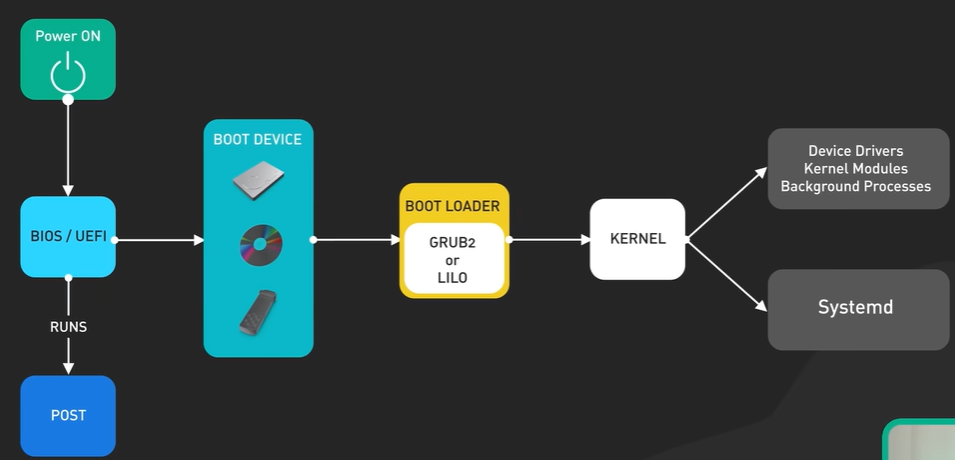
Power On and CPU: When the computer is powered on, the CPU is hard-wired to look for instructions at a specific address in the motherboard’s ROM or flash memory.
-
BIOS/UEFI Firmware: The CPU executes the BIOS (Basic Input/Output System) or UEFI (Unified Extensible Firmware Interface). This firmware performs a POST (Power-On Self-Test) to check and initialize hardware components.
BIOS
UEFI
-
Boot Device Search: The firmware searches for a bootable device (HDD, SSD, USB, etc.) configured in the boot order.
-
MBR/ESP Execution:
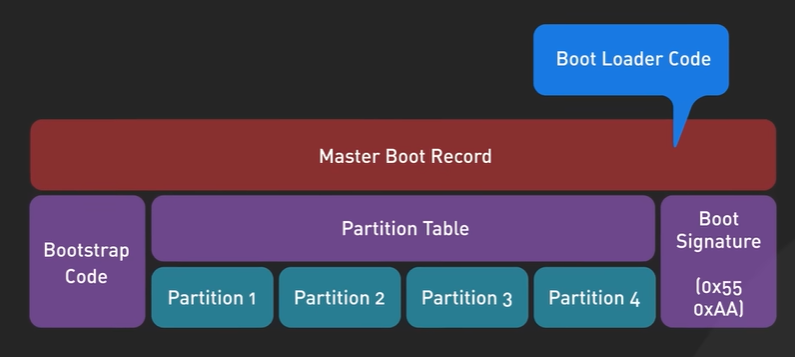
- In BIOS systems, the firmware loads the MBR (Master Boot Record) from the first sector of the boot device. The MBR contains a small amount of machine code to load the next step.
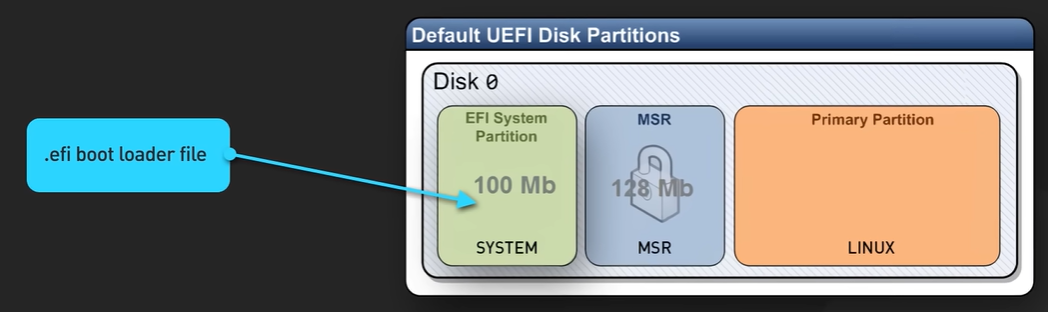
- In UEFI systems, the firmware looks for an ESP (EFI System Partition) to find the boot loader executable file.
-
GRUB (Boot Loader): The boot loader, typically GRUB2, is loaded into memory. It reads its configuration file, presents a menu (if applicable), and loads the Linux Kernel and the initramfs (Initial RAM Filesystem) image into memory.
Main Functions of Boot Loader is..
- locate OS Kernel into Disk
- Load Kernel into RAM
-
Linux Kernel: The kernel decompresses itself and takes control. It uses the initramfs to load necessary drivers to mount the actual root filesystem.
Main Job of Kernel is
- Load Kernel Modules, Device Drivers, Bg Processes
- start SYSTEMd
-
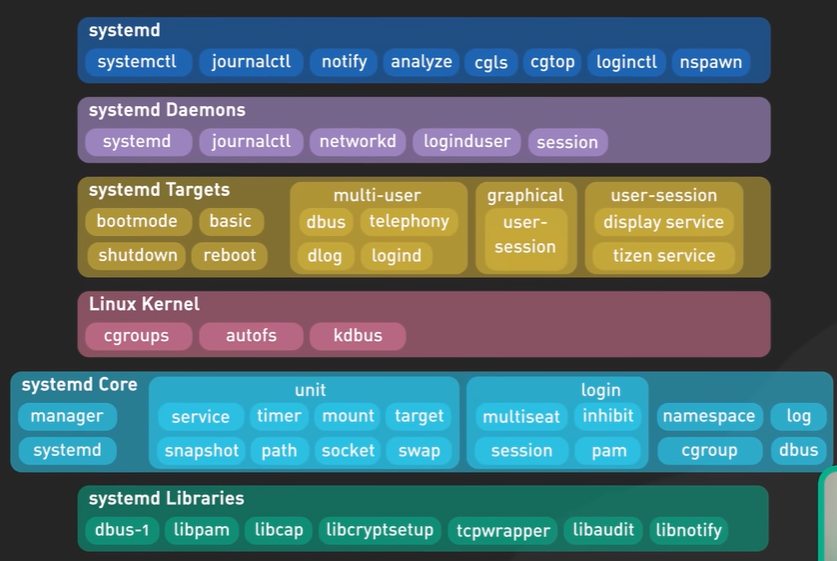
systemd: The kernel launches the first process, systemd (PID 1), which is responsible for bringing up the system services, mounting filesystems, and ultimately displaying the login screen.
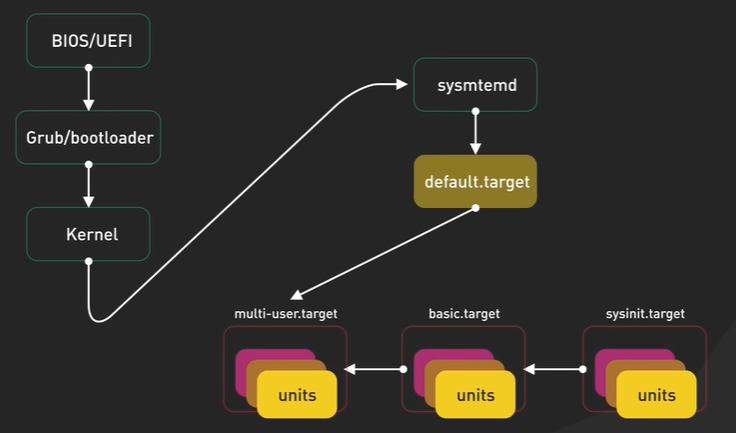
The bootloader is a highly specialized, tiny middleman program.
- Its only job: Find the massive Operating System Kernel on the hard drive, pull it into the high-speed RAM, and hand over control of the hardware to it.
Basics
Section titled “Basics”To understand the bootloader, you must understand the hardware physics:
- ROM (Read-Only Memory): A tiny chip on the motherboard. It holds data without power. It contains the BIOS/UEFI. The CPU is hardwired to read this chip the millisecond power is applied.
- RAM (Random Access Memory): The CPU’s fast workspace. It loses all data without power. It is completely blank at startup.
- Disk (Non-Volatile Memory - HDD, SDD): Where your OS and data live permanently.
The Problem: The ROM is too small to hold an Operating System. The Disk holds the OS, but the CPU can’t execute from it directly.
The Solution: The ROM executes a tiny program (the bootloader) from the very first sector of the Disk, puts it into RAM, and the bootloader pulls the rest of the OS into RAM.
Chain Loading: The Bootstrap Logic
Section titled “Chain Loading: The Bootstrap Logic”The Problem: The initial boot sector on a traditional hard drive (the Master Boot Record, or MBR) is exactly 512 bytes. It is mathematically impossible to fit the logic required to read complex filesystems (like ext4), decrypt passwords, and load a massive OS kernel into 512 bytes.
The Solution: Chain Loading Bootloaders split themselves into stages of increasing complexity:
- Stage 1 (in MBR): Extremely primitive code. It has no idea what a “file” is. It only contains hardcoded physical disk coordinates pointing to Stage 1.5.
- Stage 1.5 (in empty disk space): Contains just enough logic to understand filesystems.
- Stage 2 (in
/boot): The full bootloader application, loaded into RAM. It reads configuration files, displays the GUI menu, and executes the Kernel.
Bootloader Evolution: LILO vs. GRUB
Section titled “Bootloader Evolution: LILO vs. GRUB”LILO (Linux Loader)
Section titled “LILO (Linux Loader)”- The Logic: LILO is a legacy, block-based bootloader. It does not understand filesystems. It points directly to the physical disk sectors where the Kernel is stored.
- The Flaw: If you update the Linux Kernel, the new file is written to different physical sectors on the disk. You must run a command to rewrite LILO’s map. If you forget, the system will look at the old disk sectors, find nothing, and fatally crash on the next reboot.
GRUB (Grand Unified Bootloader)
Section titled “GRUB (Grand Unified Bootloader)”- The Logic: GRUB is a modern, filesystem-aware bootloader. It understands ext4, xfs, etc.
- The Advantage: Because it understands filesystems, you just drop a new Kernel into the
/bootdirectory and update a text file. GRUB reads the filesystem dynamically at boot to find the file. - Advanced Features:
- Interactive CLI: If the system breaks, GRUB drops you into a shell to manually locate and boot a Kernel.
- Network Boot (PXE): Can pull an OS image over the network instead of a local disk.
- Security: Supports MD5 hashed passwords to prevent unauthorized users from modifying boot parameters (like breaking into single-user root mode).
Configuration Routing:
/boot/grub/grub.conf: The actual physical configuration file read by GRUB./etc/grub.conf: A symbolic link to the above file, placed in/etcpurely for administrative convenience, as/etcis the standard location for system configurations.
Runlevels & Systemd Targets
Section titled “Runlevels & Systemd Targets”A Linux system does not simply “turn on.” It transitions into a specific operational state designed for a specific purpose (e.g., a headless server, a desktop GUI, or a locked-down maintenance mode). This state is defined by Runlevels (legacy) or Targets (modern).
The Legacy Architecture: SysVinit (Runlevels)
Section titled “The Legacy Architecture: SysVinit (Runlevels)”Historically, the init daemon used numeric runlevels (0-6) to dictate which background services (daemons) should be active.
The Execution Logic (/etc/rc[0-6].d/):
When entering a runlevel, the system looks inside the corresponding /etc/rcX.d/ directory. These directories contain symbolic links to the actual service scripts in /etc/init.d/.
The naming convention of these links dictates the execution order:
K20nfs: TheKstands for Kill (stop the service). The20is the execution priority. The system kills lower numbers first.S10network: TheSstands for Start. The10is the priority. The system starts lower numbers first.
Deep Reasoning: By prefixing links with K or S and a number, the OS guarantees that dependencies are respected (e.g., starting the network S10 before starting a network file system S20).
The Default State:
In SysVinit, the default boot state was hardcoded in the /etc/inittab file using a line like: id:3:initdefault: (telling the kernel to always boot to runlevel 3).
The Modern Architecture: Systemd (Targets)
Section titled “The Modern Architecture: Systemd (Targets)”Modern Linux distributions replaced SysVinit with systemd. Systemd discards rigid sequential runlevels in favor of Targets. A target is a logical grouping of services that must be running to achieve a specific system state.
To maintain backward compatibility, systemd maps the old legacy runlevel numbers to its modern targets using symbolic links.
The Target Mapping:
- Runlevel 0 ➔
poweroff.target: Sends the ACPI signal to cut hardware power. - Runlevel 1 ➔
rescue.target: Single-user mode. Mounts local filesystems but disables network and normal services. Used for resetting root passwords or repairing broken/etc/fstabfiles. - (Pre-Rescue) ➔
emergency.target: Even lower level than rescue. Mounts the root filesystem as read-only. Used for catastrophic filesystem corruption. - Runlevel 3 ➔
multi-user.target: Standard state for headless servers. Full network capabilities, multiple user logins, but no GUI. - Runlevel 5 ➔
graphical.target: Standard state for desktops. Loads everything inmulti-user.target, plus the Display Manager (X11/Wayland) for the UI. - Runlevel 6 ➔
reboot.target: Safely kills all processes and triggers a warm hardware reset.
Command Dictionary
Section titled “Command Dictionary”Managing the default state determines what happens the next time the server is powered on.
| Action | Systemd Command | Purpose |
|---|---|---|
| View Current Default | systemctl get-default | Outputs the target the system will boot into (e.g., multi-user.target). |
| Change Default Target | systemctl set-default <target_name> | Modifies the default boot state (e.g., systemctl set-default multi-user.target). |
| Switch State Now | systemctl isolate <target_name> | Immediately transitions the live system to a new target without rebooting (e.g., dropping a GUI server down to CLI-only). |