

Docker Compose
https://docs.docker.com/compose/
https://docs.docker.com/engine/reference/commandline/compose/
https://github.com/dockersamples/example-voting-app
Docker Compose: Architecture and YAML Specifications
Section titled “Docker Compose: Architecture and YAML Specifications”Docker Compose is an orchestration tool used to define and run multi-container Docker applications. It replaces imperative, error-prone shell scripts (multiple docker run commands) with a single, declarative YAML configuration file.
Core Definitions
Section titled “Core Definitions”- YAML (YAML Ain’t Markup Language): A human-readable data serialization standard heavily used for configuration files. It relies on strict indentation (spaces, not tabs) to define data hierarchy.
- Declarative Infrastructure: Stating what the final state should be (via YAML) rather than writing the step-by-step commands of how to get there.
- Service: A discrete computing component (e.g., a web UI, a database, a message queue) running as a container within the larger application stack.
- Docker Swarm (Context for V3): Docker’s native clustering and orchestration engine, allowing Compose files to be deployed across multiple physical or virtual machines, not just a single host.
The Evolution of Docker Compose Versions
Section titled “The Evolution of Docker Compose Versions”The YAML schema for Docker Compose has evolved significantly to support complex networking and distributed systems.
Version 1 (Legacy / Deprecated)
Section titled “Version 1 (Legacy / Deprecated)”- Structure: Flat hierarchy. Containers are defined directly at the root of the file.
- Networking: Attaches all containers to the default
bridgenetwork. - DNS & Linking: Containers cannot resolve each other by name. Requires the explicit
links:directive to inject/etc/hostsentries for inter-container communication. - Limitations: No ability to define custom networks, volumes, or execution order.
Version 2 (Single-Host Standard)
Section titled “Version 2 (Single-Host Standard)”- Structure: Introduces the
version: '2'declaration at the top. All containers are moved under a rootservices:key. - Networking: Automatically creates a dedicated, isolated bridge network for the stack.
- DNS: Embedded DNS allows containers to natively resolve each other using their service names. The
links:directive becomes obsolete. - Execution Order: Introduces the
depends_on:key to control the startup sequence (e.g., ensuring a database starts before a web application).
Version 3 (Swarm & Production Ready)
Section titled “Version 3 (Swarm & Production Ready)”- Structure: Declares
version: '3'. Retains theservices:hierarchy of Version 2. - Swarm Integration: Designed specifically to be compatible with Docker Swarm via the
docker stack deploycommand. - Modifications: Removes certain single-host specific options (like
buildin swarm deployments) and introduces thedeploy:key to handle replica counts, update configurations, and resource limits across a cluster of nodes.

Key YAML Configuration Directives
Section titled “Key YAML Configuration Directives”A modern (V2/V3) docker-compose.yml relies on specific key-value pairs to define the infrastructure:
image:Specifies the pre-built image to pull from a registry (e.g.,postgres:13).build:Replacesimagewhen an image must be built dynamically. Takes a path to a directory containing aDockerfile.depends_on:first starts the specified container before staring to theports:Maps host ports to container ports (format:HOST:CONTAINER).environment:Injects environment variables into the container at runtime.volumes:Mounts host paths or named volumes to persist data outside the container’s lifecycle.networks:Maps the service to specific custom networks.

Advanced Networking Isolation
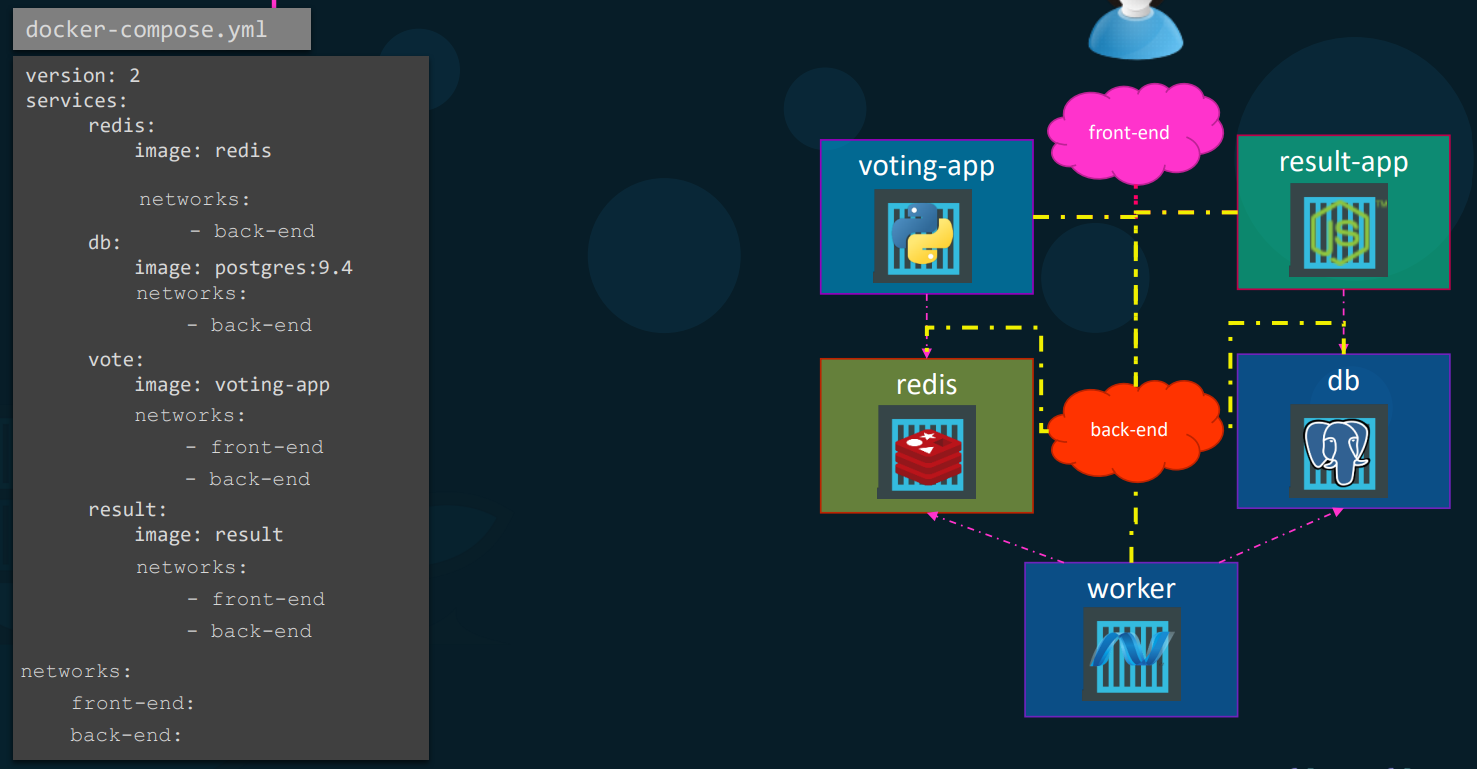
Section titled “Advanced Networking Isolation”To improve security, applications should separate public traffic from internal database traffic. Compose handles this via a root networks: key.
version: '3'services:  web:    image: frontend-app    networks:      - public_net      - private_net  db:    image: postgres    networks:      - private_net
networks:  public_net:  private_net:
Logic: The web service can communicate with the internet and the database. The db service is strictly isolated to the private_net, rendering it inaccessible from outside the stack.
Essential Command Reference
Section titled “Essential Command Reference”docker-compose up -d: Parses the YAML, builds images if necessary, creates networks, and starts the stack in detached mode (background).docker-compose down: Stops and removes all containers, networks, and generic volumes created byup.docker-compose build: Forces a rebuild of all images defined via thebuildkey without starting the containers.docker-compose ps: Lists the current status of all containers defined in the current compose file.docker-compose logs -f: Tails the aggregated logs of all services in the stack in real-time.
Lab Task
Section titled “Lab Task”- https://github.com/dockersamples/example-voting-app/tree/main
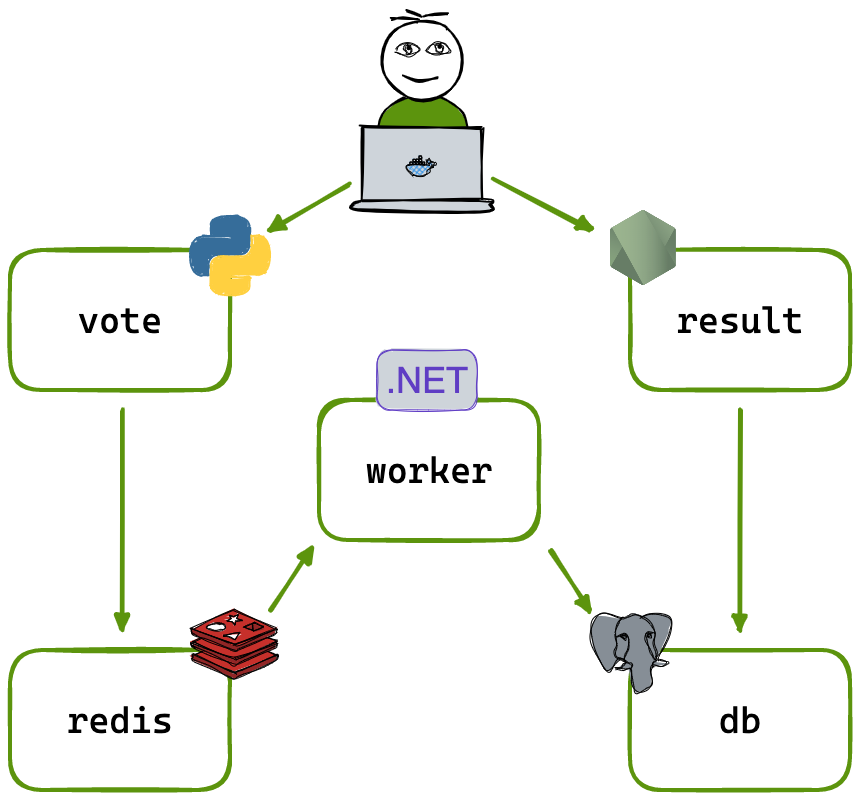
- run the following application with docker compose and later with docker compose..
- make sure to clone above repo.. and build images from folders
voter,results,workerthen useredisandpostgresimages from docker hub and build the entire app..
Solution..
Section titled “Solution..”-
Without Docker Compose
git clone https://github.com/dockersamples/example-voting-appcd example-voting-app- Build Voter-app image..
cd vote/docker build -t voter-app .
- Build Worker image
cd worker/docker build -t worker .
- Build Results-app
cd result/docker build -t results-app .
- Run Postgres Instance -
docker run --name db -e POSTGRES_PASSWORD=postgres -e POSTGRES_USER=postgres -d postgres:15-alpine - Run Redis.. -
docker run -d --name redis redis:latest docker run -p 5050:80 --link redis:redis voter-app:latestdocker run --name=worker --link db:db --link redis:redis workerdocker run --name=results-app --link db:db -p 6060:80 results-app:latest- Now check functionality in browser
- Voter - http://localhost:5050
- Results - http://localhost:6060
-
Docker compose..
- in the above commands
--linkis replaced in newer versions.. in newer versions of docker, docker automatically creates a internal bridge network where each device can communicate with other using their names.. - in the following config.
depends_onspecifies that, whatever mentioned under it needs to start first before going to run the present service
version: "3"services:redis:image: redisdb:image: postgres:15-alpineenvironment:POSTGRES_USER: postgresPOSTGRES_PASSWORD: postgresworker:image: worker:latestdepends_on:- redis- dbvoter:image: voter-app:latestports:- "5050:80"depends_on:- redisresults:image: results-app:latestports:- "6060:80"depends_on:- db - in the above commands
- save the above file into
docker-compose.yamland rundocker compose up
other useful commands..
docker compose up -d # start everything in backgrounddocker compose logs -f worker # watch only worker logs