

systemctl & journelctl
Init Systems: Legacy vs. Modern
Section titled “Init Systems: Legacy vs. Modern”The Init System is the first process that starts when Linux boots (PID 1). It is responsible for bringing the rest of the system to life by starting services.
| Feature | Legacy: init.d (SysVinit) | Modern: systemd |
|---|---|---|
| Logic | Script-based (Shell scripts) | Declarative (Unit configuration files) |
| Speed | Serial (starts one service at a time) | Parallel (starts many services at once) |
| Location | /etc/init.d/ | /etc/systemd/system/ (and others) |
| Features | Simple Start/Stop | Snapshots, Cgroups, Timers, Mounts |
What is Systemd?
Section titled “What is Systemd?”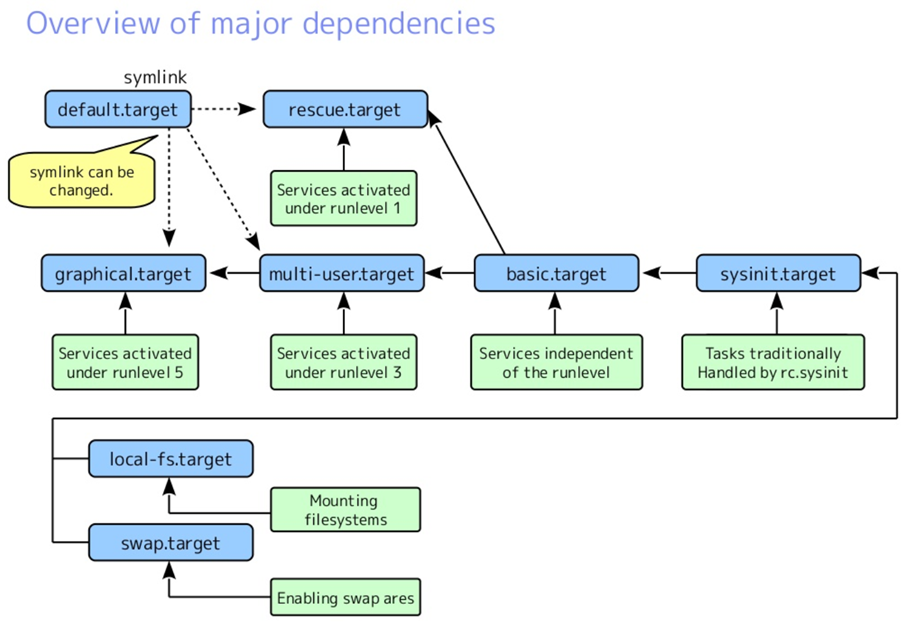
- Systemd is a system initialization system and service manager used in Linux.
- It starts and manages services (background tasks or daemons), such as web servers, database servers, and more.
- It also manages things like:
- Mounting file systems (automount).
- Snapshot support (system states).
- Tracking processes using Linux control groups (for managing resources like CPU and memory).
- Systemd is a broader suite of tools. It doesn’t just start services; it manages logs (journald), sessions (logind), and networks (networkd).
- Systemd is the default init system for most modern Linux distributions (like Ubuntu, CentOS, and Debian).
- unit is a resource or component that systemd knows how to manage
- A unit is a resource or component that systemd knows how to manage, such as services, devices, and mounts.
- Unit File Locations (Priority Order)
/etc/systemd/system/: User-created or modified unit files. Highest priority./run/systemd/system/: Runtime units (created dynamically)./usr/lib/systemd/system/: Default units provided by installed software (RPM/Debian packages).
- Unit File Locations (Priority Order)
Types of Units
Section titled “Types of Units”- There are various types of units in systemd. Some of the most common ones include:
- .service: Most used unit type, used for managing services (e.g.,
apache2.service). - .socket: Used for socket-based communication between services.
- .device: Represents a device unit.
- .mount: Defines file system mounts.
- .automount: Defines automount points.
- .swap: For swap devices.
- .target: Represents a group of services to be started.
- .path: Used for monitoring paths (directories).
- .timer: For running tasks at specific times (like cron jobs).
- .snapshot: Represents system snapshots.
- .slice: Used for organizing resources (CPU, memory).
- .scope: Manages external processes.
- .service: Most used unit type, used for managing services (e.g.,
Anatomoy of a .service Unit File
Section titled “Anatomoy of a .service Unit File”Systemd unit files use a structured .ini format divided into three specific sections:
[Unit] (Metadata & Dependencies)
Section titled “[Unit] (Metadata & Dependencies)”- Description: What is this?
- After/Before: Defines the order.
After=network.targetmeans wait for the internet before starting. - Requires/Wants:
Requiresis a hard dependency (fails if the other fails);Wantsis a soft suggestion.
[Service] (Execution Logic)
Section titled “[Service] (Execution Logic)”- Type:
simple(default),forking(service moves to background), oroneshot(runs once and exits). - ExecStart: The exact command to run.
- User/Group: Which user owns this process (security best practice).
- Restart: Rules for when it crashes (e.g.,
Restart=on-failure). - SyslogIdentifier: A tag to easily find logs via
journalctl -t <tag>.
[Install] (Boot Configuration)
Section titled “[Install] (Boot Configuration)”- WantedBy: Usually
multi-user.target. This tells systemd to start this service during a normal boot.
Example
This tomcat.service unit file defines how to manage the Tomcat application server using systemd:
$ cat /etc/systemd/system/tomcat.service[Unit]Description=Tomcat Application serverAfter=network.target
[Service]Type=forkingExecStart=/apps/tomcat/bin/startup.shExecStop=/apps/tomcat/bin/shutdown.shUser=tomcat55Group=staff
[Install]WantedBy=multi-user.target
Commands for Managing Services:
Section titled “Commands for Managing Services:”-
systemctl list-units: Lists all available units. -
systemctl list-units --type=<unit_type>: Lists all units of a specific type (e.g., all services or all timers). -
sudo systemctl list-unit-files: Shows the status of all unit files. -
sudo systemctl **status/start/stop/show/restart** <service_name>: Shows the current status of a service. -
sudo systemctl list-dependencies <service_name>: Lists the dependencies of a service (what other units the service relies on). -
sudo systemctl mask <service_name>: Marks a unit as unstartable. -
sudo systemctl unmask <service_name>: Makes a masked unit available again. -
Enable a Service to Start on Boot:
sudo systemctl **enable** <service_name>- Disable:
sudo systemctl **disable** <service_name>
- Disable:
-
systemctl is-active [name.service] -
systemctl list-units --type service --all
Working with common Services
Section titled “Working with common Services”| Service Name | Package to Install | Process Name (systemctl) | Default Port | Main Config Directory / File | Test Command (Local) |
|---|---|---|---|---|---|
| Web Server | httpd | httpd | 80, 443 | /etc/httpd/ | curl -I localhost |
| SSH | openssh-server | sshd | 22 | /etc/ssh/sshd_config | ssh localhost |
| Nginx | nginx | nginx | 80, 443 | /etc/nginx/ | curl -I localhost |
| DHCP | dhcp-server | dhcpd | 67 (UDP) | /etc/dhcp/dhcpd.conf | dhcpd -t (syntax check) |
| DNS (Bind) | bind | named | 53 | /etc/named.conf | dig @localhost |
| Database | mariadb-server | mariadb | 3306 | /etc/my.cnf.d/ | mariadb-admin ping |
| FTP | vsftpd | vsftpd | 21 | /etc/vsftpd/ | ftp localhost |
| NFS | nfs-utils | nfs-server | 2049 | /etc/exports | showmount -e localhost |
| Firewall | firewalld | firewalld | N/A | /etc/firewalld/ | firewall-cmd --state |
Journalctl
Section titled “Journalctl”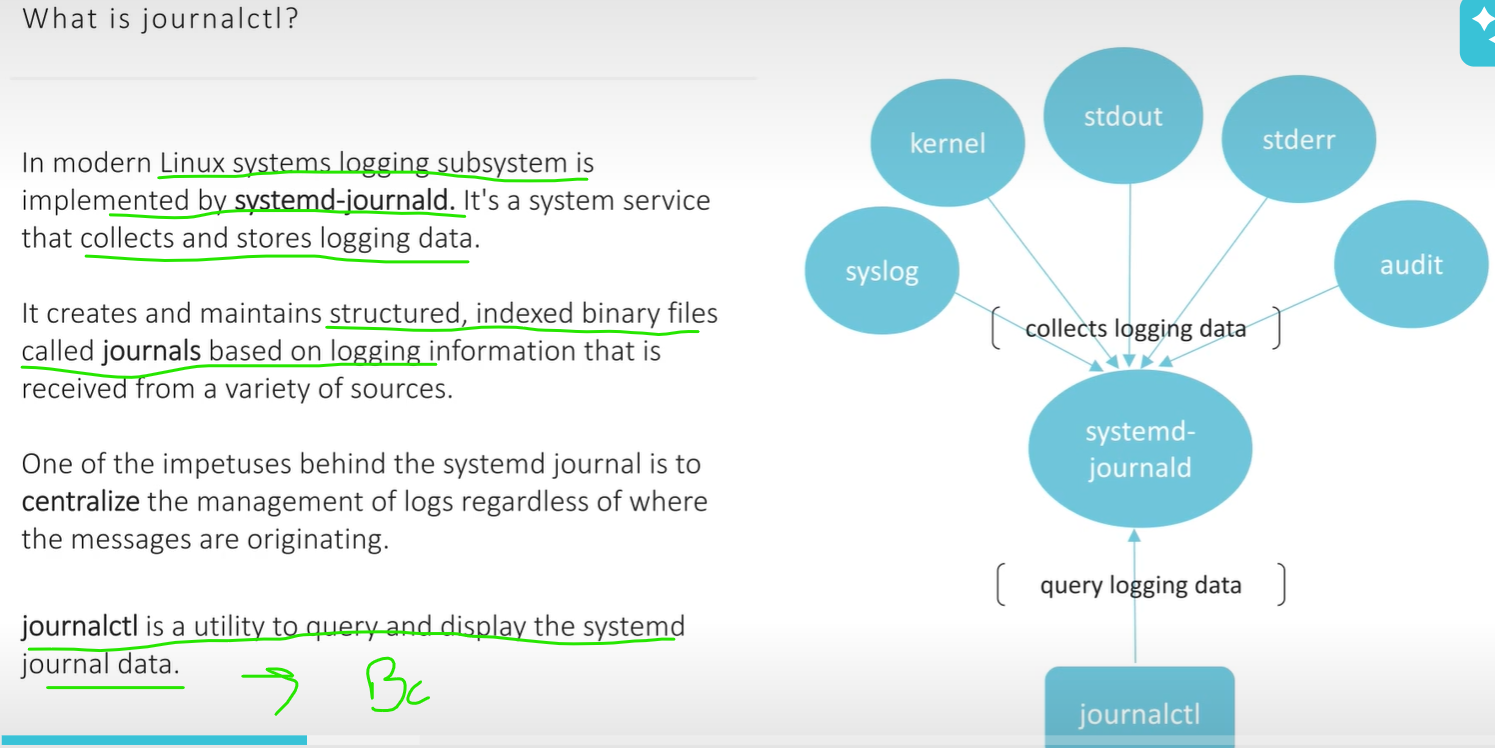
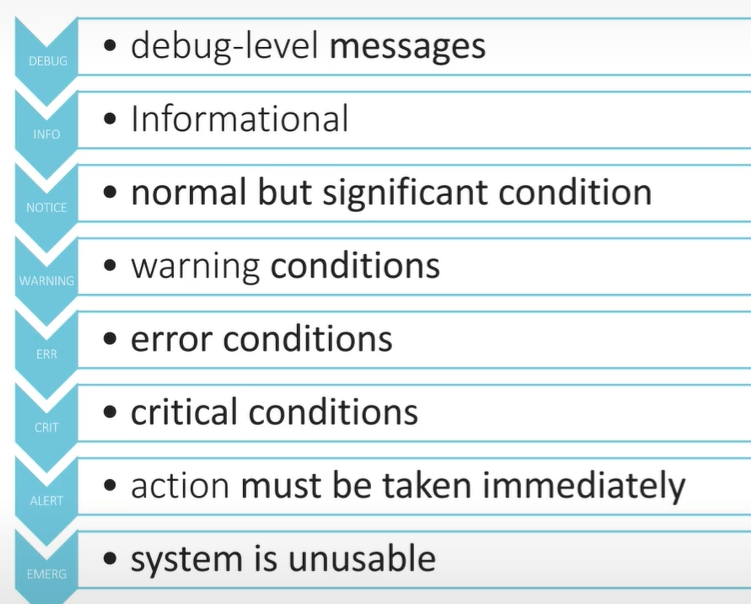
Logging Levels
-
NOTE: if loglevel is set to some x, say INFO level then INFO log file include all the LOWER Levels stuff init..
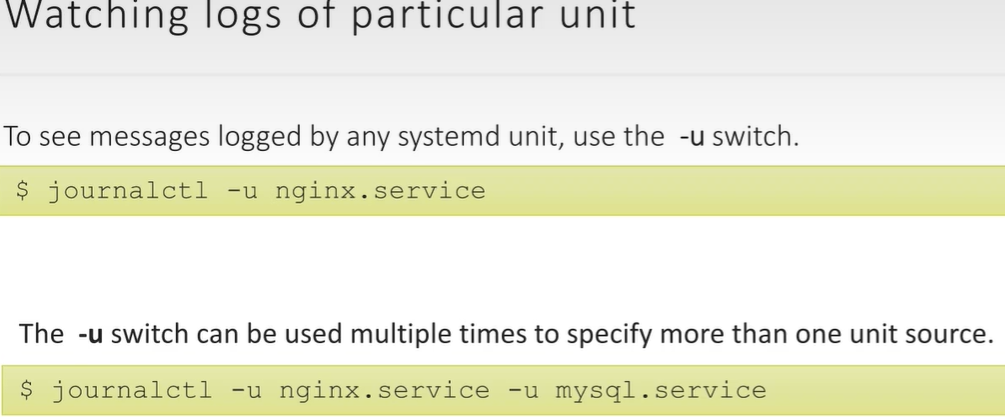
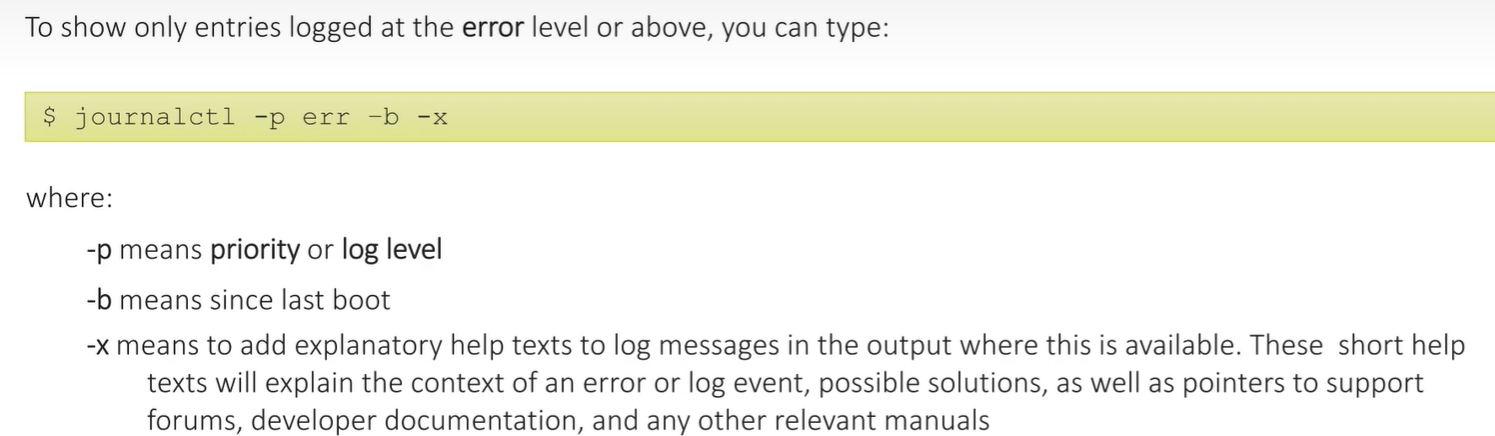
view logs by tag indentifier..
Section titled “view logs by tag indentifier..”For example, in a service unit file (/etc/systemd/system/myapp.service):
[Unit]Description=My Application Service
[Service]ExecStart=/path/to/myapp**SyslogIdentifier=myapp**
[Install]WantedBy=multi-user.target
then instead of remembering myapp.service
you can use something like
journalctl -t myappwhere-tmeans SyslogIdentifier Tag
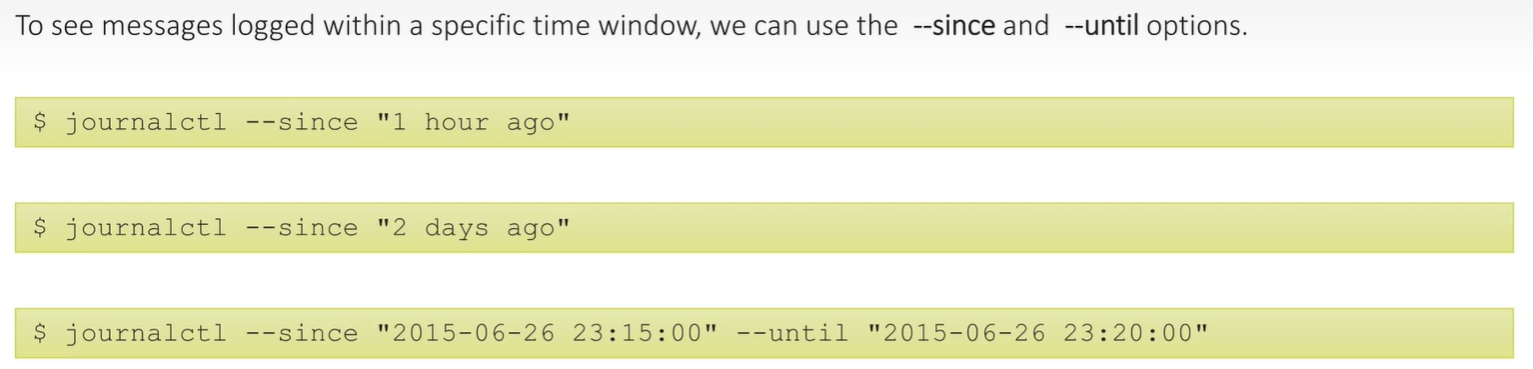
NOTE: date and time format is fixed
Log File Locations..
Section titled “Log File Locations..”/var/log/messages– Contains global system messages, including the messages that are logged during system startup. There are several things that are logged in /var/log/messages including mail, cron, daemon, kern, auth, etc./var/log/secure- Contains information related to authentication and authorization privileges. For example, sshd logs all the messages here, including unsuccessful login/var/log/cron- Whenever cron daemon (or anacron) starts a cron job, it logs the information about the cron job in this file/var/log/auth.log- Contains system authorization information, including user logins and authentication machinsm that were used./var/log/maillogand/var/log/mail.log- Contains the log information from the mail server that is running on the system. For example, sendmail logs information about all the sent items to this file- **
/var/log/mail/**- This subdirectory contains additional logs from your mail server. /var/log/sa/- Contains the daily sar files that are collected by the sysstat package.