

Files Permissions
File Permission
Section titled “File Permission”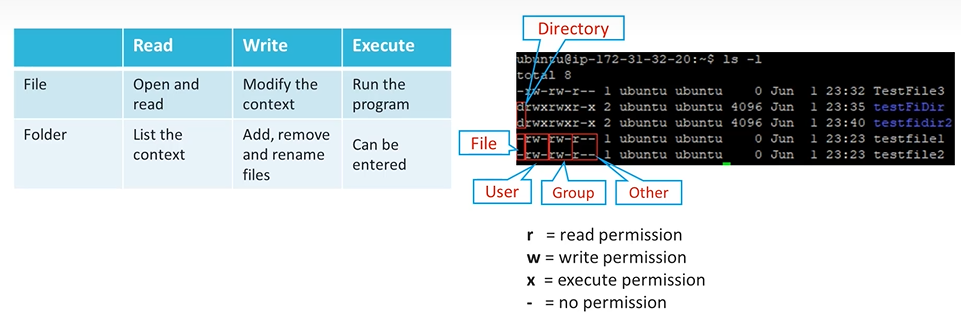
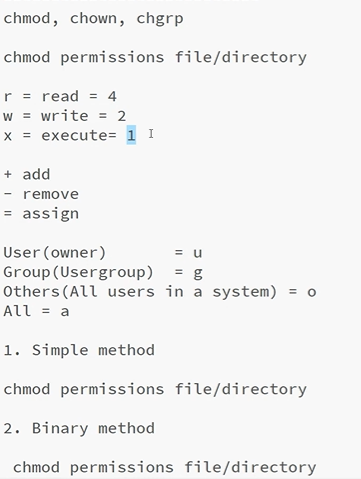
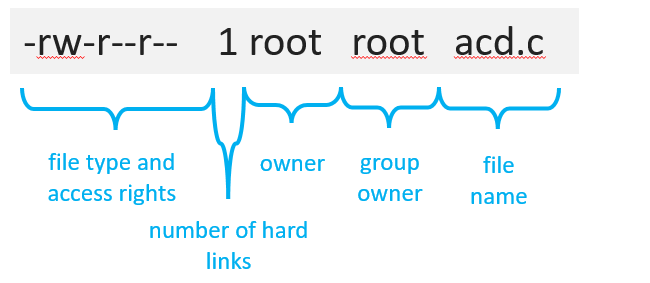
| Bit Position | 1 | 2 | 3 | 4 | 5 | 6 | 7 | 8 | 9 |
|---|---|---|---|---|---|---|---|---|---|
| Permission | r | w | x | r | w | x | r | w | x |
| Binary Value | 4 | 2 | 1 | 4 | 2 | 1 | 4 | 2 | 1 |
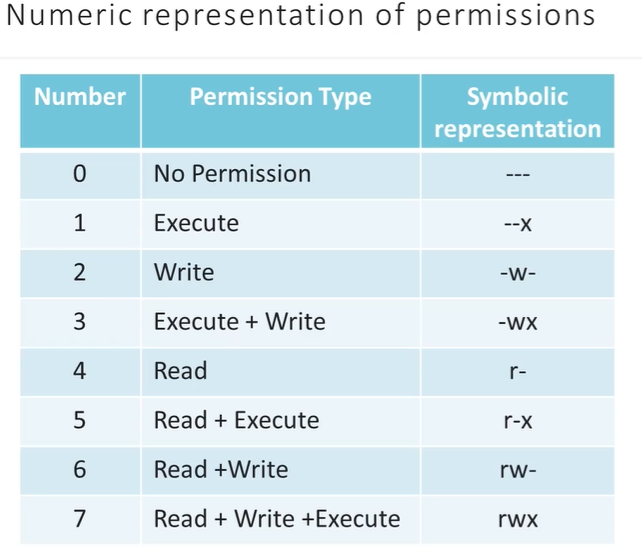
Common Numeric Combos: • 7 (4+2+1): Full Access (r w x) • 6 (4+2): Read/Write (r w —) • 5 (4+1): Read/Execute (r — x) • 4: Read Only (r — —) • 0: No Access (— — —)
| Command | Syntax Type | Example Command | Logical Result / Use Case |
|---|---|---|---|
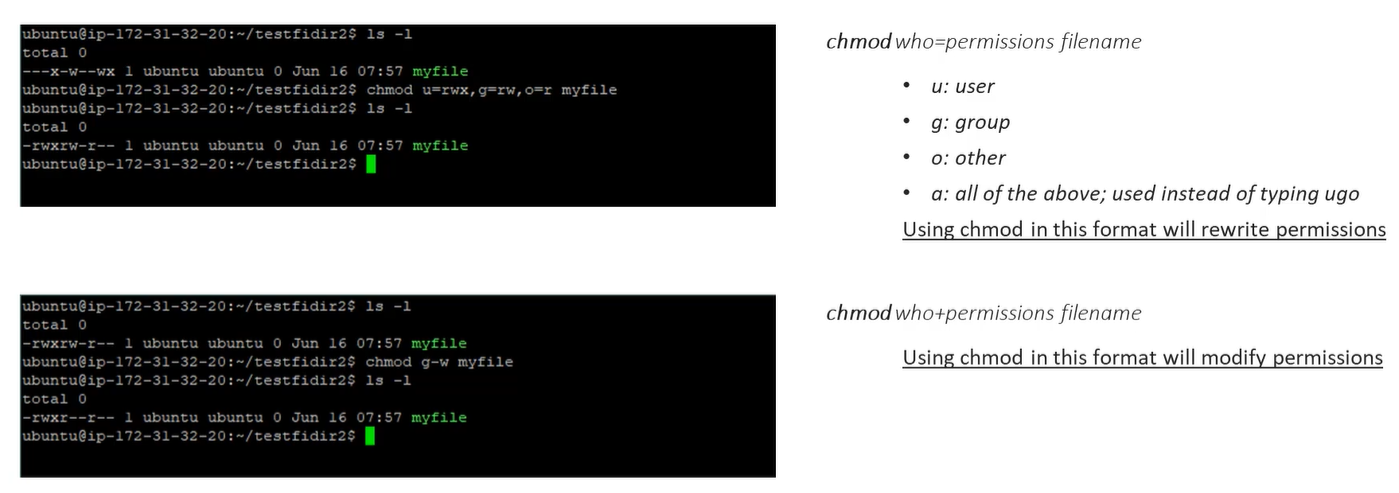
chmod | Numeric | chmod 755 file | Owner: Full, Group/Other: Read/Run. Standard for scripts. |
| Symbolic (+/-) | chmod g+w file | Add write permission to the group only. Leaves others alone. | |
| Symbolic (=) | chmod o=rx file | Explicitly set Others to Read/Run. Wipes out any previous w bit. | |
| Recursive | chmod -R 700 dir/ | Advanced: Locks a folder and everything inside to the Owner only. -R means recursive | |
| Verbose | chmod -v 644 file | Advanced: Prints a message explaining the change (e.g., mode of 'file' changed to 0644). | |
| Reference | chmod --reference=A B | Advanced: Makes File B have the exact same 9 bits as File A. | |
chown | Basic | chown pavan2 file | Changes the primary owner to pavan2. |
| Combined | chown pavan:devops file | Advanced: Changes both Owner and Group in one command. | |
| Group Only | chown :prod file | Advanced: Changes only the group (shorthand for chgrp). | |
| Conditional | chown --from=root pavan file | Advanced: Only swaps owner if the current owner is root. | |
| Recursive | chown -R pavan:devops dir/ | Advanced: Fixes ownership for a whole project directory tree. | |
chgrp | Basic | chgrp devops file | Changes the group to devops. No sudo needed if you are in that group. |
| Recursive | chgrp -R prod dir/ | Advanced: Mass-updates group for entire directory structures. | |
| Changes Only | chgrp -c devops * | Advanced: Only reports if a file actually changed its group (ignores correct ones). | |
| Silent | chgrp -f prod file | Advanced: Suppresses “Permission Denied” errors if you hit a file you don’t own. |
| Pattern (rwx) | Identity of User | Action Attempted | Result | Deep Logic |
|---|---|---|---|---|
rwx------ | Owner | Read/Write/Run | Allowed | You are the owner; you have full bits. |
rwx------ | Group member | Read/Write/Run | Denied | You aren’t the owner; the group bits are all ---. |
---rwx--- | Owner | Read | Denied | The Owner Trap: You are the owner, but your specific bits are ---. Linux stops here and ignores the group’s rwx. |
---rwx--- | Group member | Read/Write/Run | Allowed | You aren’t the owner, but you match the Group which has rwx. |
rw-r----- | Group member | Write | Denied | You match the group, but they only have r-- (Read). Write is missing. |
-------r- | Everyone | Read | Allowed | No one owns it or groups it with rights, but the “Others” bit allows everyone to read. |
r-xr-xr-x | Any User | Run Script | Allowed | Everyone has the x (Execute) bit. |
| Scenario Pattern | Your Identity | Logic Result | Why? |
|---|---|---|---|
---rwx--- | Owner | DENIED | You matched “Owner” first. Your bits are ---. You are blocked. |
---rwx--- | Group Member | GRANTED | You are not the owner. You matched “Group.” Group bits are rwx. |
rw-r--r-- | Owner | READ/WRITE | You matched “Owner.” You can Read and Write. |
rw-r--r-- | Group Member | READ ONLY | You matched “Group.” Group bits only allow r--. |
--------- | Root User | GRANTED | The Exception: Root (UID 0) bypasses this algorithm entirely. |
https://www.youtube.com/watch?v=eWsCbBfxZ04&list=PLbvUFWvKlQnmiDGAW7T_gZNgJN2bmQsFu&index=10