Networking in Linux
-
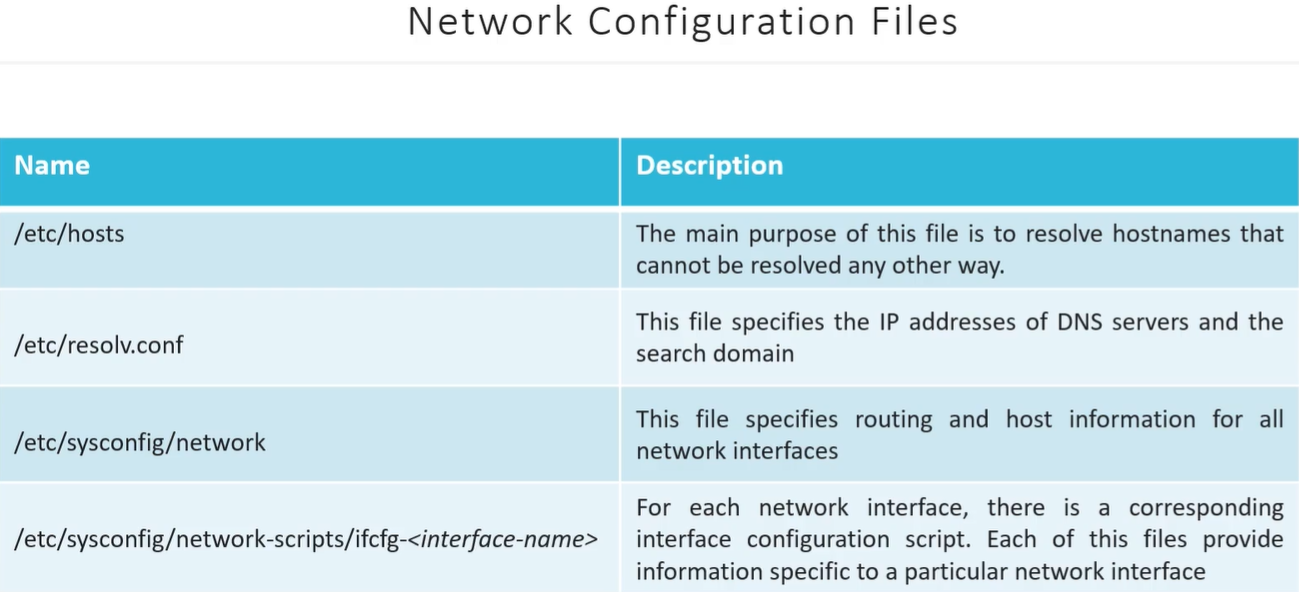
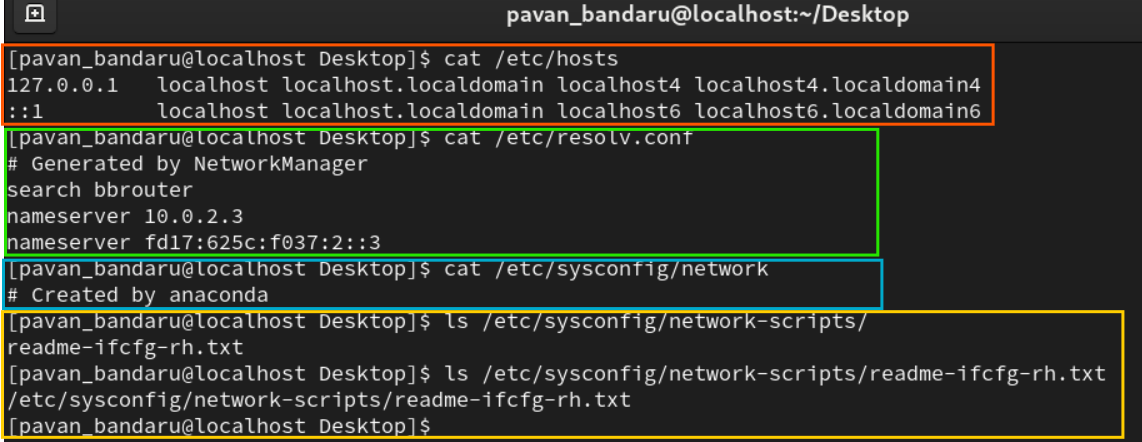
/etc/hosts→ This file is used to manually map hostnames to IP addresses. It provides a static mapping, and the system checks this file first when resolving a hostname., those cant be resolved by DNS, eg: localhost -
/etc/resolv.conf: → This file is used to configure DNS servers that the system should use to resolve domain names into IP addresses. When the system cannot resolve a name via/etc/hosts, it queries the DNS servers listed in this file.search→ means Automatically appendexample.comto any unqualified domain names (likeserver1) when attempting to resolve them. eg: when you ping server1, it is translated toserver1.example.com
-
/etc/sysconfig/network→ This file contains global network configuration settings for the entire system. It is used to configure network-wide parameters that affect the system’s networking behavior.-
Typical Contents of
/etc/sysconfig/network:Terminal window NETWORKING=yesHOSTNAME=localhost.localdomain-
NETWORKING=yes: This setting controls whether the networking service is enabled at boot. If set tono, the network interfaces will not be brought up at boot. -
HOSTNAME=localhost.localdomain: This setting specifies the system’s hostname. The hostname is used to identify the system on a network.Other settings in this file might include:
NETWORKING_IPV6=yes: Enables or disables IPv6 networking.GATEWAY=192.168.1.1: Sets the default gateway for the system (typically used when there is no route for a packet).
-
-
-
/etc/sysconfig/network-scripts/ifcfg-*→ This directory contains configuration files for each network interface on the system. The files are namedifcfg-*, where*is the name of the network interface (e.g.,ifcfg-eth0,ifcfg-enp0s3,ifcfg-ens33, etc.). Each file describes how a specific interface should be configured.
For example:
/etc/sysconfig/network-scripts/ifcfg-eth0(older naming convention)/etc/sysconfig/network-scripts/ifcfg-enp0s3(modern naming convention usingPredictable Network Interface Names)
Example Content of ifcfg-* File:
Section titled “Example Content of ifcfg-* File:”DEVICE=enp0s3BOOTPROTO=dhcpONBOOT=yesIPV6INIT=noKey Directives in ifcfg-* Files:
Section titled “Key Directives in ifcfg-* Files:”DEVICE=<interface>: Specifies the network interface name (e.g.,eth0,enp0s3,ens33, etc.).BOOTPROTO=dhcp: Defines how the interface will obtain an IP address. Common options are:dhcp: The system will use DHCP (Dynamic Host Configuration Protocol) to automatically obtain an IP address.static: The system will use a static IP address specified by other directives (e.g.,IPADDR,NETMASK).
ONBOOT=yes: This directive tells the system to bring up this interface during boot. If set tono, the interface will not be brought up automatically at boot.IPADDR=<ip_address>: Specifies a static IP address ifBOOTPROTO=staticis used.NETMASK=<netmask>: Specifies the subnet mask for the static IP address.GATEWAY=<gateway_ip>: Specifies the default gateway for this interface (if using a static IP).DNS1=<dns_ip>andDNS2=<dns_ip>: Specifies the DNS servers that should be used when resolving domain names.IPV6INIT=no: This setting controls whether IPv6 should be enabled for this interface.nodisables IPv6,yesenables it.
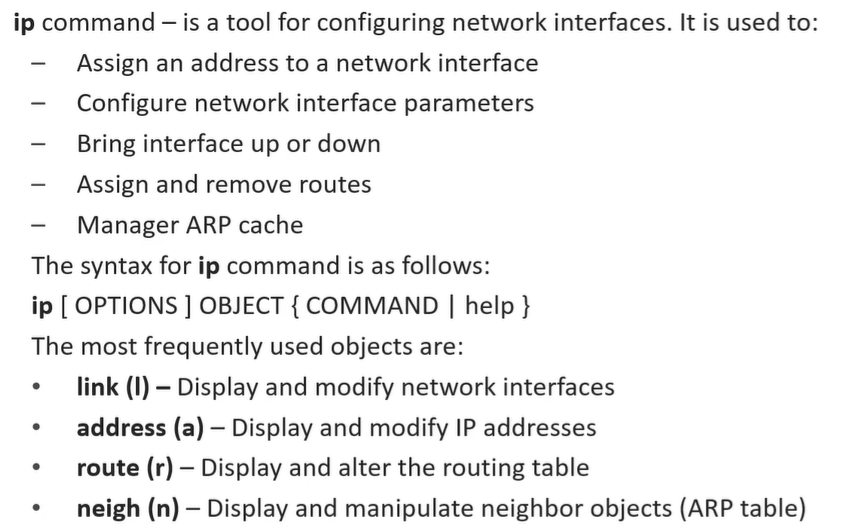
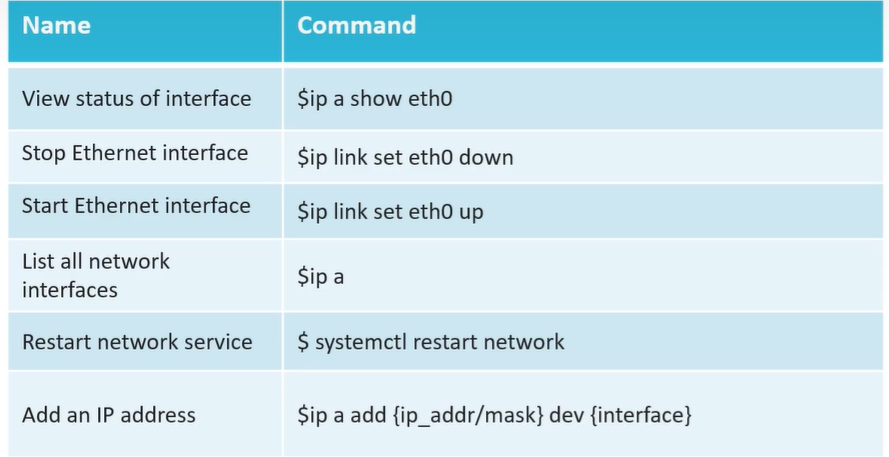
IP Command
Section titled “IP Command”