

Intro & Docker vs VMs
- Background: Founded in 2010 by Solomon Hykes and Sebastien Pahl; open-sourced in March 2013.
- Core Function: Facilitates application development, testing, and deployment by running applications in isolated containers orchestrated independently of the host environment.
- The Problem it Solves: Traditional host-level installations (e.g., installing Tomcat and its Java dependencies) alter the host filesystem, creating “unique” and brittle virtual machines. Upgrading libraries often leads to unpredictable breakage and version conflicts across the system.
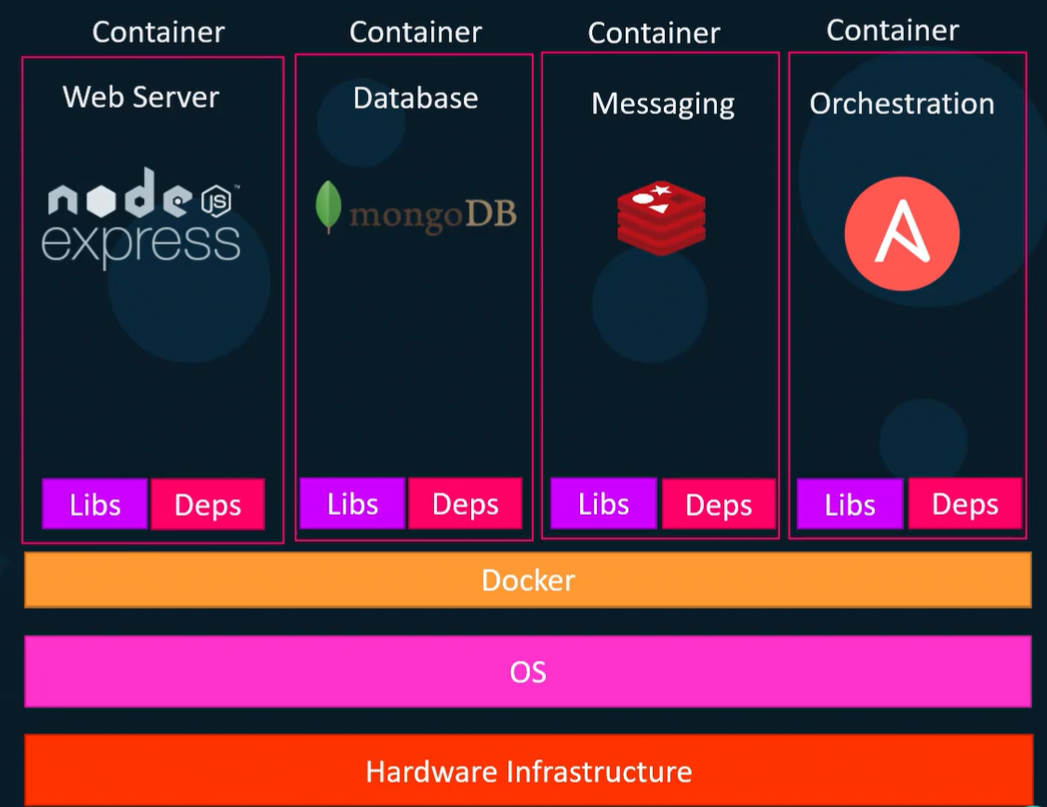
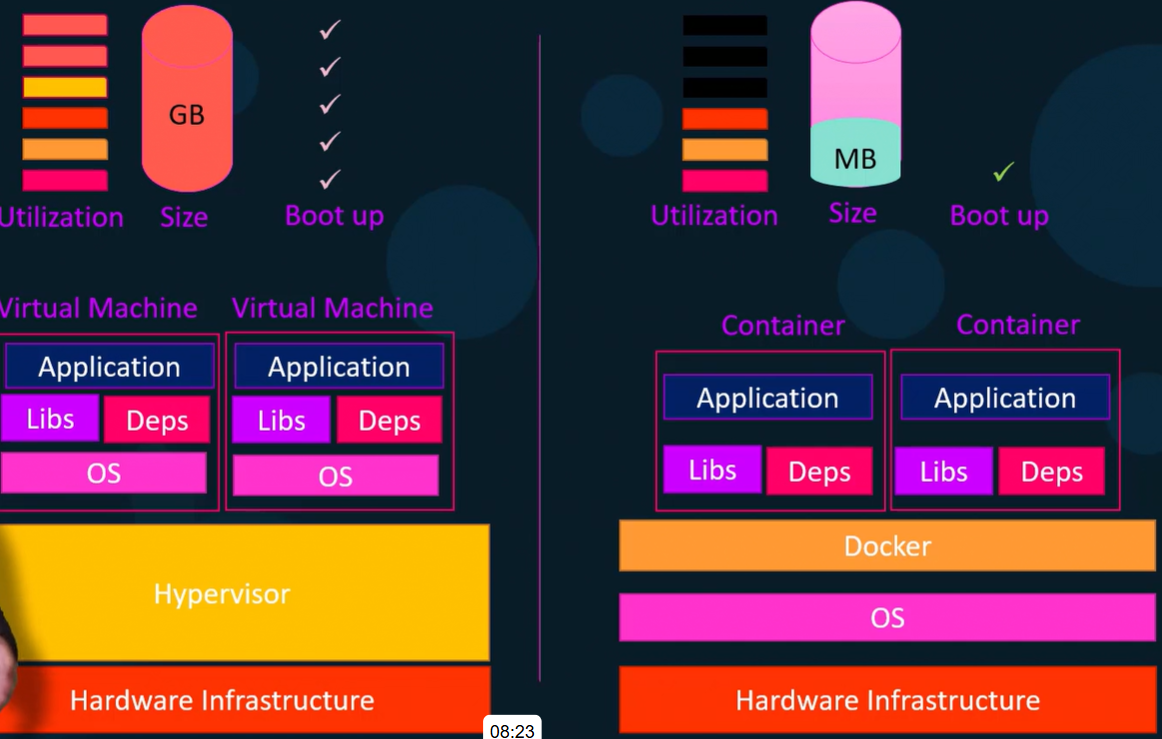
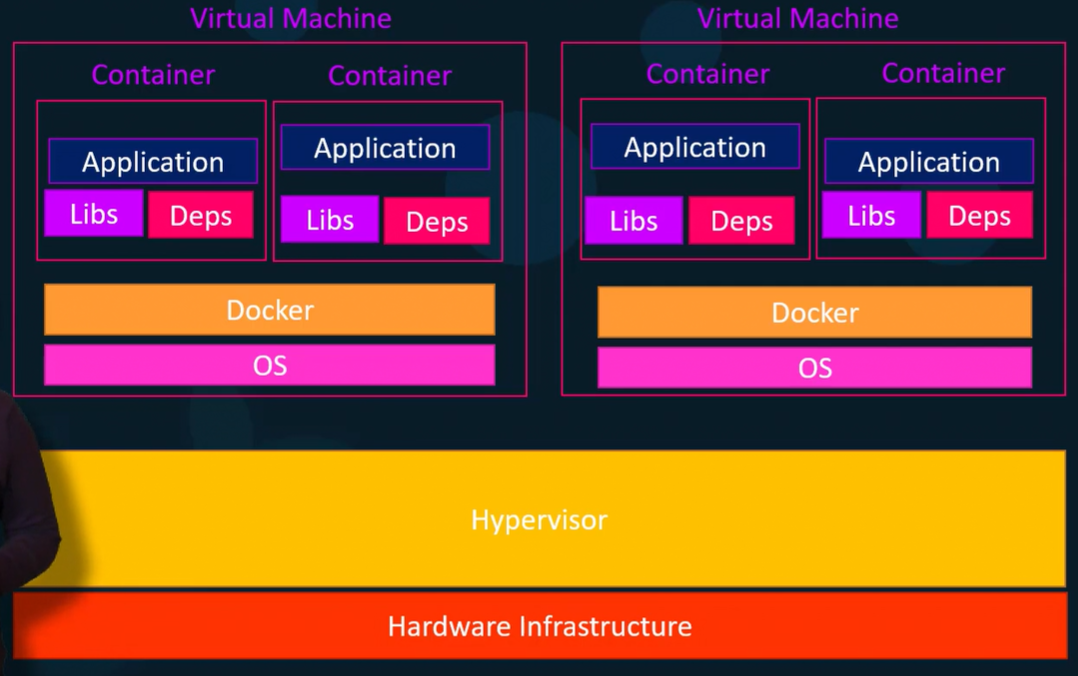
Advantages
Section titled “Advantages”Managing at the application level
Section titled “Managing at the application level”- Command:
docker run -d -p 8080:8080 tomcat:<tomcat version> - How it Works in the Background: The daemon fetches the specified image from the registry, spins up an isolated server environment, and binds it to port 8080.
- Practical Advantage: All dependencies are pre-packaged within the image. You completely bypass manual server-level dependency installations, shifting management entirely to the application level.
Running the right version of application
Section titled “Running the right version of application”- Command:
docker run -d -p <port_id> tomcat:<tomcat version> - How it Works in the Background: By declaring the specific application version, Docker pulls an isolated container equipped with the exact underlying dependencies required for that version.
- Practical Advantage: Eliminates dependency clashes. You can run multiple, conflicting versions of an application (e.g., older Tomcat requiring older Java alongside newer Tomcat requiring newer Java) on the same machine simultaneously without manual configuration errors.
Docker Architecture Overview
Section titled “Docker Architecture Overview”- Structure: Operates on a Client-Server model.
- Execution Steps:
- User inputs commands via the Docker CLI (Client).
- Client transmits requests to the Daemon using a REST API over a UNIX socket or network interface.
- Daemon processes the request, managing the heavy lifting of building, running, and distributing the containers.
- Daemon connects to the Registry to pull down any images required to run the containers.
- Flexibility: The Client and Daemon can run on the exact same local system, or a local Client can connect to a remote Daemon.
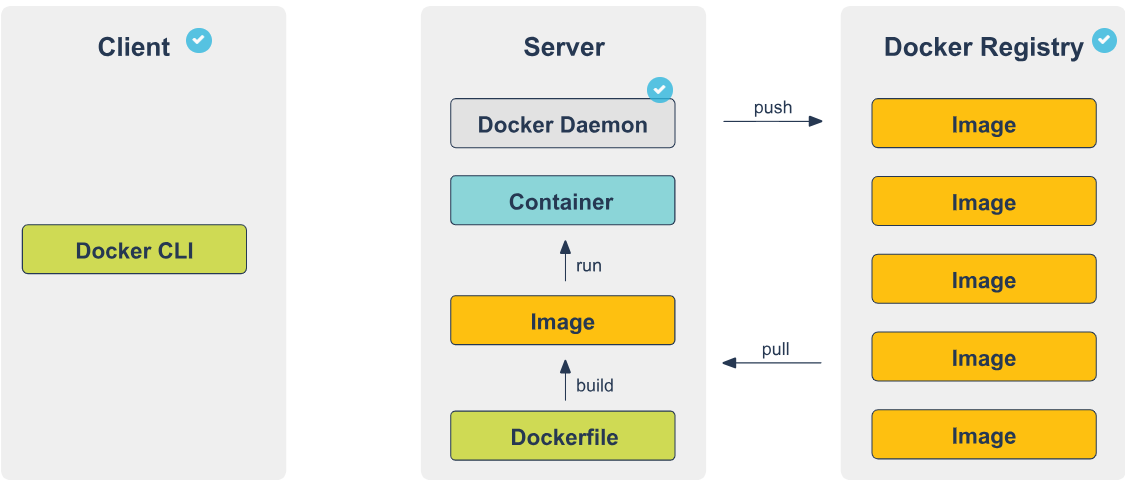
The Docker Client
Section titled “The Docker Client”- Role: The primary user interface for interacting with Docker.
- How it Works: It captures CLI commands (like
docker run), translates them into Docker API calls, and routes them to the Daemon. A single client can connect to and manage multiple daemons.
The Docker Daemon
Section titled “The Docker Daemon”- Role: The server-side background process.
- Core Responsibilities:
- Listens for inbound Docker API requests from the Client.
- Manages the physical Docker objects on the host machine: Images, Containers, Networks, and Volumes.
- Communicates with other daemons to orchestrate broader Docker services.
The Docker Registry
Section titled “The Docker Registry”- The centralized storage repository for Docker images.
- Eg: Docker Hub.
- You can self-host a registry (via a container image), use Docker Trusted Registry (DTR) via Docker Datacenter, or utilize integrated registries provided by cloud hosts (AWS, Azure, GCP).
- Supports secure connections and user access management.
- Commands & Workflows:
docker pullordocker run: Instructs the Daemon to reach out to the configured registry and download the necessary image layers to the local machine.docker push: Instructs the Daemon to upload your locally built image up to the configured registry for storage or distribution.
Docker Workflow
Section titled “Docker Workflow”Docker Components: The Core Infrastructure Pipeline
Section titled “Docker Components: The Core Infrastructure Pipeline”When a container is launched, the workload cascades through five distinct, specialized components. Here is the detailed, step-by-step logical breakdown of how they operate in the background:
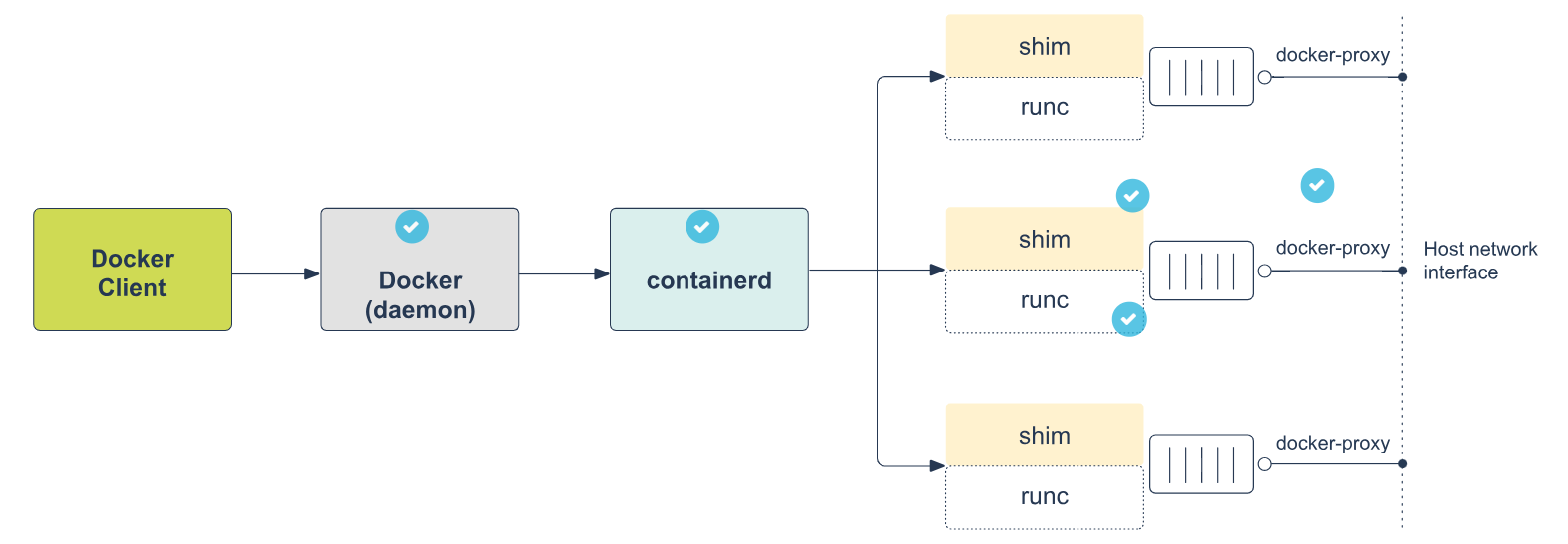
- Step 1: The Docker Daemon (
docker)- Role: The highest-level component and the primary engine interfacing with the user.
- Background Mechanism: It provides all the UX features of Docker. It receives your high-level commands (via the CLI/REST API) and translates them into actionable tasks, delegating the actual execution down the pipeline.
- Step 2: Containerd (
docker-containerd)- Role: The mid-level management daemon.
- Background Mechanism: It operates by listening on a UNIX socket and exposing GRPC endpoints. Rather than running the container directly, it handles the complex, low-level management tasks: orchestrating storage, distributing images, and managing network attachments.
- Step 3: Containerd Shim (
docker-containerd-shim)- Role: The persistent middleman.
- Background Mechanism: It sits strictly between
containerdandrunC. Its primary architectural purpose is decoupling. By taking over the container’s standard I/O and status monitoring, it allowsrunCto exit cleanly after the container is started. This ensures the daemon doesn’t have to spawn heavy, long-running processes for every single active container.
- Step 4: runC (
docker-runc)- Role: The lightweight execution binary.
- Background Mechanism: This is the tool that physically creates the container. It interacts directly with the Linux kernel at the lowest level, explicitly configuring the isolation layers (like cgroups and namespaces) for the process. Once the containerized process is successfully running,
runCexits.
- Step 5: Docker Proxy (
docker-proxy)- Role: The network traffic director.
- Background Mechanism: Because the container is isolated in its own network namespace, this tool acts as the bridge. It is strictly responsible for proxying the internal container ports and mapping them directly to the host machine’s physical network interfaces, making the container accessible to the outside world.
Docker Components: Container
Section titled “Docker Components: Container”-
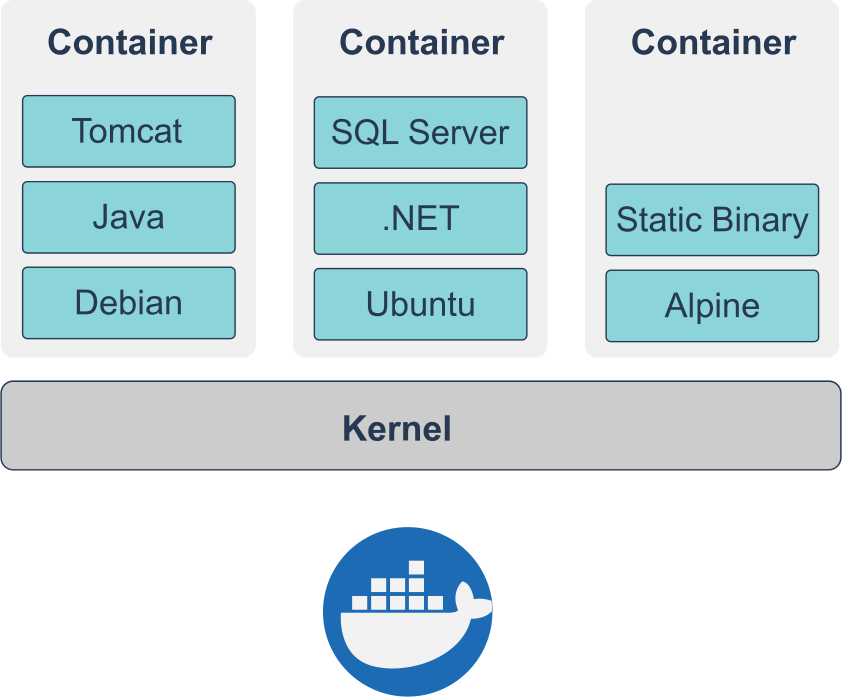
Definition: A standalone, runnable instance of an image, similar to a lightweight virtual machine.
-
Contents: It packages the filesystem (usually a Linux flavor), installed software dependencies, and runtime configurations (exposed ports, external volumes).
-
Practical Advantage: Ensures total reproducibility. You can run incompatible software environments side-by-side on any supporting infrastructure (laptop to cloud) without dependency conflicts or manual installations.
-
Background Mechanism: Unlike a VM, a container does not require a full operating system or its own kernel. It utilizes the host machine’s kernel.
-
State & Isolation: Containers are isolated from the host and each other by default. Any changes made inside a container disappear upon removal unless explicitly saved to persistent storage.
Virtual Machines vs Containers
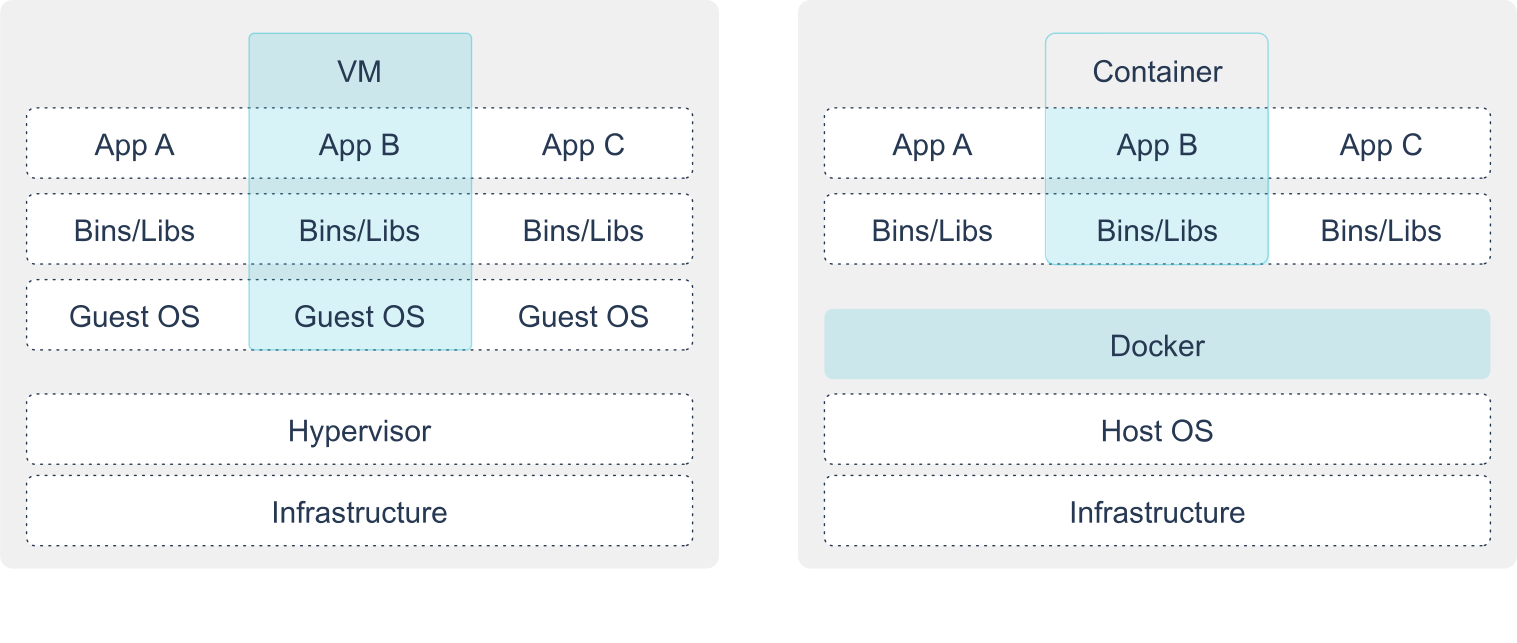
Section titled “Virtual Machines vs Containers”- Misconception → Equating containers directly to VMs is technically incorrect.
- VMs: Possess dedicated virtual CPUs, a full heavyweight OS, and their own kernel.
- Containers: Contain strictly the binaries and dependencies needed for the application. They rely entirely on Docker to provide access to the host kernel.
- A container is best understood as a secure, highly isolated standalone process running natively on the host system.
Isolation Technologies: Functional Requirements
Section titled “Isolation Technologies: Functional Requirements”- Core Purpose: Creating strictly separated spaces within one machine to reduce the security surface area, protecting both the host from the applications and the applications from each other.
- Key Isolation Mechanisms:
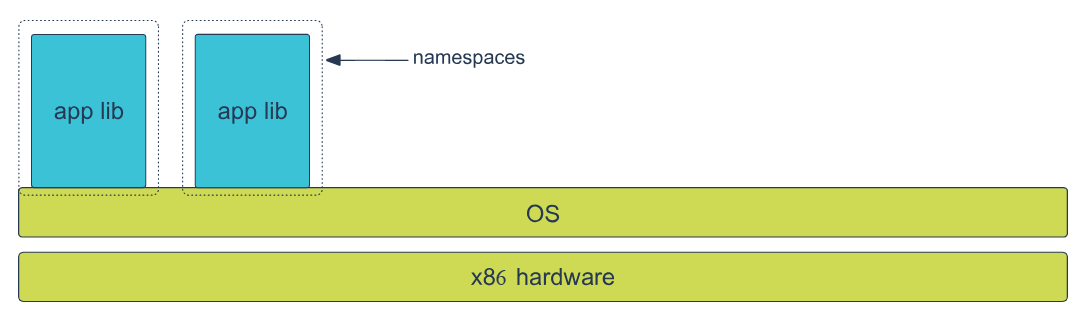
- Namespaces: Hides other processes; makes the container feel like the only process on the system.
- Control Groups (cgroups): Manages and limits hardware resources (RAM, CPU shares).
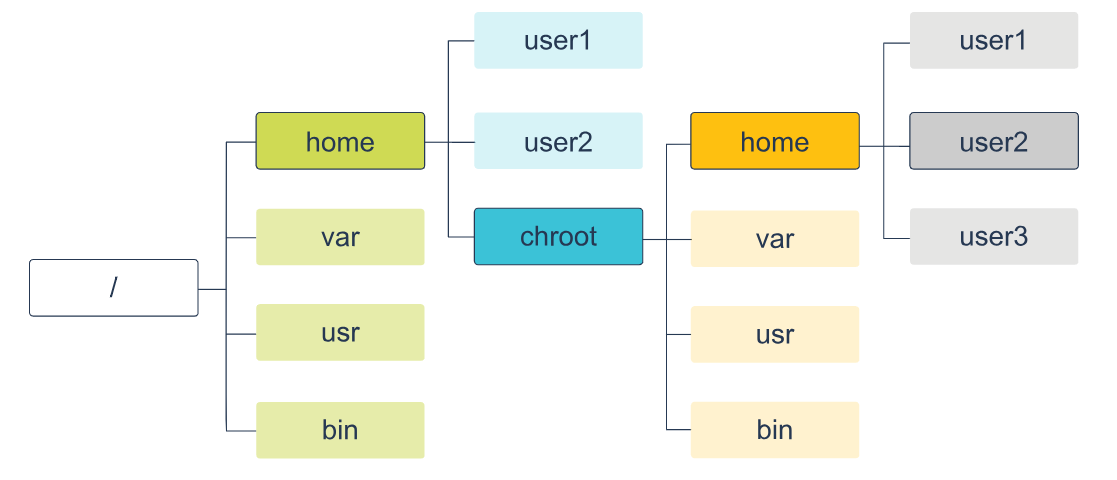
- Chroot: Restricts filesystem visibility to a specific, isolated directory.
- Process Capabilities: Restricts or grants granular permissions to use kernel features.
- Virtual eth: Provides a safe, isolated ethernet device instead of direct host network access.
- Port Binding: Safely resolves conflicts when multiple containers expose the exact same port.
- Volumes: Detaches data storage from the container lifecycle, ensuring data survives shutdowns.
- Docker Network: Allows isolated services to communicate securely via internal IPs/names.
Namespaces
Section titled “Namespaces”- How it Works: Docker builds a layered isolation wall by assigning a unique set of namespaces to a container upon launch. The process cannot see or access anything outside its assigned namespace.
- 6 Linux Kernel Namespaces utilized by Docker:
- MNT (Linux 2.4.19): Isolates mount-points and filesystems.
- UTS (Linux 2.6.19): Isolates kernel and version identifiers (Unix Timesharing System).
- IPC (Linux 2.6.19): Isolates Inter-Process Communication resources.
- PID (Linux 2.6.24): Isolates Process IDs (preventing visibility of host processes).
- NET (Linux 2.6.24): Isolates network interfaces.
- USER (Linux 3.8): Isolates user and group IDs.
Control Groups
Section titled “Control Groups”- How it Works: Ensures containers act as good “multi-tenant citizens” by strictly enforcing hardware limits.
- Practical Application: Allows the Docker Engine to allocate specific CPU shares or cap the exact amount of RAM a specific container can consume, preventing a single rogue application from starving the host machine.
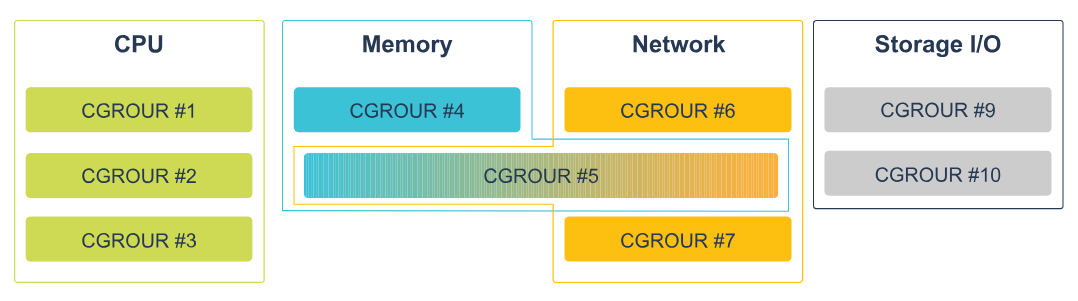
Chroot
Section titled “Chroot”- How it Works: Alters the root directory for the running process. The containerized application is tricked into seeing only a fragmented piece of the host’s filesystem, securely locking it within that designated directory tree.
chroottells a process: “Your/(root) directory is actually/home/user/docker/container_fs.” The process cannotcd ..high enough to escape that folder.
Isolation technology example
Section titled “Isolation technology example”- Scenario: Running a Tomcat web server in a container.
- Step-by-Step Isolation Background:
- Filesystem (Chroot/MNT): Tomcat loads its required libraries directly from the container’s isolated filesystem piece, completely unaware of the host’s actual drive.
- Networking (Virtual eth/NET): Tomcat expects to bind to a network interface. To maintain strict isolation, Docker denies direct access to the host’s physical Ethernet. Instead, it provisions a virtual Ethernet interface inside the namespace.
- External Access (Port Binding): Because the container is entirely cut off, Tomcat’s web port is invisible to the outside world. Docker uses port binding/forwarding to explicitly map a port on the host machine through the isolation layer to the container’s virtual port, bridging the gap securely.
Docker Image
Section titled “Docker Image”- Definition: An inert, immutable file that acts as a read-only snapshot of a container.
- Creation: Generated via the
docker buildcommand, which executes the script defined in aDockerfile. - Storing: Hosted in a Docker Registry (e.g., Docker Hub).
- Sending & Practical Layering: Images are built using layers.
- How it works in the background: If you run five Tomcat instances, Docker spins up five separate containers but utilizes only one base Tomcat image. Because images are constructed in layers (not flat archives like
.tar.gz), Docker is highly efficient. When pulling or pushing an image, Docker checks your local host or the registry; it will only download or upload the specific layers that are missing, saving massive amounts of network bandwidth and storage space.
Docker Storage (Graph) Drivers
Section titled “Docker Storage (Graph) Drivers”- Union filesystem (Union FS): A technology that takes separate files and directories (branches) and transparently overlays them, presenting them to the user as a single, merged, coherent virtual filesystem.
- Copy-on-Write (CoW) strategy: An efficiency mechanism for sharing files.
- How it works in the background: All layers within a downloaded Docker image are strictly read-only. When you launch a container, Docker automatically generates a thin, writable “container layer” on top.
- If the running container needs to read a file, it looks down through the read-only image layers.
- The first time the container needs to modify or create a file, CoW triggers. The file is copied up into the thin writable container layer and modified there. This leaves the base image untouched and minimizes I/O overhead.
Docker Graph Drivers
Section titled “Docker Graph Drivers”- Concept: Because the dependencies between image layers form a complex graph, the specific filesystem driver that manages these relationships and executes the Union FS/CoW strategies is called a graph driver.
- VFS
- Practical Usage: Strictly for simple validation and testing of Docker Engine parts. Not for production.
- Background: It does not utilize Union FS or the Copy-on-Write strategy, resulting in notably poor performance.
- AUFS
- Practical Usage: The default driver if you are running Ubuntu or Debian (may require extra package installations).
- Background: Allows disparate containers to share memory pages if they are loading shared libraries from the exact same layer. It lacks quota support.
- Overlay2
- Practical Usage: The default, preferred storage driver for all currently supported Linux distributions. Ideal for general practice.
- Background: Requires no extra configuration out of the box. It resolves older inode exhaustion bugs and efficiently enables shared memory between containers using on-disk shared libraries.
- DeviceMapper
- Practical Usage: A production-grade option, specifically suited for environments like RedHat.
- Background: Operates directly on block devices rather than at the file level. It does not perform well “out of the box” and requires advanced skills to heavily tune the underlying filesystem and validate
libdevmapperversions.
- Btrfs
- Practical Usage: Another production-grade option, but with strict formatting requirements. Not supported by RedHat.
- Background: Requires the underlying host directory (usually
/var/lib/docker) to be explicitly formatted as abtrfsfilesystem. It natively supports quotas directly within the Docker daemon.
Docker Installation and Configuration
Section titled “Docker Installation and Configuration”- General Rule: Always ensure you are installing and running the latest available version for your OS.
- MacOS:
- Steps: Execute
Docker.dmg-> drag to Applications -> launchDocker.app. - Background: The “Docker Desktop” package is comprehensive. It installs the Docker Engine, CLI, Compose, Kubernetes, Notary, and Credential Helper all at once. The top menu bar provides access to the daemon status, preferences, and terminals.
- Windows:
- Background: Docker on Windows operates by utilizing either HyperV containers or containers based strictly on Windows Server Core images.