

Kubernetes Replication - ReplicationController and ReplicaSet
The Core Concept:
Section titled “The Core Concept:”A Kubernetes cluster is highly dynamic; Pods (the smallest deployable units) are mortal. They crash, their underlying nodes fail, or they are evicted for resource optimization. If you run a single Pod for your application and it dies, your users experience downtime.
The Solution:
Section titled “The Solution:”Kubernetes uses Controllers — background processes that constantly monitor the state of the cluster. To solve the mortal Pod problem, we use replication-focused controllers to ensure a specific, desired number of identical Pod instances are always running.
Why use a replication mechanism?
Section titled “Why use a replication mechanism?”- High Availability: If one Pod fails, another immediately takes its place.
- Load Balancing: Distribute incoming user traffic across multiple identical Pods.
- Scaling: Easily increase or decrease the number of application instances to handle spikes or drops in demand.
- Resilience (Even for a single Pod): Even if your desired state is just one Pod, a controller ensures that if that single Pod dies, a replacement is automatically spun up.
ReplicationController vs. ReplicaSet
Section titled “ReplicationController vs. ReplicaSet”Both serve the same fundamental purpose: maintaining a stable set of replica Pods running at any given time. However, Kubernetes has evolved, and the older technology has been superseded.
1. ReplicationController (The Old Way)
Section titled “1. ReplicationController (The Old Way)”- Status: Legacy technology. It is highly recommended not to use this in modern Kubernetes clusters.
- API Version:
v1 - Selector Logic: Basic equality-based selection (e.g.,
app=frontend). It essentially assumes the labels defined in its own Pod template are the only labels it cares about.
Example rc-definition.yaml:
apiVersion: v1
kind: ReplicationController
metadata:  name: myapp-rc # RC name  labels:    app: myapp    type: frontend
spec:  replicas: 3
  # Note: No explicit 'selector' block is strictly required here;  # it infers from the template labels.
  template:    metadata:      name: myapp-pod # (Optional, usually omitted in templates)      labels:        app: myapp        type: frontend    spec:      containers:      - name: nginx-container        image: nginx
2. ReplicaSet (The Modern Standard)
Section titled “2. ReplicaSet (The Modern Standard)”- Status: The current, recommended way to set up raw replication. (Note: In practice, ReplicaSets are almost always managed by a higher-level
Deploymentobject, which adds rolling update capabilities). - API Version:
apps/v1 - Selector Logic: This is the major difference. ReplicaSets require an explicit
selectorblock and support Set-Based selectors (e.g.,matchLabels,matchExpressions).
The Power of the Selector:
Section titled “The Power of the Selector:”A ReplicaSet doesn’t just manage Pods it creates; it manages any Pod in the namespace that matches its selector labels. If you already have 3 loose Pods running with the label app=myapp, and you create a ReplicaSet with a desired count of 3 and a selector of app=myapp, the ReplicaSet will simply “adopt” those 3 existing Pods and create zero new ones.
Example replicaset-definition.yaml:
apiVersion: apps/v1
kind: ReplicaSet
metadata:  name: myapp-replicaset  labels:    app: myapp    type: frontend
spec:  replicas: 3
  selector:    matchLabels: # REQUIRED in ReplicaSets      type: frontend
  template: # REQUIRED (Even if adopting existing pods, it needs a blueprint for future failures)    metadata:      labels:        type: frontend    spec:      containers:      - name: nginx-container        image: nginx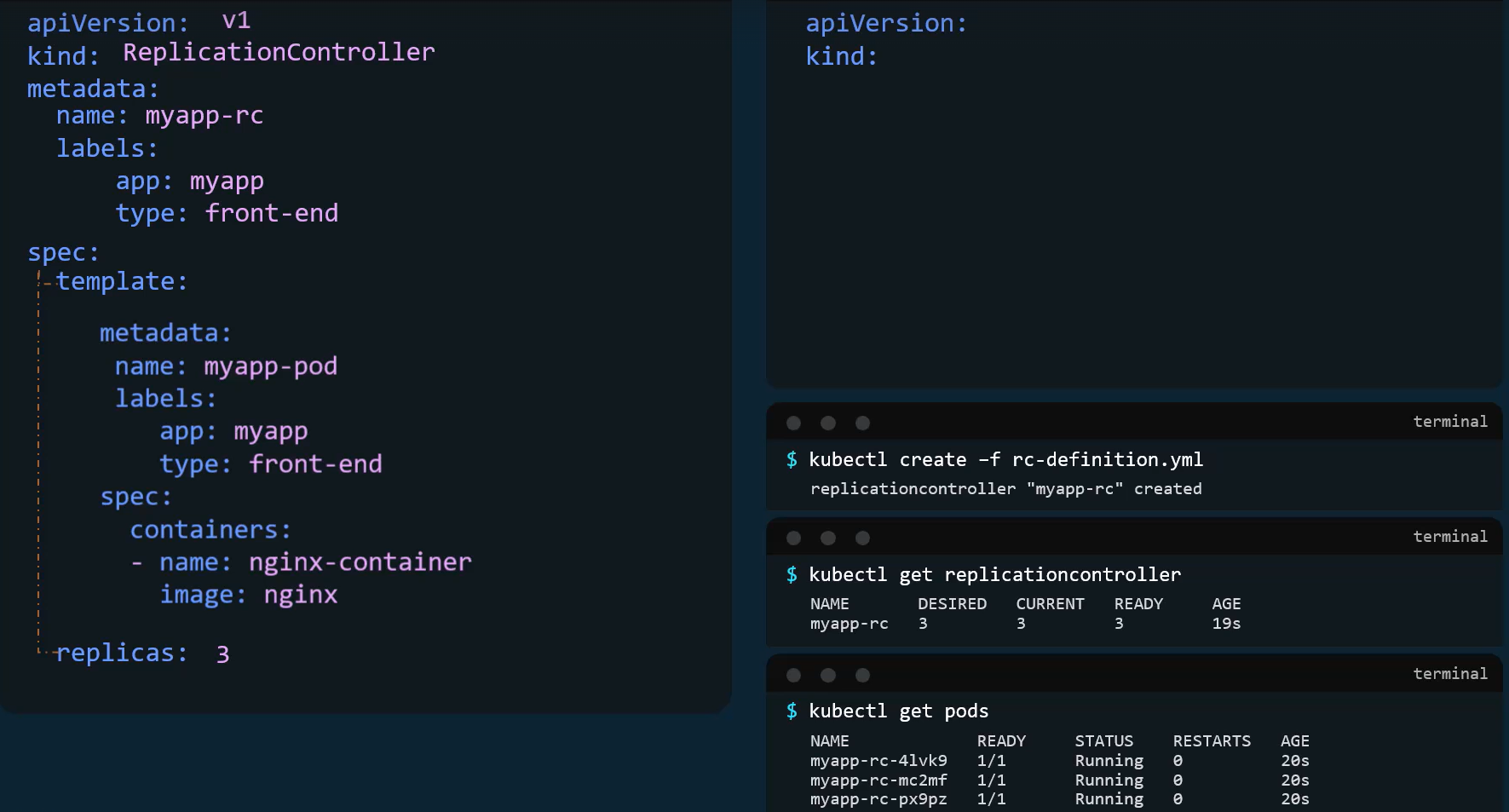
Scaling a ReplicaSet
Section titled “Scaling a ReplicaSet”When demand increases, you need to scale up. When demand drops, you scale down to save resources. There are three primary ways to achieve this:
Method 1: Declarative Update (The Best Practice)
Section titled “Method 1: Declarative Update (The Best Practice)”- Open your
replicaset-definition.yamlfile. - Change the
replicas: 3line toreplicas: 6. - Save the file and apply the changes:
kubectl apply -f replicaset-definition.yaml
Method 2: Imperative Scale Command
Section titled “Method 2: Imperative Scale Command”Scale directly from the command line. This is fast but leaves your YAML file out of sync with the actual cluster state.
kubectl scale --replicas=6 replicaset myapp-replicaset
(Alternatively, you can specify the file: kubectl scale --replicas=6 -f replicaset-definition.yaml, but note this does not modify the actual YAML file on your disk).
Method 3: Live Editing
Section titled “Method 3: Live Editing”Open a temporary text editor to edit the live configuration directly in the cluster’s memory (etcd).
kubectl edit replicaset myapp-replicaset
Change the replicas value, save, and close the editor.
(Note: Kubernetes also supports Horizontal Pod Autoscaling (HPA), which dynamically adjusts replicas based on CPU/Memory usage, but that is an advanced configuration.)
Commands Cheat Sheet
Section titled “Commands Cheat Sheet”Creation & Application
kubectl create -f replicaset-definition.yaml(Creates the object, fails if it already exists).kubectl apply -f replicaset-definition.yaml(Creates or updates the object declaratively. Recommended).
Viewing & Discovery
kubectl get rc(Lists legacy ReplicationControllers).kubectl get replicasetorkubectl get rs(Lists active ReplicaSets).kubectl describe replicaset myapp-replicaset(Shows detailed events, current replica counts, and pod statuses).kubectl get pods(Shows the actual Pods spawned by the ReplicaSet. Their names will be appended with a random hash, e.g.,myapp-replicaset-7xg2p).
Scaling & Updating
kubectl scale --replicas=6 rs/myapp-replicaset(Imperatively scale).kubectl replace -f replicaset-definition.yaml(Completely replaces the existing object with the file contents.applyis generally preferred).kubectl edit rs myapp-replicaset(Live edit the YAML configuration).
Deletion
kubectl delete rs myapp-replicaset(Deletes the ReplicaSet AND gracefully terminates all underlying Pods it manages).kubectl delete -f replicaset-definition.yaml(Deletes based on the file definition).kubectl delete rs myapp-replicaset --cascade=orphan(Advanced: Deletes the ReplicaSet but leaves the Pods running independently).
| Feature | ReplicationController | ReplicaSet |
|---|---|---|
| Selector required? | ❌ Optional (auto-derived) | ✅ Mandatory |
| Matching type | Equality-based only | Set-based + equality |
| API group | v1 | apps/v1 |
| Status | Deprecated / legacy | Modern (used by Deployments) |