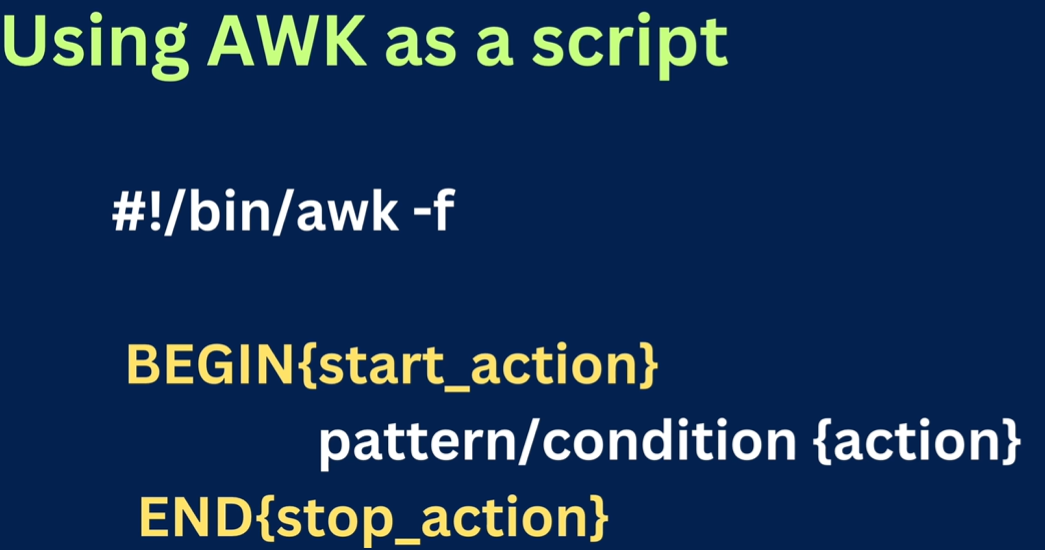
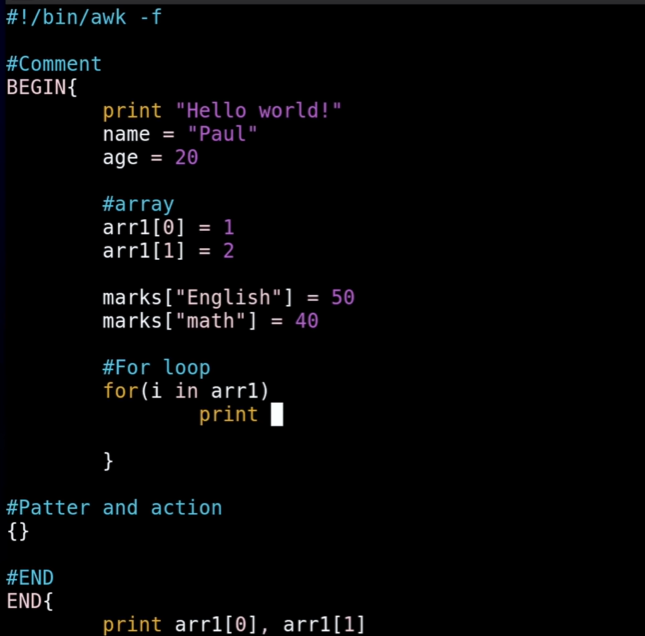
AWK
Builtin Variables
→ NF → holds the count of fields in a row
→ NR → holds no.of rows
→ $NF, $NR → represent present row or field being processed
Data to Practice
Section titled “Data to Practice”cat << 'EOF' > abc.txtID Name Role Dept Language Commits Hours Rating Status Last_Active101 Pavan DevOps Cloud Python 45 160 9.2 Active 2026-03-01102 Sais SRE Infra Go 32 155 8.8 Active 2026-02-28103 Anjali Frontend UI/UX JS 58 140 9.5 Idle 2026-03-05104 Vikram Backend Core Java 24 170 7.4 Active 2026-03-02105 Sita Data AI Python 89 180 9.9 Active 2026-03-07106 Arjun DevOps Infra Shell 12 130 6.5 Away 2026-01-15107 Meera Security Cyber C++ 41 165 8.1 Active 2026-03-04108 Rahul Fullstack Web JS 77 190 9.0 Active 2026-03-06109 Kiran Backend Core Go 19 150 7.2 Idle 2026-02-20110 Deepak DevOps Cloud Rust 55 175 9.4 Active 2026-03-07EOF→ Print only a given column awk '{print $1, $2}' abc.txt
→ Print last column
NF → holds count of fields, so $NF means last field i.e count
awk '{print $NF}' abc.txt
→ Search a word
awk '/Pavan/{print}' abc.txt
prints all rows have word Pavan
note: its Case sensitive
→ Print only a given line no. (let’s say line 5)
awk '{print $5}' abc.txt
or with regex awk '/Pavan/{print $5}' abc.txt
→ Print row or line no. at start of each line
awk '{print NR, $0}' abc.txt
→ Print range of lines (line3 to 6)
awk 'NR==1, NR==2 {print $1, $2}' abc.txt
this will print the 1, 2 cols of lines 1 to 2 (not 1 and 2)
means if NR==2, NR==5, this will give all lines from 2 to 5
→ Get line no. of empty lines
awk 'NF==0 {print NR}' abc.txt
this means print line numbers i.e NR where line having 0 Fields i.e NF
→ Search multiple words
awk '/Pavan|Rahul|Sita/ \{print $0\}' abc.txt
this returns the all the lines havinf Words Pavan, Rahul, Sita
Ignore case while searching
awk 'BEGIN {IGNORECASE=1} /DEVOPS/ {print $0}' abc.txt
How to check if a given char is present in column
awk '$2 ~ /pa/ {print $0}' abc.txt
this will check if char p present in 2nd col, if yes print all such rows
`pavan_bandaru@epam~> awk ‘$2 ~ /h/ {print $0}’ abc.txt 108 Rahul Fullstack Web JS 77 190 9.0 Active 2026-03-06
pavan_bandaru@epam~> awk ‘$2 ~ /it/ {print $0}’ abc.txt 105 Sita Data AI Python 89 180 9.9 Active 2026-03-07`
→ How to work with CSV file
since .csv files have content seprated by , we have to handle them separetly
awk -F , '{print $2}' abc.csv
this will tell the awk to consider , as delimiter
→ Print data of employees whose salary more than 50k [or] print all employee name having rating above 9
awk -F , '$8 > 9 {print $2}' abc.csv
here $8 is the rating column (if it is last col you can also use $NF)
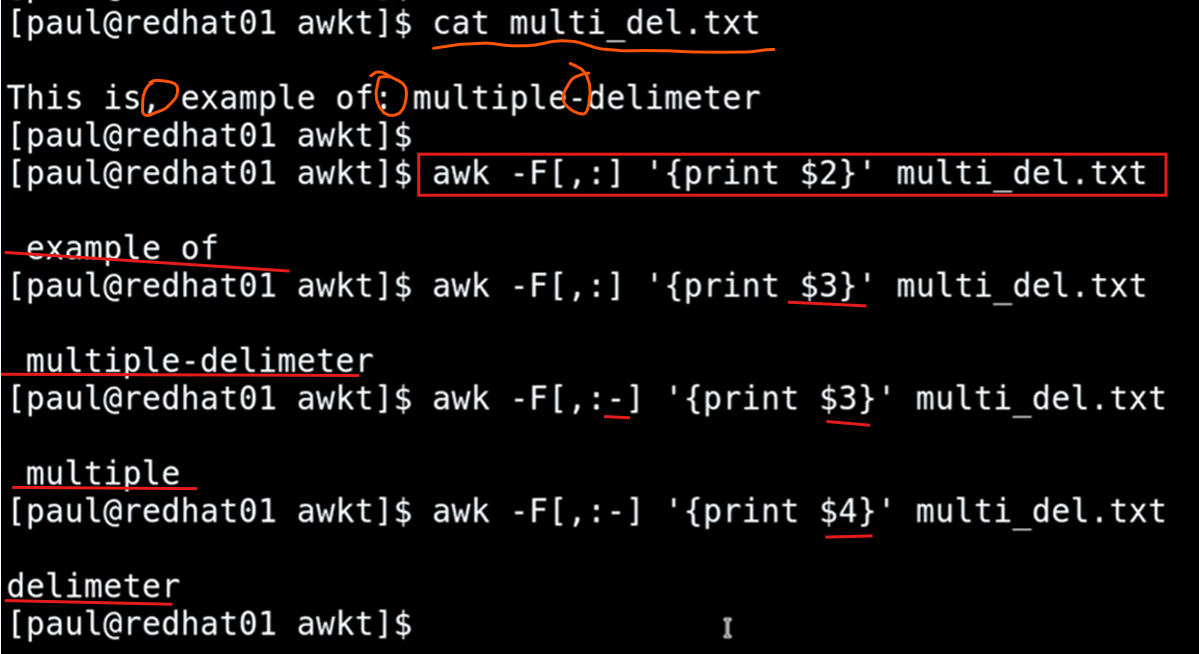
→ What if a file is having multiple delimeter
use awk -F [write_all_delimeters_without_spaces] '{}'
→ How to only get Status of service [like active, disabled etc..]
pavan_bandaru@epam~> **sudo systemctl status httpd**[sudo] password for pavan_bandaru:● httpd.service - The Apache HTTP Server     Loaded: loaded (/usr/lib/systemd/system/httpd.service; enabled; preset: disabled)     **Active: active** (running) since Sat 2026-03-07 18:05:06 IST; 5h 14min ago       Docs: man:httpd.service(8)   Main PID: 1346 (httpd)     Status: "Total requests: 0; Idle/Busy workers 100/0;Requests/sec: 0; Bytes served/sec:   0 B/sec"      Tasks: 177 (limit: 48744)     Memory: 18.8M (peak: 19.3M)        CPU: 22.155s
pavan_bandaru@epam~> **sudo systemctl status httpd | awk 'NR==3 {print $0}'**     Active: active (running) since Sat 2026-03-07 18:05:06 IST; 5h 15min ago
pavan_bandaru@epam~> **sudo systemctl status httpd | awk 'NR==3 {print $2}'****active**
→ How to get list of files
pavan_bandaru@epam~> lltotal 472640-rwxr-x---. 1 pavan_bandaru pavan_bandaru    751618 Mar  5 22:35 17_Functions.pdf-rw-r--r--. 1 pavan_bandaru pavan_bandaru         0 Mar  5 14:45 2026-03-05_14-45-01.log-rw-r--r--. 1 pavan_bandaru pavan_bandaru         0 Mar  6 14:45 2026-03-06_14-45-01.log-rw-r--r--. 1 pavan_bandaru pavan_bandaru       625 Mar  7 23:04 abc.csv
pavan_bandaru@epam~> ll | awk '{print $NF}'47264017_Functions.pdf2026-03-05_14-45-01.log2026-03-06_14-45-01.logabc.csv
pavan_bandaru@epam~> ll | awk 'NR==2, NR==$NR {print $NF}'17_Functions.pdf2026-03-05_14-45-01.log2026-03-06_14-45-01.logabc.csv
[OR] ll | awk 'NR>1 \{print $NF\}'
→ How to read logs in range of time
pavan_bandaru@epam~> sudo head /var/log/messagesMar  6 11:19:23 epam rsyslogd[1454]: [origin software="rsyslogd" swVersion="8.2510.0-2.el9" x-pid="1454" x-info="https://www.rsyslog.com"] rsyslogd was HUPedMar  6 11:19:32 epam systemd[1]: systemd-hostnamed.service: Deactivated successfully.Mar  6 11:19:32 epam systemd[1]: systemd-localed.service: Deactivated successfully.Mar  6 11:19:32 epam systemd[1]: fprintd.service: Deactivated successfully.Mar  6 11:20:01 epam systemd[1]: Starting system activity accounting tool...Mar  6 11:20:01 epam systemd[1]: sysstat-collect.service: Deactivated successfully.Mar  6 11:20:01 epam systemd[1]: Finished system activity accounting tool.Mar  6 11:20:01 epam geoclue[3754]: Service not used for 60 seconds. Shutting down..Mar  6 11:20:01 epam systemd[1]: geoclue.service: Deactivated successfully.Mar  6 11:20:03 epam systemd[1]: realmd.service: Deactivated successfully.
pavan_bandaru@epam~> sudo head /var/log/messages | awk '$3 >= "11:19:32" && $3 < "11:20:04" {print}'Mar  6 11:19:32 epam systemd[1]: systemd-hostnamed.service: Deactivated successfully.Mar  6 11:19:32 epam systemd[1]: systemd-localed.service: Deactivated successfully.Mar  6 11:19:32 epam systemd[1]: fprintd.service: Deactivated successfully.Mar  6 11:20:01 epam systemd[1]: Starting system activity accounting tool...Mar  6 11:20:01 epam systemd[1]: sysstat-collect.service: Deactivated successfully.Mar  6 11:20:01 epam systemd[1]: Finished system activity accounting tool.Mar  6 11:20:01 epam geoclue[3754]: Service not used for 60 seconds. Shutting down..Mar  6 11:20:01 epam systemd[1]: geoclue.service: Deactivated successfully.Mar  6 11:20:03 epam systemd[1]: realmd.service: Deactivated successfully.
in this command {print} is optional
→ Get files modified in Oct
ls | awk '$6=="Oct"'
→ How to replace a word?
awk '{ gsub("Pavan", "PAVAN") ; print }' abc.txtID Name Role Dept Language Commits Hours Rating Status Last_Active101 PAVAN DevOps Cloud Python 45 160 9.2 Active 2026-03-01
102 Sais SRE Infra Go 32 155 8.8 Active 2026-02-28103 Anjali Frontend UI/UX JS 58 140 9.5 Idle 2026-03-05
Replaces ALL OCCURENCES OF Pavan with PAVAN
→ Length of line/field
Print all lines whose size is not zero awk 'length()!=0 {print}' abc.txt
pavan_bandaru@epam~> cat abc.txt101 Pavan DevOps Cloud Python 45 160 9.2 Active 2026-03-01102 Sais SRE Infra Go 32 155 8.8 Active 2026-02-28103 Anjali Frontend UI/UX JS 58 140 9.5 Idle 2026-03-05104 Vikram Backend Core Java 24 170 7.4 Active 2026-03-02105 Sita Data AI Python 89 180 9.9 Active 2026-03-07106 Arjun DevOps Infra Shell 12 130 6.5 Away 2026-01-15107 Meera Security Cyber C++ 41 165 8.1 Active 2026-03-04108 Rahul Fullstack Web JS 77 190 9.0 Active 2026-03-06109 Kiran Backend Core Go 19 150 7.2 Idle 2026-02-20110 Deepak DevOps Cloud Rust 55 175 9.4 Active 2026-03-07
pavan_bandaru@epam~> awk '{ print $2, length($2) }' abc.txtPavan 5Sais 4Anjali 6Vikram 6Sita 4Arjun 5Meera 5Rahul 5Kiran 5Deepak 6
# length of each line/rowpavan_bandaru@epam~> awk '{ print length($0) }' abc.txt
→ Index/position of a word in a given line
awk '/DevOps/ \{print NR, index($0, "DevOps")\}' abc.txt 1 11 6 11 10 12
this means in 1st line 11th char is DevOps, and in 6th line 11 char is DevOps tec..
→ Print values in upper or lower letter
**> awk '{print toupper($0)}' abc.txt**101 PAVAN DEVOPS CLOUD PYTHON 45 160 9.2 ACTIVE 2026-03-01102 SAIS SRE INFRA GO 32 155 8.8 ACTIVE 2026-02-28103 ANJALI FRONTEND UI/UX JS 58 140 9.5 IDLE 2026-03-05104 VIKRAM BACKEND CORE JAVA 24 170 7.4 ACTIVE 2026-03-02105 SITA DATA AI PYTHON 89 180 9.9 ACTIVE 2026-03-07106 ARJUN DEVOPS INFRA SHELL 12 130 6.5 AWAY 2026-01-15107 MEERA SECURITY CYBER C++ 41 165 8.1 ACTIVE 2026-03-04108 RAHUL FULLSTACK WEB JS 77 190 9.0 ACTIVE 2026-03-06109 KIRAN BACKEND CORE GO 19 150 7.2 IDLE 2026-02-20110 DEEPAK DEVOPS CLOUD RUST 55 175 9.4 ACTIVE 2026-03-07
> **awk '{print tolower($3)}' abc.txt**devopssrefrontendbackenddatadevopssecurityfullstackbackenddevops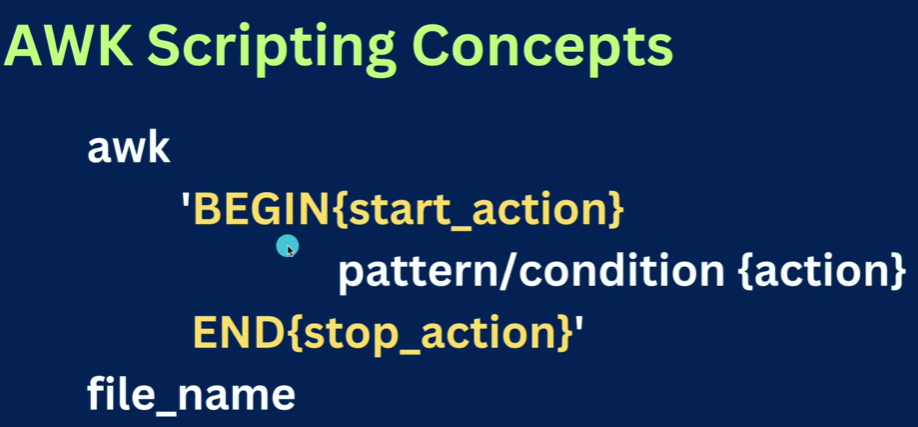

→ How to find total/sum of salary [OR] total commits by all ppl
awk 'BEGIN{commit=0} NR>1 {commit+=$6} END{print "Sum of all Commits =", commit}' abc.txt
→ How to print no. of lines
awk ' NR>1 {if(NF>0)count++} END{print "Total Employees: ", count}' abc.txt
Total Employees: 10
None this will skip 1st line i.e header NR>1 empty lines i.e if(NF>0)
→ How to find average salary / commits / ratings
awk ' NR>1 {if(NF>0)count++; sum+=$6} END{print "Total Employees: ", count, "\nAverage Ratings: ", sum/count}' abc.txt
Total Employees: 10
Average Ratings: 45.2
→ How to ignore headers/first row to count no. of users
→ How to get length of longest line?
awk 'BEGIN{max=0} NR>1 {if(length($0) > max) max=length($0)} END{print "Max. Len is " max}' abc.txt
Max. Len is 58
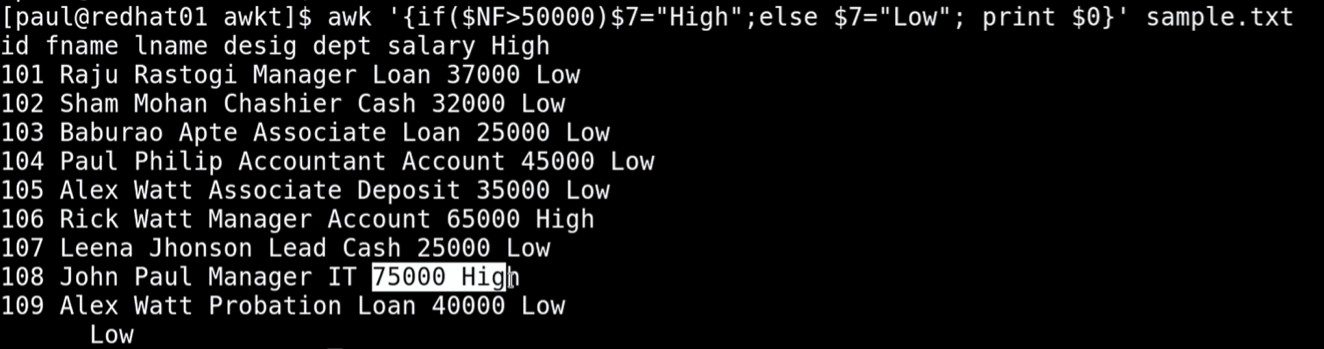
→ Print High for salary more than 50k else LOW
→ Print Total commits of DevOps dept
awk '{if($3 == "DevOps") total+=$6 } END{ print "Total Commits of DevOps: ", total}' abc.txt
Total Commits of DevOps: 112
awk '/ResponseTime=[0-9]+ms/ && /Endpoint=\/[^ ]+/ {print $2, $4}' server_logs.log